'%20d='M0%208a8%208%200%200%201%208-8h24a8%208%200%200%201%208%208v24a8%208%200%200%201-8%208H8a8%208%200%200%201-8-8V8Z'/%3e%3cpath%20fill='%23fff'%20d='M8.375%2013v14L20.5%2034l12.124-7v-7.737l-1.687-.975-2.806-1.62-1.082-.624v4.83l-.002%204.83H13.95V16.07l3.275-1.89%202.192-1.265%201.082-.625%203.275%201.877%202.192%201.256%201.083.62V9.782L20.5%206%208.376%2013Z'/%3e%3cdefs%3e%3clinearGradient%20id='reapit-pm__a'%20x1='20.702'%20x2='20.702'%20y1='.351'%20y2='31.228'%20gradientUnits='userSpaceOnUse'%3e%3cstop%20stop-color='%235573FD'/%3e%3cstop%20offset='.575'%20stop-color='%234E56EA'/%3e%3c/linearGradient%3e%3c/defs%3e%3c/svg%3e)
Snug Integration
Snug (https://snug.com/) is one of Reapit PM's Console’s integration partners. Among their products, they offer a digital Tenancy Applications process. PM clients can integrate with this product, and when the integration is activated, the two systems will work together so data entry is minimised.
Snug Integration
Snug (https://snug.com/) is one of Reapit PM's Console’s integration partners. Among their products, they offer a digital Tenancy Applications process. PM clients can integrate with this product, and when the integration is activated, the two systems will work together so data entry is minimised.
The integration allows Snug to:
- Sync property information that has an application process. An application process is automatically created in Reapit PM when you have a vacant property or a property has an upcoming vacate date.
- Receive applications from Snug to remove the need to double enter data. At present Snug only sends applications to Reapit PM that have been selected as the successful applicant.
- Property addresses must match in the 2 systems
Important information
- Only office admins can activate and deactivate the integration
- Snug currently only send a successful application back to Reapit PM
- Only properties & owner's information is synced to Snug when there is an active application process for the property.
Activating the Snug Integration
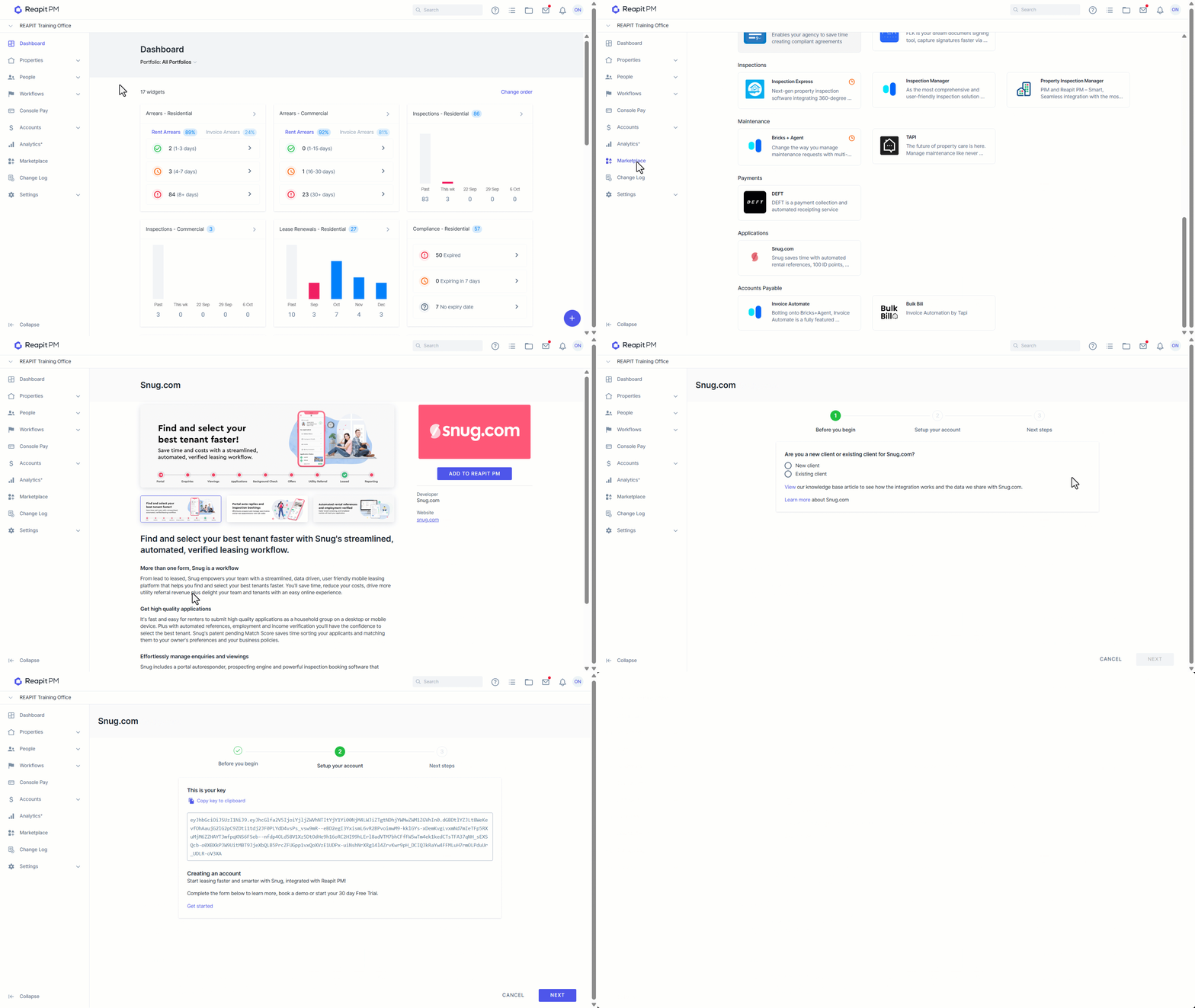
- Click on Marketplace.
- Navigate to Applications and click Snug.com.
- Click on Add to Reapit PM.
- You will now be guided through the rest of the setup in the activation wizard. This includes getting your API key and how to enter it into the Snug system.
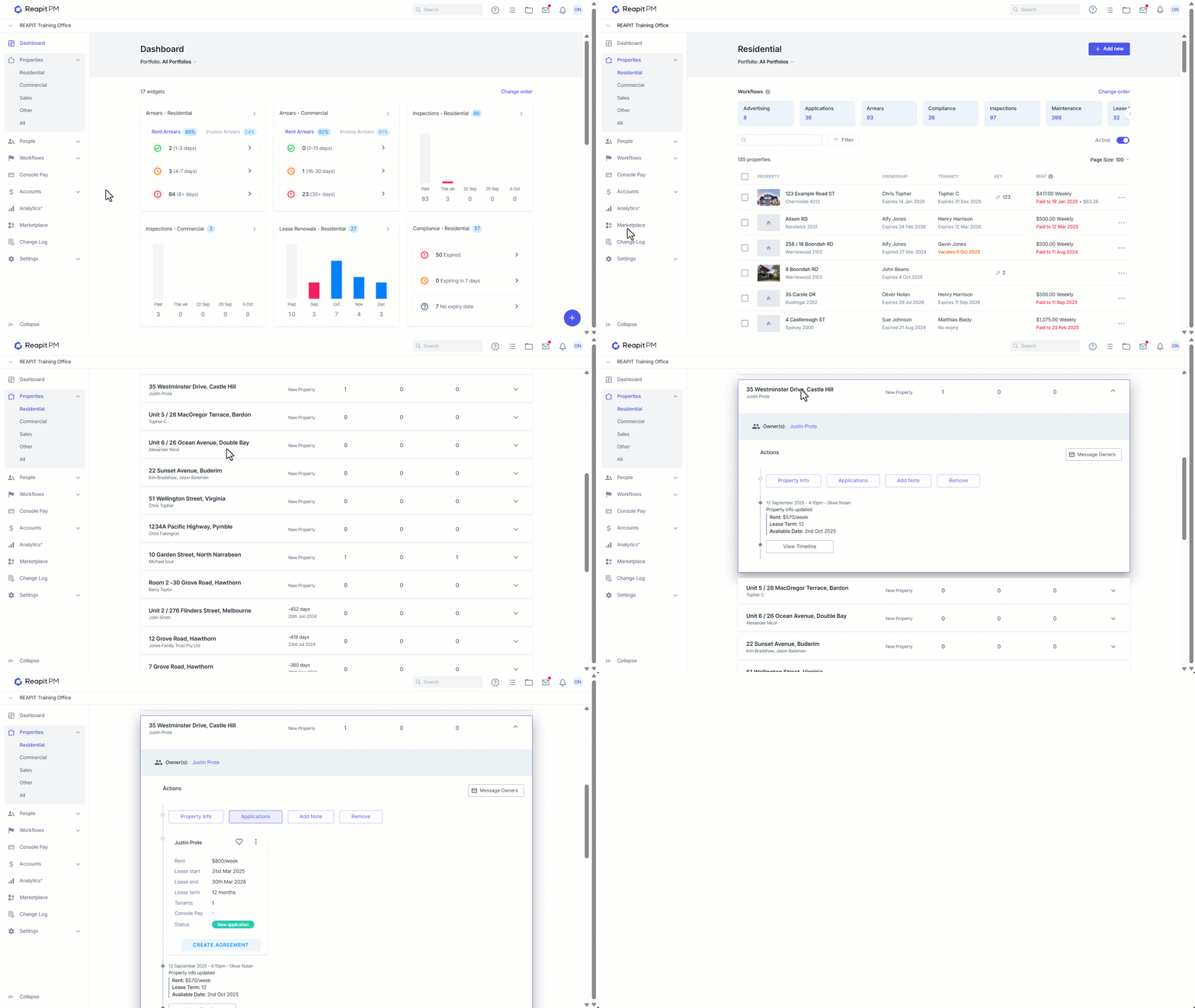
Viewing a successful application & creating the PM Tenant Agreement with the application information
- Once the successful applicant is selected, the application needs to be marked as successful in the Snug product.
- Click on Properties.
- Click on Residential.
- Select the Applications workflow.
- Search and Select the relevant property.
- Click on Applications.
- For the successful application sent from Snug click Create Agreement.
- The Reapit PM tenancy agreement will now pre pre-populated with application data sent from Snug ready to carry on your processes as normal without having to double enter the information.
Deactivating the Snug Integration
- Click on Marketplace.
- Navigate to Applications and click Snug.com.
- Click Deactivate.
- Confirm you want to deactivate. Once deactivated. Reapit PM will no longer sync any information to or from Snug.