'%20d='M0%208a8%208%200%200%201%208-8h24a8%208%200%200%201%208%208v24a8%208%200%200%201-8%208H8a8%208%200%200%201-8-8V8Z'/%3e%3cpath%20fill='%23fff'%20d='M8.375%2013v14L20.5%2034l12.124-7v-7.737l-1.687-.975-2.806-1.62-1.082-.624v4.83l-.002%204.83H13.95V16.07l3.275-1.89%202.192-1.265%201.082-.625%203.275%201.877%202.192%201.256%201.083.62V9.782L20.5%206%208.376%2013Z'/%3e%3cdefs%3e%3clinearGradient%20id='reapit-pm__a'%20x1='20.702'%20x2='20.702'%20y1='.351'%20y2='31.228'%20gradientUnits='userSpaceOnUse'%3e%3cstop%20stop-color='%235573FD'/%3e%3cstop%20offset='.575'%20stop-color='%234E56EA'/%3e%3c/linearGradient%3e%3c/defs%3e%3c/svg%3e)
CC Owner Statements to Additional Email
Owners can have additional email addresses for Owner Statements to also be sent. This article will cover how to enable CC Owner Statements in Reapit PM.
CC Owner Statements to Additional Emails
Owners can have additional email addresses for Owner Statements to also be sent. This article will cover how to enable CC Owner Statements in Reapit PM.
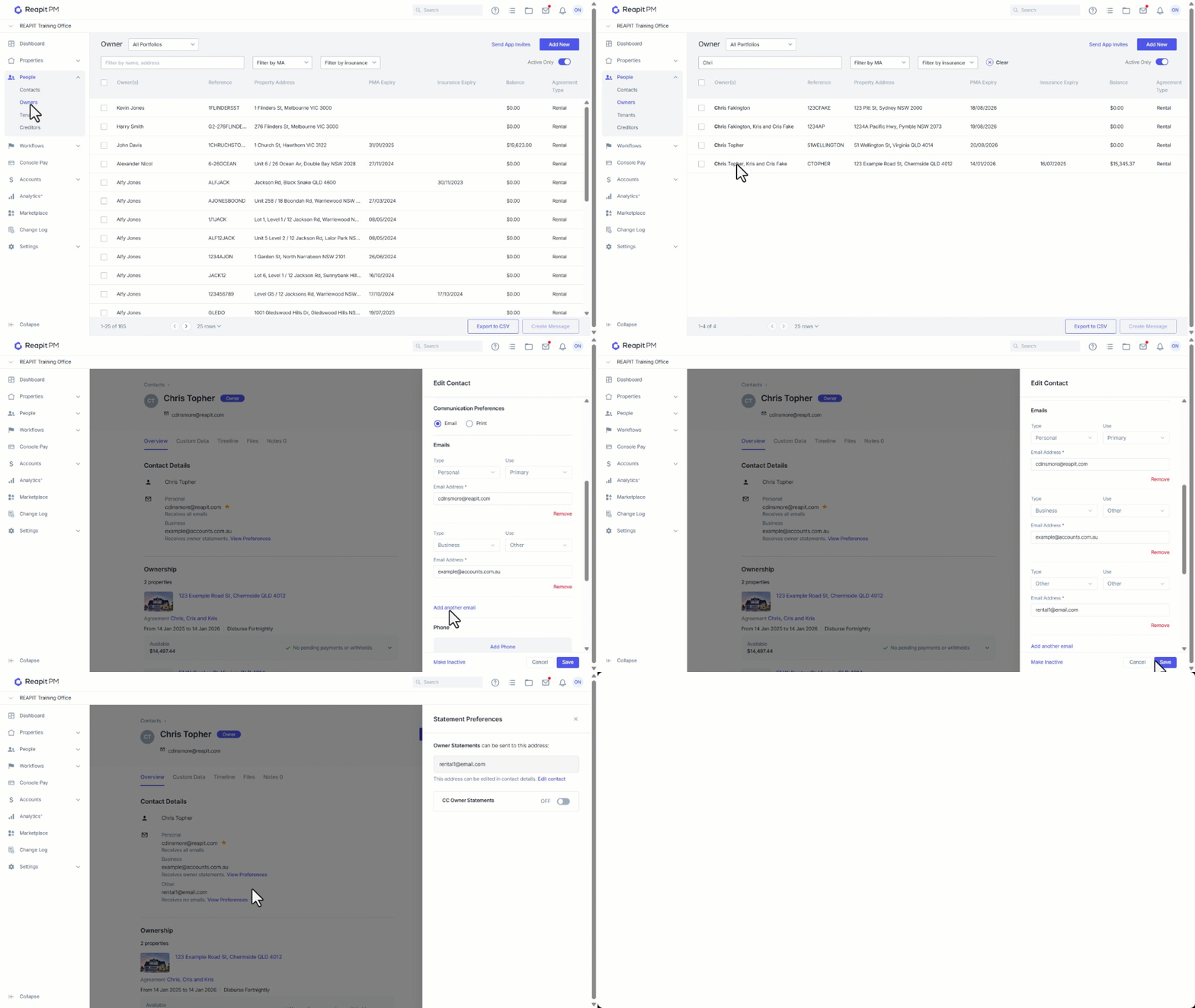
If your Owner has requested that their owner statements to be sent to an additional email address, you can add that address to their contact and select to receive them.
Please note: email addresses that are added that aren't selected as the primary email address won't receive any other communication; they will only receive Owner Statements when selected. Ensure the email you want to use for your day-to-day communication with your Owner is set to the primary address.
- Click on People.
- Click on Owners.
- Search and Select an owner.
- Select the three dots then Edit Owner.
- Navigate to Emails and click on Add another email.
- Set the Type, Use and enter the email address.
- Click on Save.
- Click View preferences.
- Use the toggle to turn on if this email is to receive Owner Statements.
- Click on X** to close.