'%20d='M0%208a8%208%200%200%201%208-8h24a8%208%200%200%201%208%208v24a8%208%200%200%201-8%208H8a8%208%200%200%201-8-8V8Z'/%3e%3cpath%20fill='%23fff'%20d='M8.375%2013v14L20.5%2034l12.124-7v-7.737l-1.687-.975-2.806-1.62-1.082-.624v4.83l-.002%204.83H13.95V16.07l3.275-1.89%202.192-1.265%201.082-.625%203.275%201.877%202.192%201.256%201.083.62V9.782L20.5%206%208.376%2013Z'/%3e%3cdefs%3e%3clinearGradient%20id='reapit-pm__a'%20x1='20.702'%20x2='20.702'%20y1='.351'%20y2='31.228'%20gradientUnits='userSpaceOnUse'%3e%3cstop%20stop-color='%235573FD'/%3e%3cstop%20offset='.575'%20stop-color='%234E56EA'/%3e%3c/linearGradient%3e%3c/defs%3e%3c/svg%3e)
Movinghub Integration
This guide covers how to activate and deactivate the Movinghub integration within Reapit PM. Only office administrators are able to complete these processes. The Processes in this article include: How to Activate the Movinghub Integration How to Deactivate the Movinghub Integration
Overview
Movinghub Integration
This guide covers how to activate and deactivate the Movinghub integration within Reapit PM.
Only office administrators are able to complete these processes.
The Processes in this article include:
- How to Activate the Movinghub Integration
- How to Deactivate the Movinghub Integration
How to Activate the Movinghub Integration
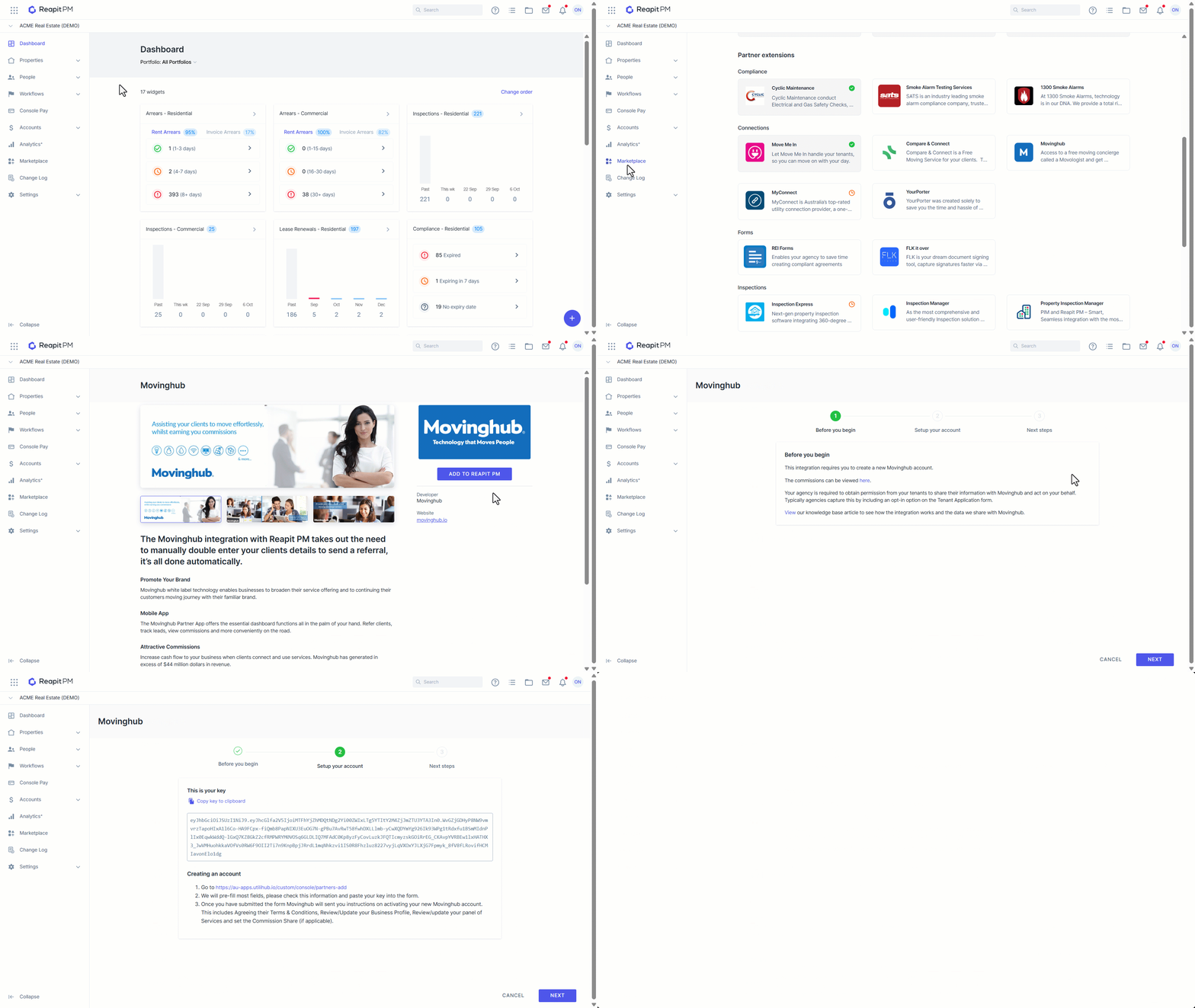
- Click on Marketplace.
- Navigate to Partner extensions and click on Movinghub.
- Click on Add to PM..
- You will now be guided through the rest of the setup in the activation wizard. This includes; how to create a new Movinghub account, what commissions are paid and what data we share with Movinghub.
| How new tenancy leads are sent | When a new tenancy agreement is created in Reapit PM and of that agreement, one or more tenants have opted in, a lead is sent from Reapit PM to Movinghub for the Movologists to follow up. This lead is only sent on the initial creation of the tenancy agreement. You will be able to track this lead in your Movinghub account.If you opt in a tenant by mistake for a tenancy lead you need to opt them out in Reapit PM and also remove them from the lead in Movinghub. |
| How vacating leads are sent | When you add or update a vacate date in Reapit PM, and of that agreement, one or more tenants have opted in, the lead is sent from Reapit PM to Movinghub for the Movologists to follow up. The Movologist will only contact the client 14 days prior to the vacate date.You will be able to track this lead in your Movinghub account. |
| How lease renewal leads are sent | A lease renewal lead is sent when the lease renewal process is finalised, the outcome was “renew” and there was at least 1 tenant opted in for the service.A lead is sent from Reapit PM to Movinghub for the Movologists to follow up. You will be able to track this lead in your Movinghub account. |
| Opting in and opting out a tenant | When the integration is active, you will have the option to opt the tenant in and out from the edit tenancy agreement screen. This is required to be completed for each tenant when creating or saving an agreement.Please note that opting out a tenant only applies to leads that have not been sent yet. If you need to opt a tenant out once a lead has been sent, you need to email Movinghub directly at ops@movinghub.com.au and include all relevant information. |
| Viewing leads that have been sent | You can view what leads have been sent by logging into your Movinghub account. You can also see what leads have been sent and if they were successfully received by Movinghub when the integration is active. |
How to Deactivate the Movinghub Integration
- Click on Marketplace.
- Navigate to Partner extensions and click on Movinghub.
- Click Deactivate.
- Confirm you want to deactivate. Once deactivated. Reapit PM will no longer ask the PM to opt the tenant in or out and no more leads will be sent. Your Movinghub account will remain active.