'%20d='M0%208a8%208%200%200%201%208-8h24a8%208%200%200%201%208%208v24a8%208%200%200%201-8%208H8a8%208%200%200%201-8-8V8Z'/%3e%3cpath%20fill='%23fff'%20d='M8.375%2013v14L20.5%2034l12.124-7v-7.737l-1.687-.975-2.806-1.62-1.082-.624v4.83l-.002%204.83H13.95V16.07l3.275-1.89%202.192-1.265%201.082-.625%203.275%201.877%202.192%201.256%201.083.62V9.782L20.5%206%208.376%2013Z'/%3e%3cdefs%3e%3clinearGradient%20id='reapit-pm__a'%20x1='20.702'%20x2='20.702'%20y1='.351'%20y2='31.228'%20gradientUnits='userSpaceOnUse'%3e%3cstop%20stop-color='%235573FD'/%3e%3cstop%20offset='.575'%20stop-color='%234E56EA'/%3e%3c/linearGradient%3e%3c/defs%3e%3c/svg%3e)
Daily Banking
This step-by-step guide will take you through the process of Daily Banking in Reapit PM. Processes in this article include: How to Perform Daily Banking
Overview
Daily Banking
Daily Banking is a procedure run in Reapit PM prior to taking the office's daily intake of cash & cheques to the bank. It will release deposits made to the Bank Reconciliation once it has been completed.
Processes in this article include:
- How to Perform Daily Banking
How to Complete Daily Banking
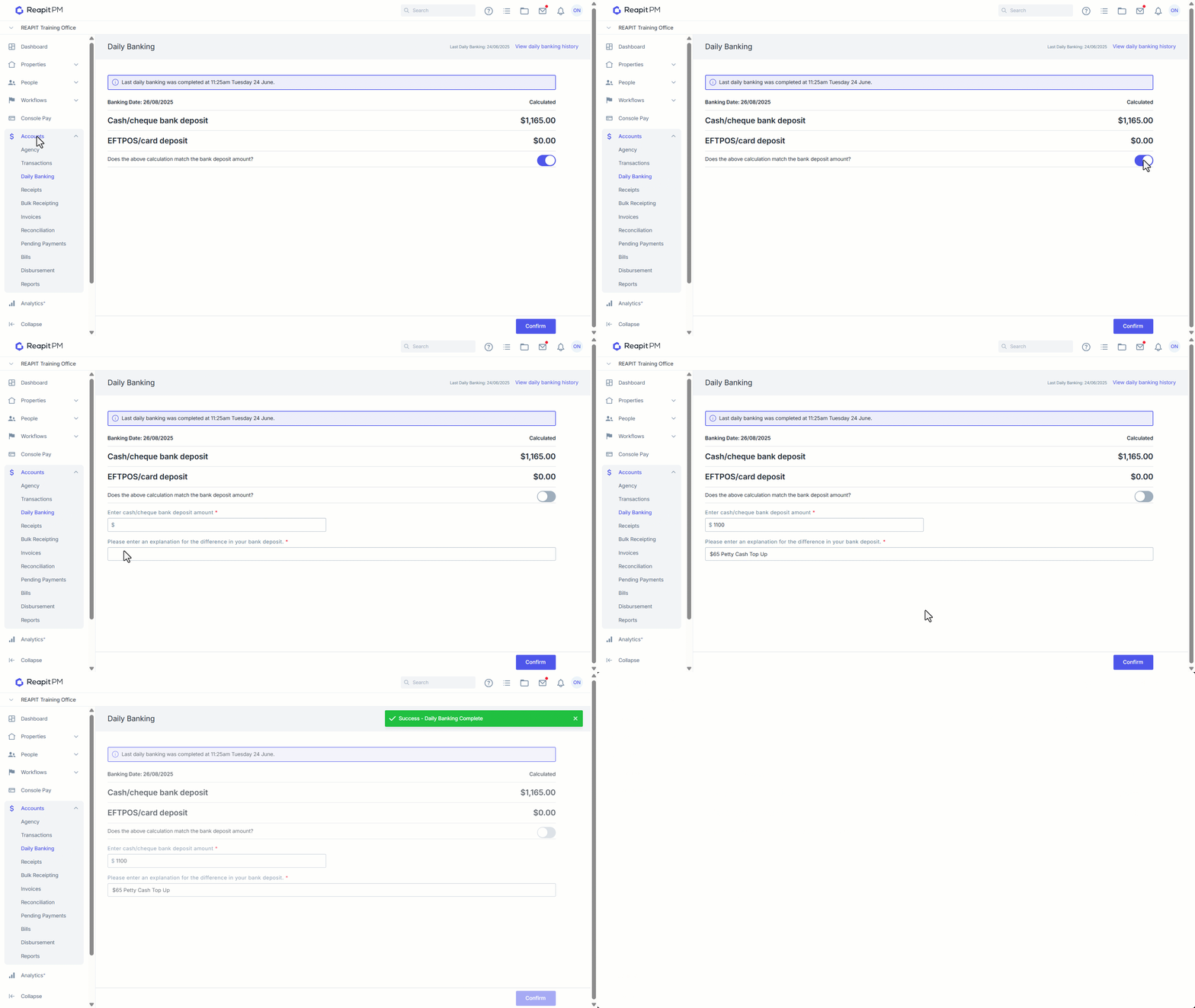
The Daily Banking screen will automatically calculate all receipted Cash, Cheque and Eftpos transactions processed since the last Daily Banking was completed. Once completed. A deposit entry for ‘Cash/Cheque bank deposit’ and one for ‘EFTPOS/Card Deposit’ will be created in Reconciliation. When the funds have cleared into your trust account, you will need to present these deposits.
- Click on Accounts.
- Click on Daily Banking.
- If amounts match, ensure the toggle is on.
- If amounts do not match, toggle off the calculations match. Enter an actual amount on hand, and enter an explanation.
- Click on Confirm.