'%20d='M0%208a8%208%200%200%201%208-8h24a8%208%200%200%201%208%208v24a8%208%200%200%201-8%208H8a8%208%200%200%201-8-8V8Z'/%3e%3cpath%20fill='%23fff'%20d='M8.375%2013v14L20.5%2034l12.124-7v-7.737l-1.687-.975-2.806-1.62-1.082-.624v4.83l-.002%204.83H13.95V16.07l3.275-1.89%202.192-1.265%201.082-.625%203.275%201.877%202.192%201.256%201.083.62V9.782L20.5%206%208.376%2013Z'/%3e%3cdefs%3e%3clinearGradient%20id='reapit-pm__a'%20x1='20.702'%20x2='20.702'%20y1='.351'%20y2='31.228'%20gradientUnits='userSpaceOnUse'%3e%3cstop%20stop-color='%235573FD'/%3e%3cstop%20offset='.575'%20stop-color='%234E56EA'/%3e%3c/linearGradient%3e%3c/defs%3e%3c/svg%3e)
Inspection Express Integration
This article explains how Property Managers can integrate Reapit PM and Inspection Express and complete their inspections from Inspection Express. The processes included in this article include: Activating the Inspection Express Integration What Data is Sync'd? Creating Inspection from PM Completing Inspections from Inspection Express
Overview
Inspection Express Integration
This article explains how Property Managers can integrate Reapit PM and Inspection Express and complete their inspections from Inspection Express.
Note: Scheduled inspections, tenant info, property info and inspection data is shared between the two systems.
The processes included in this article include:
- Activating the Inspection Express Integration
- What Data is Sync'd?
- Creating Inspection from PM
- Completing Inspections from Inspection Express
Activating the Inspection Express Integration
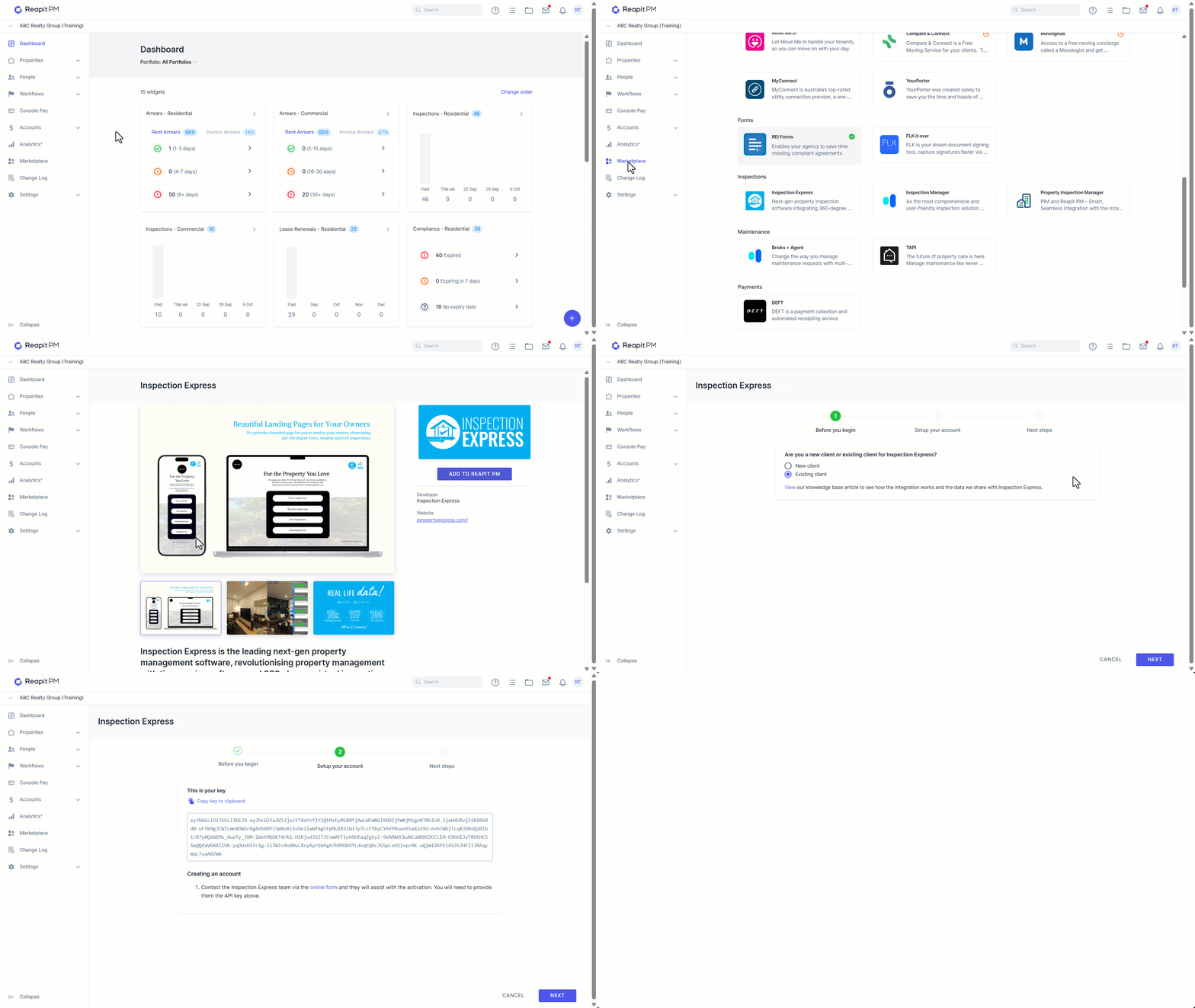
- Click on Marketplace
- Navigate to Inspection and select Inspection Express.
- Click Add to Reapit PM.
- Select either New Client or Existing Client. Click Next.
- Select Copy key to clipboard. Click Next.
- The Next Steps screen will appear, click Back to Marketplace.
What Data is Sync’d?
- Property data
- Tenant data
- Inspection data
Creating Inspections from PM
- When an inspection is scheduled from PM, the corresponding property data, tenant data and inspection data is sync’d to Inspection Express.
- The property manager is alerted to “Use Inspection Express to manage this inspection” (or they can opt to use Reapit PM instead).
Completing Inspections from Inspection Express
- Once inspections appear in Inspection Express from PM, Property Manager's can manage the inspection accordingly and mark as Finalised once done.
- Completed reports will then be sync’d back to PM. And the status in PM updated to Inspected.

Note: When a finalised report in Inspection Express is sent back to PM as “Inspected,” it can be emailed to the owner or tenant using PM's "email inspection report" feature, provided it is a routine inspection report. Entry and exit reports, however, cannot be emailed to owners or tenants using this feature if they are created in Inspection Express.