'%20d='M0%208a8%208%200%200%201%208-8h24a8%208%200%200%201%208%208v24a8%208%200%200%201-8%208H8a8%208%200%200%201-8-8V8Z'/%3e%3cpath%20fill='%23fff'%20d='M8.375%2013v14L20.5%2034l12.124-7v-7.737l-1.687-.975-2.806-1.62-1.082-.624v4.83l-.002%204.83H13.95V16.07l3.275-1.89%202.192-1.265%201.082-.625%203.275%201.877%202.192%201.256%201.083.62V9.782L20.5%206%208.376%2013Z'/%3e%3cdefs%3e%3clinearGradient%20id='reapit-pm__a'%20x1='20.702'%20x2='20.702'%20y1='.351'%20y2='31.228'%20gradientUnits='userSpaceOnUse'%3e%3cstop%20stop-color='%235573FD'/%3e%3cstop%20offset='.575'%20stop-color='%234E56EA'/%3e%3c/linearGradient%3e%3c/defs%3e%3c/svg%3e)
Managing Tenants on the Console Tenant App
This article shows how to send and disconnect tenant invites and disconnects from the Console Tenant App in Reapit PM.
Overview
Managing Tenants on the Console App
This article shows how to send and disconnect tenant invites and disconnects from the Console Tenant App in Reapit PM
Console Tenant is a self-service mobile application (for both iOS and Android) that compliments Reapit PM, providing productivity gains to property managers and tenants by streamlining communications.
Tenants can also be invited to the App as part of entering a new Tenancy Agreement.
The processes in this article include:
- Sending Individual Invitations to the Console Tenant App
- Sending Bulk Invitations to the Console Tenant App
- Disconnect Tenants from the Console Tenant App
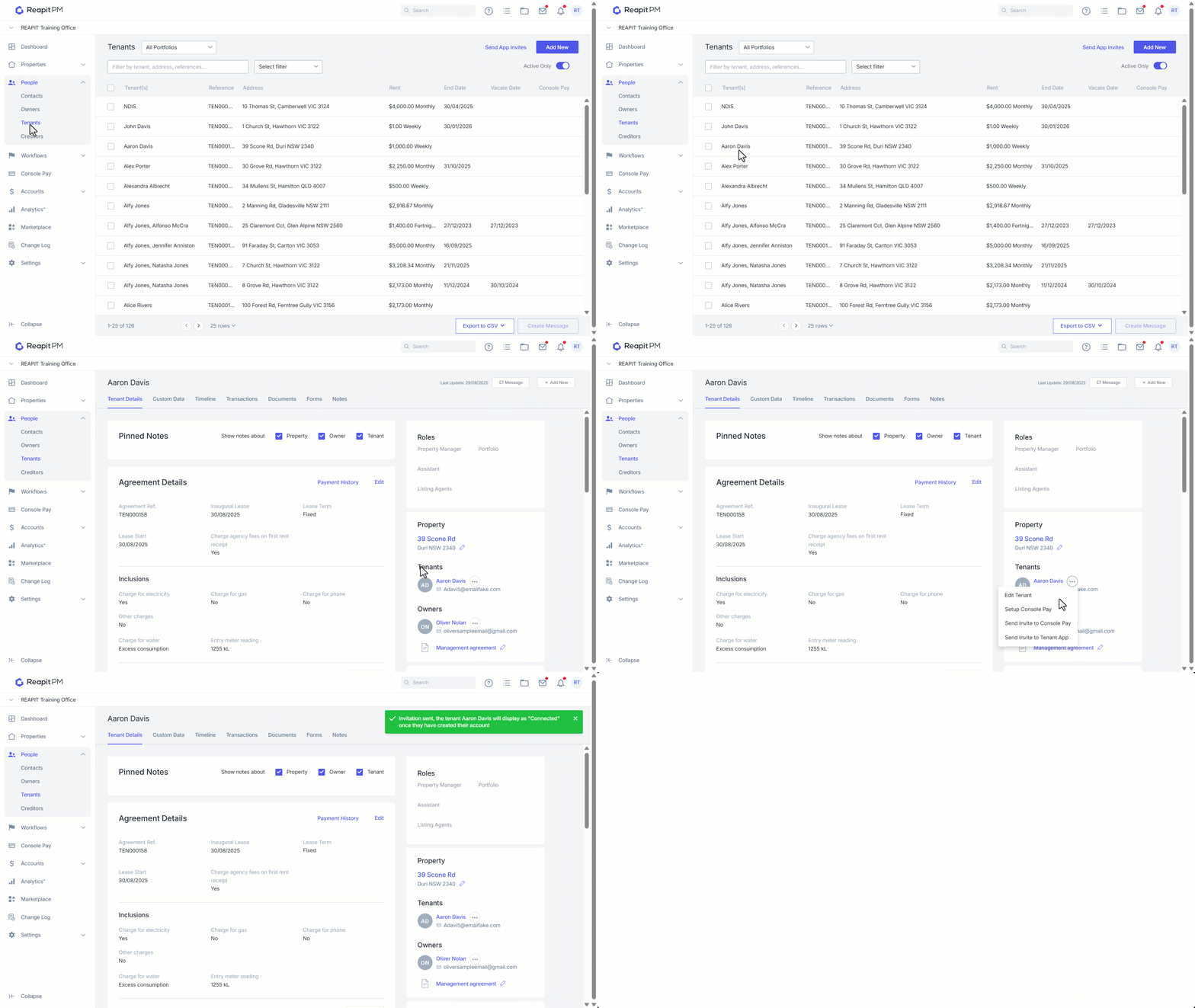
Sending Individual Invitations to the Console Tenant App
- Click on People.
- Click on Tenants.
- Search and select the tenant.
- Click on the 3 dots and select Send Invite to Tenant App.
- A green confirmation message will appear on screen.
- Once the tenant has created their account it will say Connected under their details on the right.
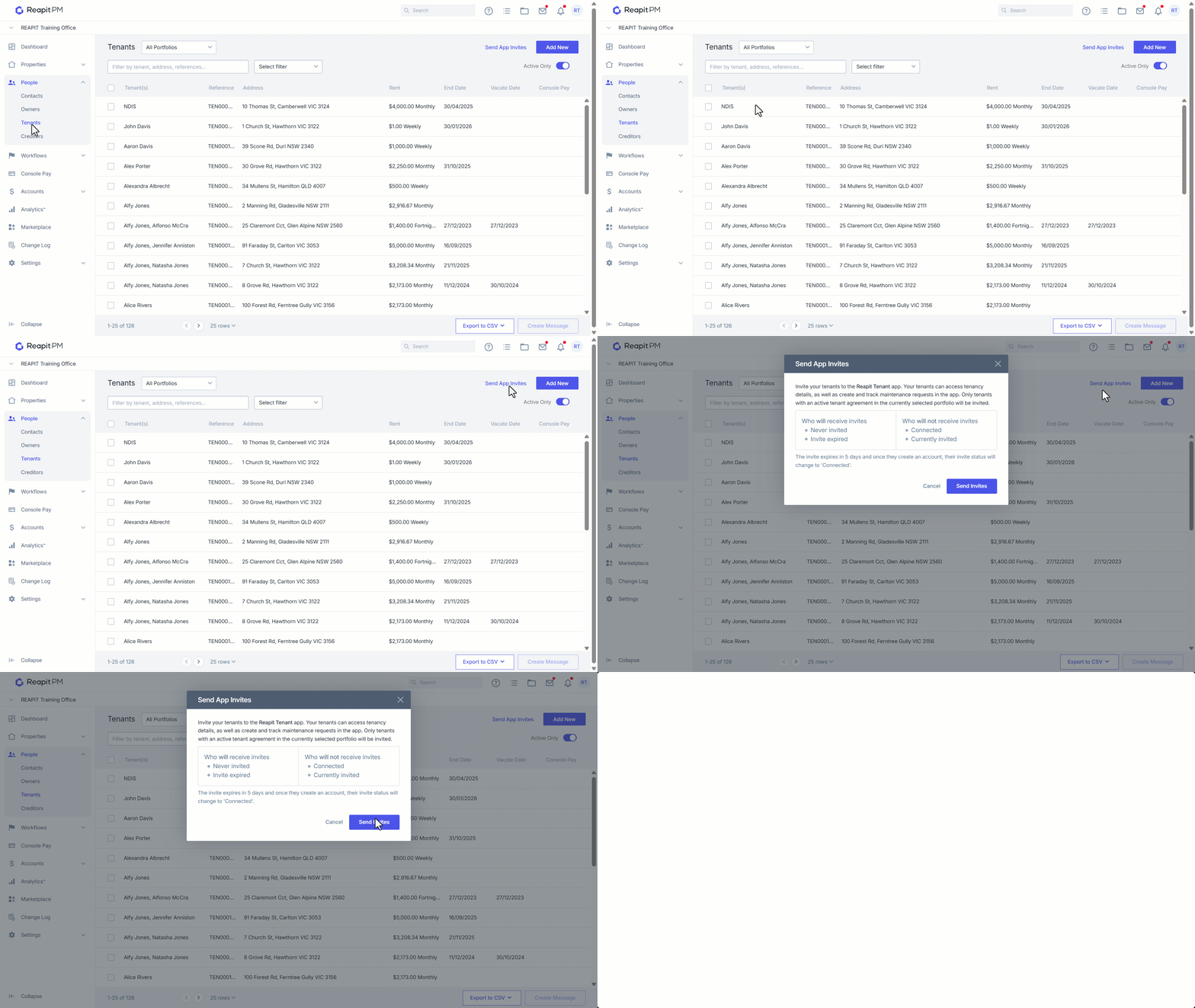
Sending Bulk Invitations to the Console Tenant App
- Click on People.
- Click on Tenants.
- Click on Send App Invites.
- Click Send Invites.
Disconnect Tenants from the Console Tenant App
- If a tenant needs to be disconnected from the Console Tenant App, whether due to an email change or to revoke access to the service, this can be actioned by the Reapit PM Support team.
Note: For any Tenant App connection concerns, the agency must contact Reapit PM support on behalf of the tenant. The support team will need to load into your Reapit PM office to action any changes.