'%20d='M0%208a8%208%200%200%201%208-8h24a8%208%200%200%201%208%208v24a8%208%200%200%201-8%208H8a8%208%200%200%201-8-8V8Z'/%3e%3cpath%20fill='%23fff'%20d='M8.375%2013v14L20.5%2034l12.124-7v-7.737l-1.687-.975-2.806-1.62-1.082-.624v4.83l-.002%204.83H13.95V16.07l3.275-1.89%202.192-1.265%201.082-.625%203.275%201.877%202.192%201.256%201.083.62V9.782L20.5%206%208.376%2013Z'/%3e%3cdefs%3e%3clinearGradient%20id='reapit-pm__a'%20x1='20.702'%20x2='20.702'%20y1='.351'%20y2='31.228'%20gradientUnits='userSpaceOnUse'%3e%3cstop%20stop-color='%235573FD'/%3e%3cstop%20offset='.575'%20stop-color='%234E56EA'/%3e%3c/linearGradient%3e%3c/defs%3e%3c/svg%3e)
How to Manage a Vacate
Within Reapit PM, when a Lease is Vacated from the Lease Renewal workflow, it will automatically be moved into the Vacate Workflow. The vacate workflow provides a single view of all your active tenancies with a vacate date entered. The process in this article include: Access the Vacate Workflow Managing the Vacate Workflow
Overview
How to Manage a Vacate
Within Reapit PM, when a Lease is Vacated from the Lease Renewal workflow, it will automatically be moved into the Vacate Workflow.
The vacate workflow provides a single view of all your active tenancies with a vacate date entered.
The process in this article include:
- Access the Vacate Workflow
- Managing the Vacate Workflow
Access the Vacate Workflow
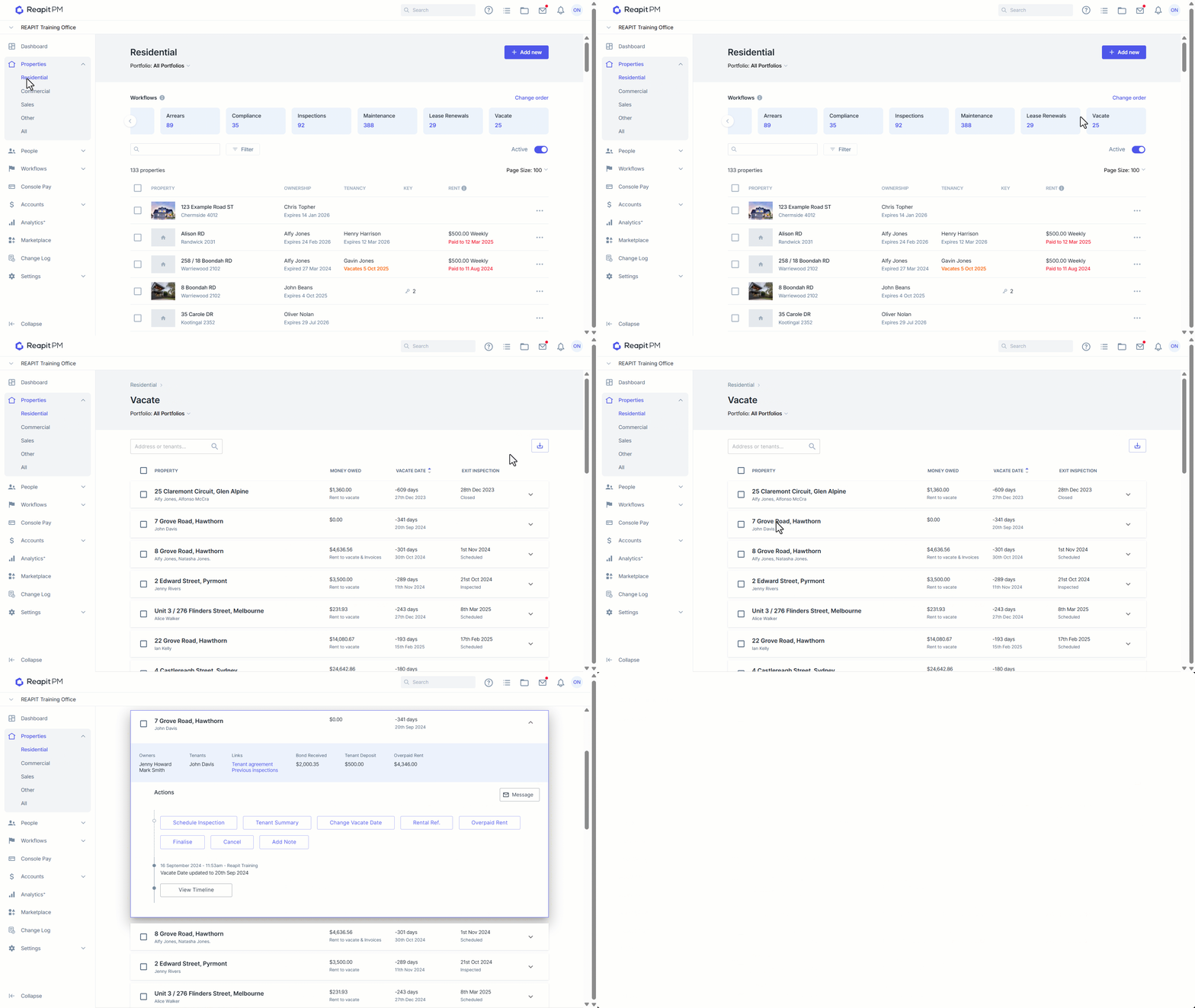
- Click on Properties. 2.. Click on Residential. 3. Select the Vacate Workflow. 4. Search and Select the address or tenant. 5. Select the property to access the vacate options.
Managing the Vacate Workflow
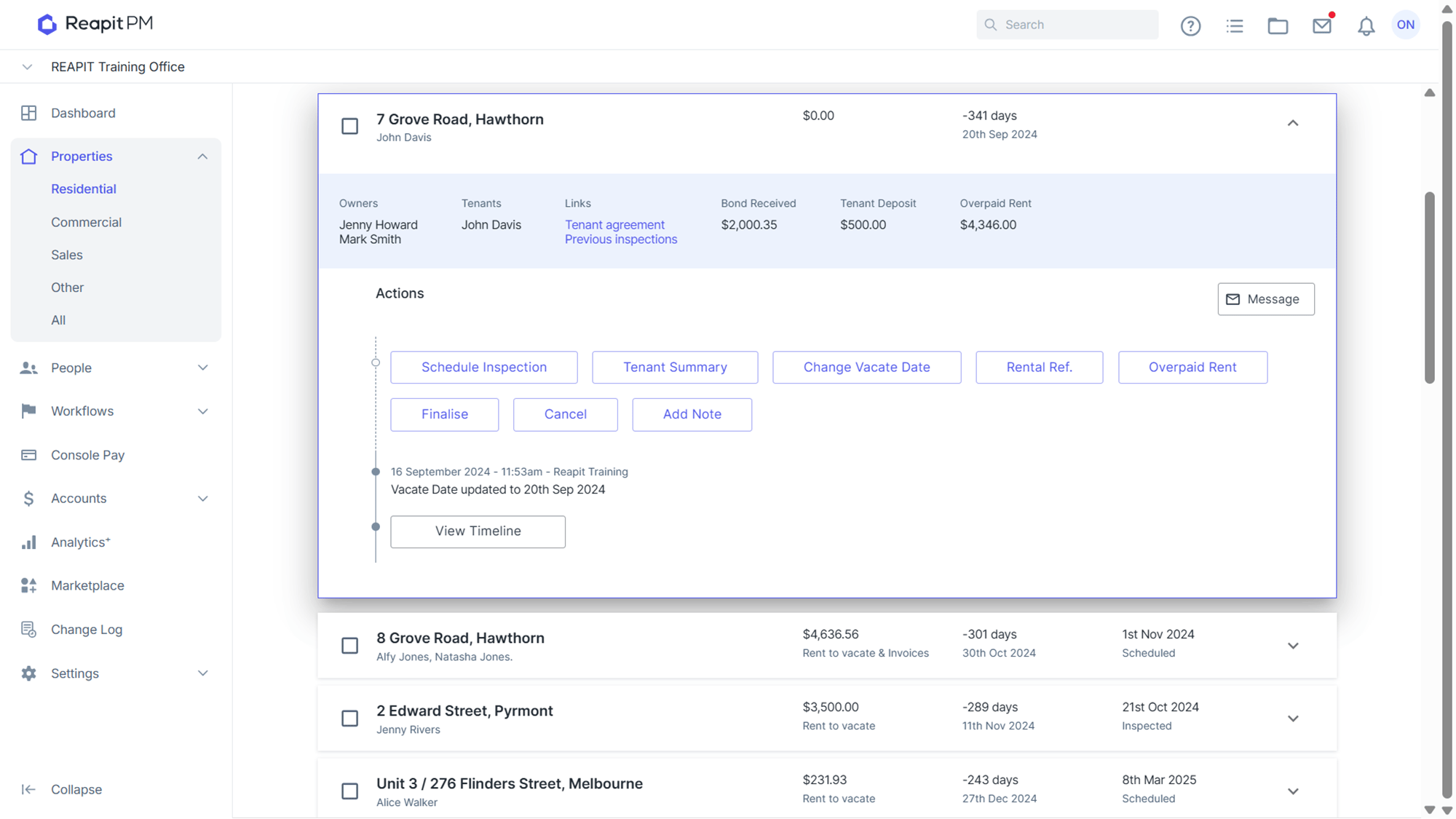
| Schedule Inspection | Schedule the exit inspection & assign it to a user. |
| Tenant Summary | Summarise the tenant’s outstanding issues, this will be saved to the tenant’s timeline as Vacate outstanding items summary. |
| Change Vacate Date | Enter a different vacate date, if necessary. |
| Rental Ref. | Enter an agent rental reference for the tenant, saved to the tenant’s timeline. (This is unrelated to the tenants rent reference they use when paying rent). |
| Overpaid Rent | Selecting this will allow you to return any overpaid rent back to tenant deposit as long as the balance overpaid is available in the owner's balances. |
| Finalise | Review the checklist and tick the box “I'm happy to finalise this tenant agreement and make it inactive”. After this step, the tenant agreement will be made inactive. |
| Cancel | Used to remove the vacate date from the tenant agreement and stop the vacate process. Check the box ‘I understand and want to stop this vacate and Submit. |
| Add Note | Use at any stage of the vacate process to add a Vacate Note to the tenant’s timeline. |
| Message | Using the Message icon at the top right of the workflow, you can complete all outgoing emails and SMS to landlords and tenants without leaving the vacate workflow. |