'%20d='M0%208a8%208%200%200%201%208-8h24a8%208%200%200%201%208%208v24a8%208%200%200%201-8%208H8a8%208%200%200%201-8-8V8Z'/%3e%3cpath%20fill='%23fff'%20d='M8.375%2013v14L20.5%2034l12.124-7v-7.737l-1.687-.975-2.806-1.62-1.082-.624v4.83l-.002%204.83H13.95V16.07l3.275-1.89%202.192-1.265%201.082-.625%203.275%201.877%202.192%201.256%201.083.62V9.782L20.5%206%208.376%2013Z'/%3e%3cdefs%3e%3clinearGradient%20id='reapit-pm__a'%20x1='20.702'%20x2='20.702'%20y1='.351'%20y2='31.228'%20gradientUnits='userSpaceOnUse'%3e%3cstop%20stop-color='%235573FD'/%3e%3cstop%20offset='.575'%20stop-color='%234E56EA'/%3e%3c/linearGradient%3e%3c/defs%3e%3c/svg%3e)
Tenant Insurance and Compliance
This Reapit PM article explains how to attach Tenant Insurance and Compliance to to a commercial property. When Insurance is added against a tenant agreement, it will be available to view in the Commercial Tenant Compliance and Insurance Workflows when it’s due for renewal. Tenant Compliance can also be tracked within the tenancy agreement. Note: This option requires the Console Commercial add on module. The process in this article include: Attaching Tenant Insurance and Compliance
Overview
Tenant Insurance and Compliance
This Reapit PM article explains how to attach Tenant Insurance and Compliance to to a commercial property.
When Insurance is added against a tenant agreement, it will be available to view in the Commercial Tenant Compliance and Insurance Workflows when it’s due for renewal. Tenant Compliance can also be tracked within the tenancy agreement.
Note: This option requires the Console Commercial add on module.
The process in this article include:
- Attaching Tenant Insurance and Compliance
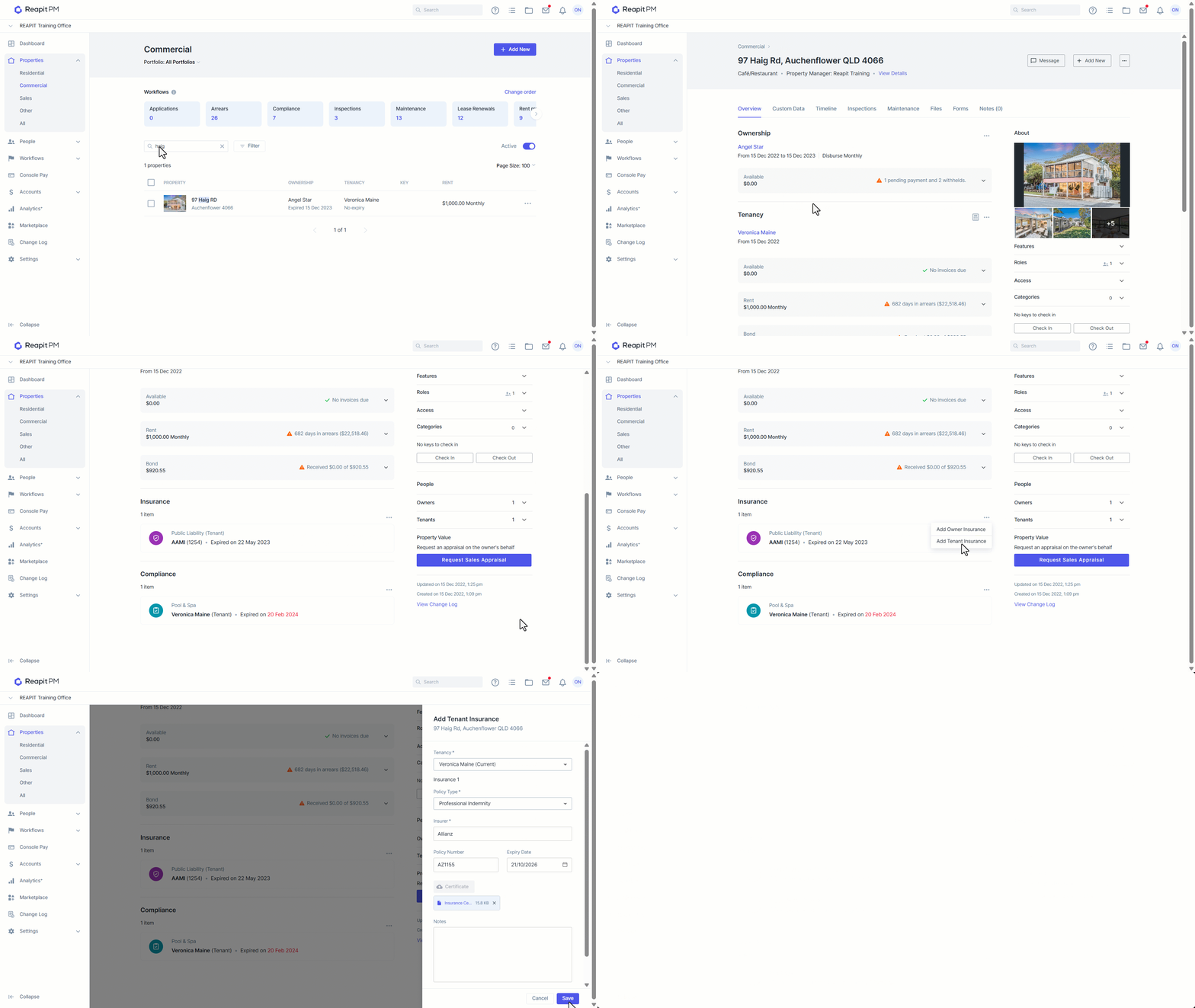
- Click on Property.
- Click on Commercial.
- Search and select a property.
- Scroll down to the Insurance and Compliance section. Select the 3-dots and add either Owner or Tenant Insurance/Compliance.
- Select Add Tenant Insurance. or Select Add Tenant Compliance.
- The drawer will then appear to the right of the screen to finalise the details.
- Enter the information, uploading any certificates if available.
- Click on Save.