'%20d='M0%208a8%208%200%200%201%208-8h24a8%208%200%200%201%208%208v24a8%208%200%200%201-8%208H8a8%208%200%200%201-8-8V8Z'/%3e%3cpath%20fill='%23fff'%20d='M8.375%2013v14L20.5%2034l12.124-7v-7.737l-1.687-.975-2.806-1.62-1.082-.624v4.83l-.002%204.83H13.95V16.07l3.275-1.89%202.192-1.265%201.082-.625%203.275%201.877%202.192%201.256%201.083.62V9.782L20.5%206%208.376%2013Z'/%3e%3cdefs%3e%3clinearGradient%20id='reapit-pm__a'%20x1='20.702'%20x2='20.702'%20y1='.351'%20y2='31.228'%20gradientUnits='userSpaceOnUse'%3e%3cstop%20stop-color='%235573FD'/%3e%3cstop%20offset='.575'%20stop-color='%234E56EA'/%3e%3c/linearGradient%3e%3c/defs%3e%3c/svg%3e)
TAPI (Bulk Bill) Integration
This article will cover enabling the TAPI integration in Reapit PM
Overview
TAPI (Bulk Bill) Integration
This article will cover enabling the TAPI integration in Reapit PM.
Tapi Bulk Bill provides clients with automated bulk upload and bill ingestion service that will queue bills for you and allow you to manage the processing and on-charging of these bills.
The tenant on-charging function allows you to harness the same prompts for tenancy liability used in ReapitPM and upon creation, the invoices will auto send to the tenant and be visible within the ReapitPM timelines.
All Bills created will become available in the Accounts > Bills management section of ReapitPM and be made ready for bulk processing.
The processes in this article include:
- Activating the TAPI Bulk Bill Integration
- Shared Data Using TAPI Bulk Bill
Activating the TAPI Bulk Bill Integration
- Click on M****arketplace.
- Navigate to Accounts Payable and click Bulk Bill.
- Click on Add to Reapit PM.
- Confirm if you are a new client or existing client click Next.
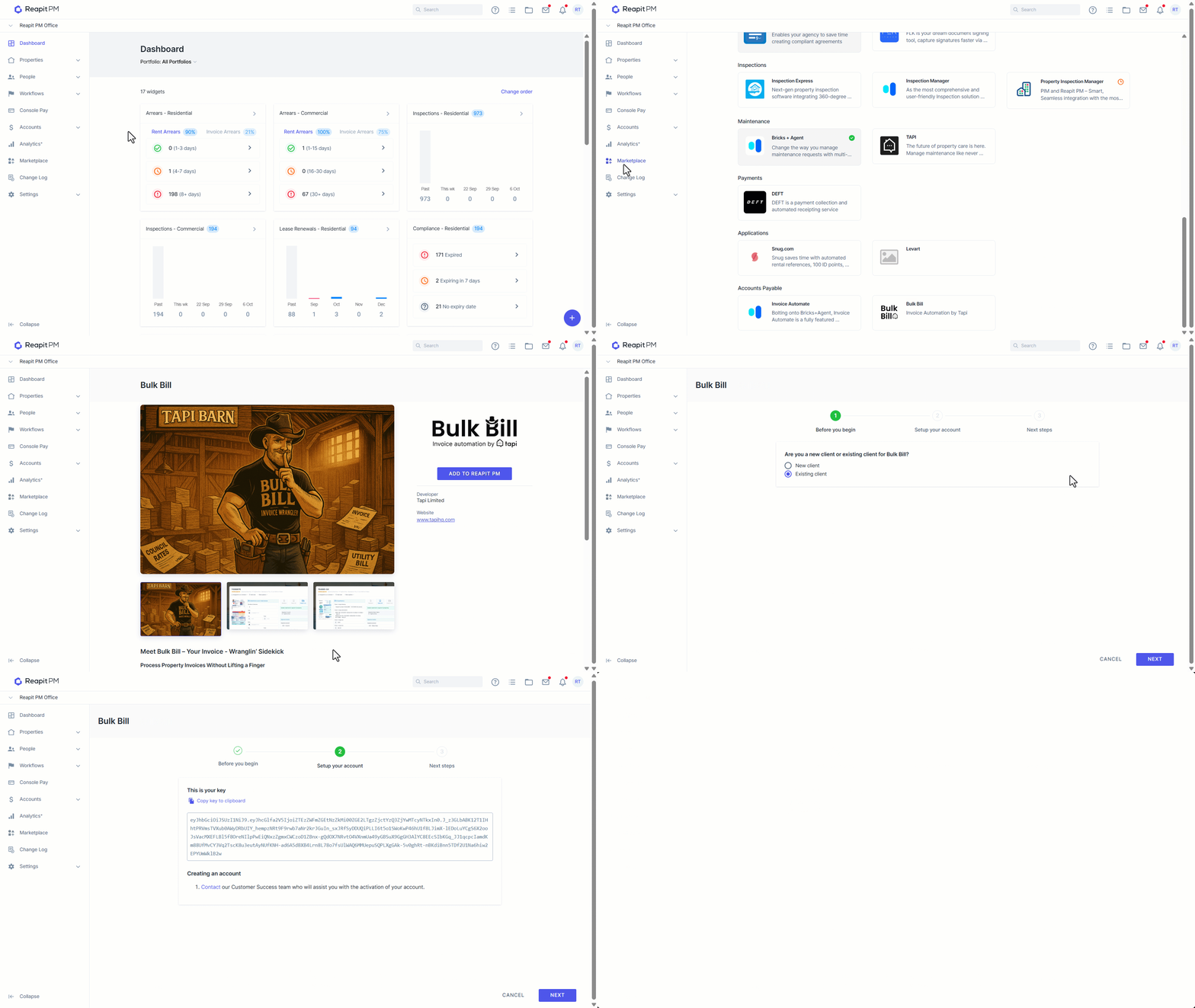
- Copy the API key to the clipboard and click on the Contact Tapi text.
- You will be redirected to a connection request page from Tapi confirming your agency details and the API key that you have copied. Paste the key in and click submit on the form.
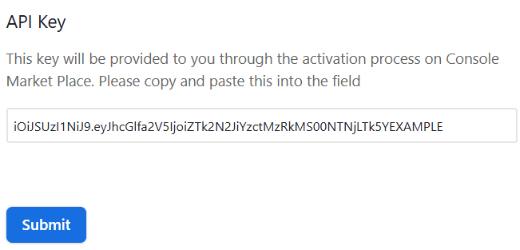
Tapi will reach out to you shortly to complete the integration steps.
Shared Data Using TAPI Bulk Bill
The following is a list of the shared data between Console Cloud and Tapi Bulk Bill:
- Property Address
- Owner
- Tenancy (in order to create invoices on-charged)
- Owner GST Status
- Tenant water and outgoings liability details