'%20d='M0%208a8%208%200%200%201%208-8h24a8%208%200%200%201%208%208v24a8%208%200%200%201-8%208H8a8%208%200%200%201-8-8V8Z'/%3e%3cpath%20fill='%23fff'%20d='M8.375%2013v14L20.5%2034l12.124-7v-7.737l-1.687-.975-2.806-1.62-1.082-.624v4.83l-.002%204.83H13.95V16.07l3.275-1.89%202.192-1.265%201.082-.625%203.275%201.877%202.192%201.256%201.083.62V9.782L20.5%206%208.376%2013Z'/%3e%3cdefs%3e%3clinearGradient%20id='reapit-pm__a'%20x1='20.702'%20x2='20.702'%20y1='.351'%20y2='31.228'%20gradientUnits='userSpaceOnUse'%3e%3cstop%20stop-color='%235573FD'/%3e%3cstop%20offset='.575'%20stop-color='%234E56EA'/%3e%3c/linearGradient%3e%3c/defs%3e%3c/svg%3e)
Creating Agency Fees
Reapit PM allows you to configure and default apply fees to management agreements. This article will walk you through the process. The processes in this article include: Creating Agency Fees Fee Event Types
Overview
Creating Agency Fees
Reapit PM allows you to create, configure and default apply fees to management agreements. This article will walk you through the process.
The processes in this article include:
- Creating Agency Fees
- Fee Event Types
The Agency Fees screen will display all active fees, including a breakdown of how it is changed, the amount, the dissection used on the fee, and if it is default (enabled on all management agreements). 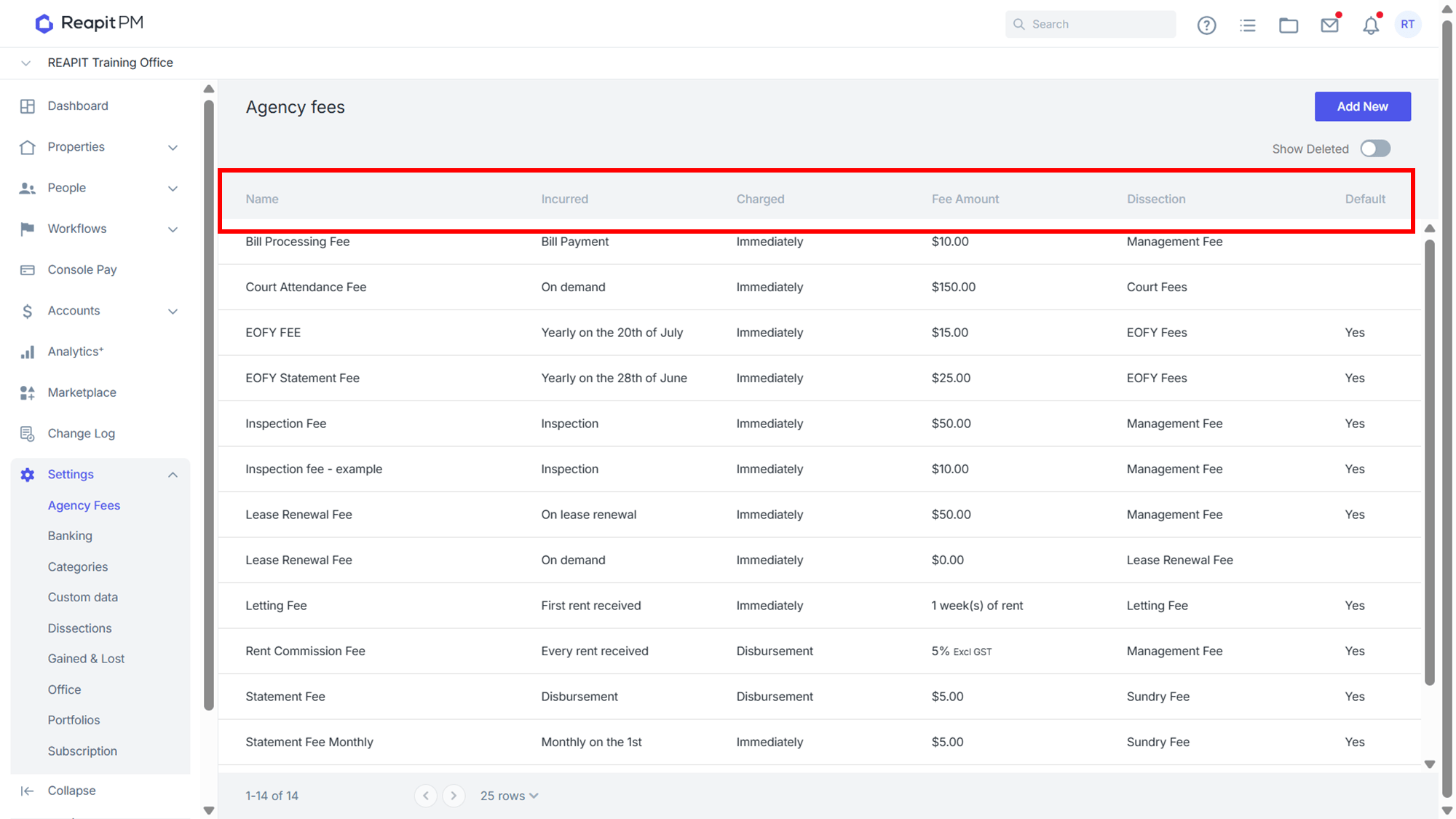
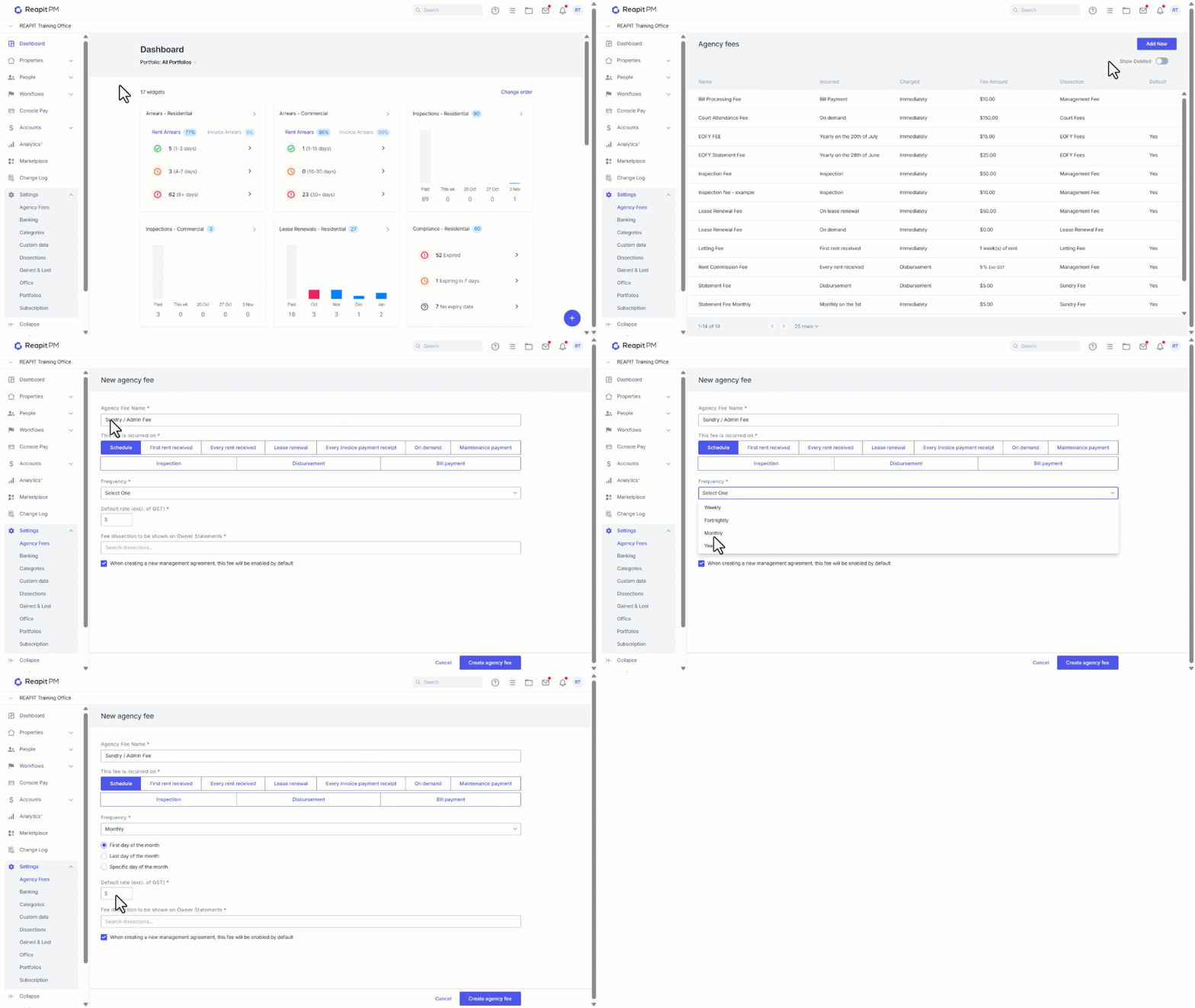
- Click on Settings.
- Click on Agency Fees.
- Click on Add New.
- Enter the Name.
- Select how the fee is incurred, On Demand, or when a particular event occurs within Reapit PM. See a breakdown of the relevant Event Types at the end of this article.
- Once you have selected your fees incurred on, enter additional information, including when to charge, a default rate and select the dissection to be shown on ownership statements.
- Select whether the fee will appear on new agreements by default.
- Click Create Agency Fee.
Event Types
| Incurred on | Additional Information |
| Schedule | For Scheduled Fees, this can be for things that occur on a regular basis such as Admin Fees/ Sundry Fees that occur on a monthly basis. This could also be used for EOFY statement fees, and be set to occur yearly. |
| First rent received | For First rent received Fees, this can be used for such things as Letting Fees, Lease Prep Fees, and Advertising charges. The fee will be journaled from the owner's ledger on the receipt of the first rent for a new tenant. |
| Every Rent Received | For Every rent received Fees, this should be used for Rent Commission/ Management Fees. You will need to set your Charged on as per your state's legislation or management agreement. If you can not take rent commission until you disburse to your owner, then check On disbursement or charge Immediately |
| Lease Renewal | For Lease Renewal fees, these will be charged when you finalise a lease renewal. Multiple fees can be set up for each management agreement if you charge different amounts for different lease types. For example, you may have a Lease Renewal Fee for a 6 months lease - 1 week's rent, and another for Lease Renewal Fee for a 12 month lease. You can also then have a Lease Prep Fee. All of the fees set up against the ownership will be presented at the time you finalise your lease renewal so that you can select the appropriate fee to charge. |
| Every Invoice Payment Receipt | For Every Invoice payment receipt, this is used when your management agreement allows charging an owner for collecting invoice funds. When you set this fee against an ownership, each time you receipt a tenant's invoice payment, that fee will be journaled from the owner's ledger to the agency fee ledger. |
| On Demand | On Demand Fees can be set up for anything, Court Prep Fees, Advertising and will only be charged when you go to that particular ownership and select charge fee. |
| Maintenance | Maintenance payment fee is used on payment of each maintenance creditor payment. |
| Inspection | An inspection fee is triggered when you close an inspection in the workflow. You can set up multiple fees for Routine, Entry, and Exit and these will be presented at the time of close of inspection for you to select the appropriate fee to be charged. |
| Disbursement | Fee is used if you charge a fee for any owner disbursements. |
| Bill Payment | Fee will be charged each time a bill payment is paid on behalf of an owner who has this fee turned on on their agreement. |