'%20d='M0%208a8%208%200%200%201%208-8h24a8%208%200%200%201%208%208v24a8%208%200%200%201-8%208H8a8%208%200%200%201-8-8V8Z'/%3e%3cpath%20fill='%23fff'%20d='M10.41%206v3.779h15.048v19.537h4.132V6H10.41Z'/%3e%3cpath%20fill='%23fff'%20d='M20.967%2034V13.837L10.41%209.78v20.166L20.967%2034Z'/%3e%3cdefs%3e%3clinearGradient%20id='reapit-sales__a'%20x1='20.702'%20x2='20.702'%20y1='.351'%20y2='31.228'%20gradientUnits='userSpaceOnUse'%3e%3cstop%20stop-color='%235573FD'/%3e%3cstop%20offset='.575'%20stop-color='%234E56EA'/%3e%3c/linearGradient%3e%3c/defs%3e%3c/svg%3e)
System-Wide SMS Credits
This article run through system-wide SMS credits in Reapit Sales.
System-Wide SMS Credits
This article run through system-wide SMS credits in Reapit Sales.
Note: Master Users or users with 'Manage Office SMS Credits' Permission only.
Please refer to these tutorials if your system is configured with System-Wide SMS Credits.
*Note: Under this configuration, there is only one account per office for SMS credits and credits cannot be allocated to individual staff members.
If you would like to change to this configuration please reach out to Support or Account Managerto request System-Wide SMS Credits.
Under this configuration:
- All Users share and consume a single pool of credits.
- Credits cannot be allocated to specific Offices or individual Users.
- Credits can only be purchased for and shared between all Users in the system by a Master User or a user with the 'Manage Office SMS Credits' Permission.
Note:
- All changes to credits are logged for audit purposes.
Purchase SMS Credits Note: Master Users Only
- Click Your Name in the top right-hand corner, from the drop-down box select Purchase SMS Credits
- A box will appear that will give you the option to select how many credits you would like to purchase
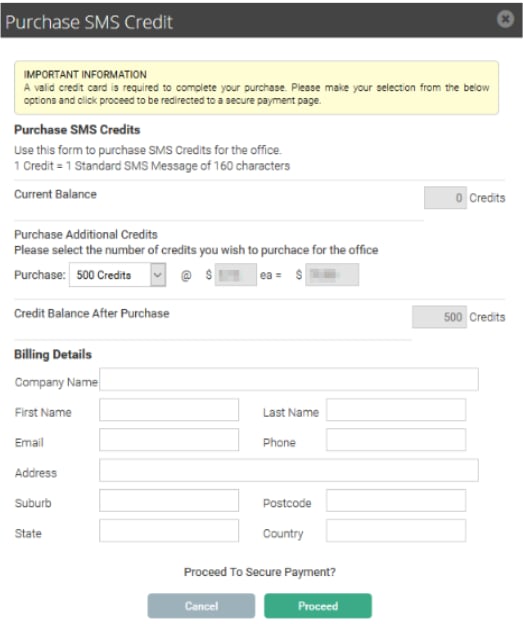
- Click Proceed
- You will proceed to the secure payment page for processing. Credits will be applied instantly upon successful payment, and a Tax Invoice / Receipt will be available to download on the confirmation page.