'%20d='M0%208a8%208%200%200%201%208-8h24a8%208%200%200%201%208%208v24a8%208%200%200%201-8%208H8a8%208%200%200%201-8-8V8Z'/%3e%3cpath%20fill='%23fff'%20d='M10.41%206v3.779h15.048v19.537h4.132V6H10.41Z'/%3e%3cpath%20fill='%23fff'%20d='M20.967%2034V13.837L10.41%209.78v20.166L20.967%2034Z'/%3e%3cdefs%3e%3clinearGradient%20id='reapit-sales__a'%20x1='20.702'%20x2='20.702'%20y1='.351'%20y2='31.228'%20gradientUnits='userSpaceOnUse'%3e%3cstop%20stop-color='%235573FD'/%3e%3cstop%20offset='.575'%20stop-color='%234E56EA'/%3e%3c/linearGradient%3e%3c/defs%3e%3c/svg%3e)
Tour of Agentbox
This article explains the basics on how to navigate Reapit Sales from the dashboard.
Tour of Reapit Sales
This article explains the basics on how to navigate Reapit Sales from the dashboard.
Layout & Navigation
See below the Reapit Sales overview diagram. Each section is explained below.
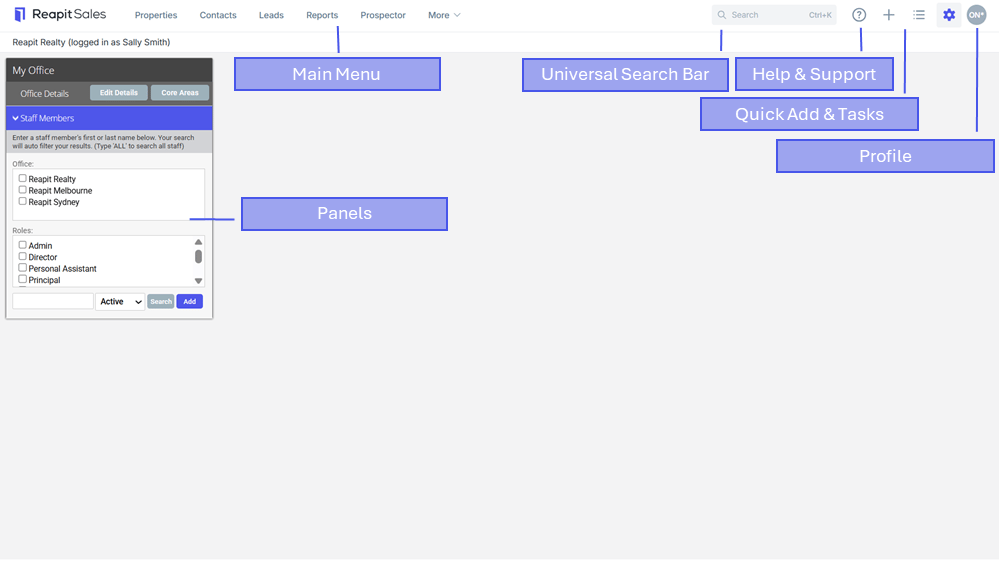
| Universal Search Bar | Quickly search and access your listings, projects, contacts, properties (prospect records) and staff using a minimum 3 character search. |
| Main Menu | You can access the various sections of the database via the 'Main Menu'. |
| Panels | The system is made up of different panels e.g. each main menu item will open up with a matching 'Left-Panel'. |
| Profile | Click your name to access your profile, purchase SMS credits, view portal feed logs and logout of the system. |
| Tasks & Quick Add | Access your targets, calendar and quickly complete actions such as log an enquiry, note, add contact etc. |
| Help & Support | Access to Live Chat for system support and access to Knowledge Base articles and courses, submit support tickets and change requests, in an easy to access friendly interface. |
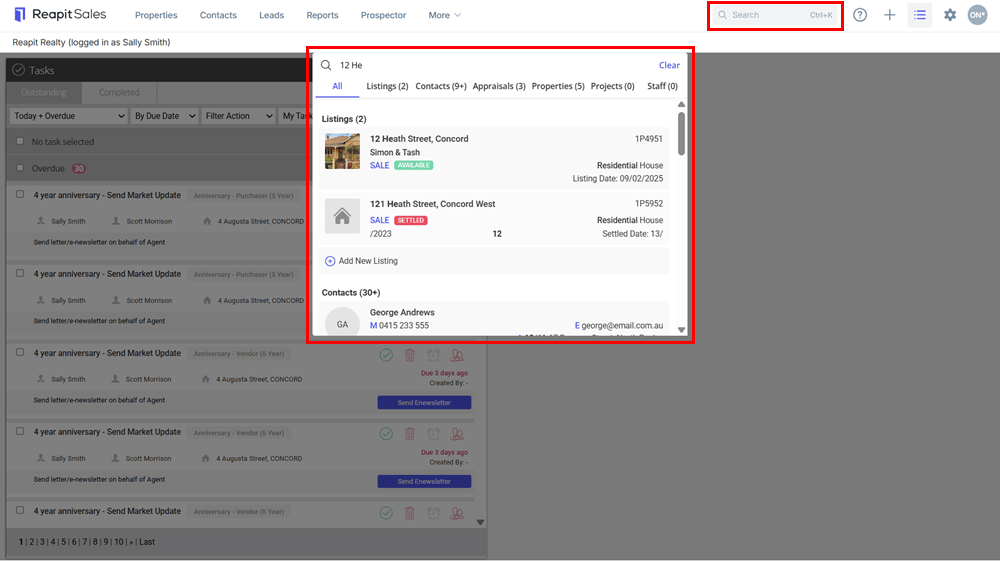
The Universal Search Bar
Quickly search and access your listings, projects, contacts, properties (prospect records) and staff using a minimum 3 character search.
The Main Menu
You can access the various sections of the database via the Main Menu, each menu item will open up a corresponding Left-Panel.
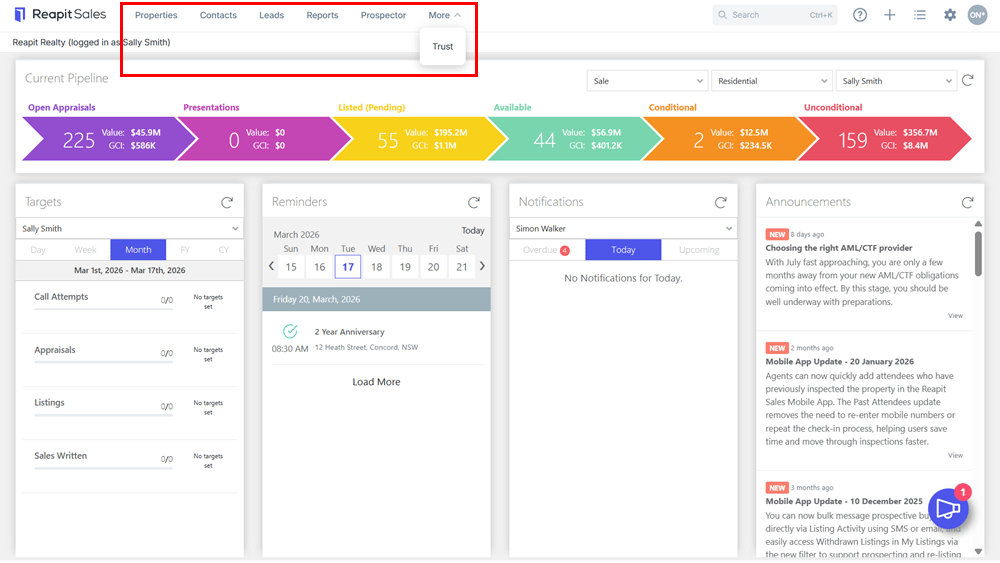
From left to right:
Dashboard
The Dashboard displays a users current pipeline, Targets, Reminders and Reapit Sales Announcements.
My Office
In My Office you can edit the office contact details which will update the website, letters, e-newsletters and brochures. You can add/edit staff and their details which will also update the website and media, delete staff members and reassign their tasks, properties and contacts, communicate to staff via email, e-newsletters or SMS etc.
Properties
In Properties you can add/edit your listings, appraisals, prospects and create projects. Add OFI time, log enquiries and feedback from OFI's create inspection/vendor reports, create brochures, letters and e-newsletters, conduct advanced searches and print reports etc.
Contacts
In Contacts you can add/edit your contacts, run advanced searches to send bulk communications e.g weekly e-newsletters, mail merges or create reports, send emails e-newsletters and SMS direct to a contact, log property feedback from an inspection by appointment, update/edit their property requirements, create tasks and add notes, view their related properties and properties they have inspected etc.
Tasks
In Tasks you can view your current, upcoming, overdue and completed tasks. You can print a report, bulk complete, create a task, or apply an activity schedule. You can also add or edit an activity schedule template and much more.
Leads
With Leads you can capture listing enquiries from Realestate.com.au, Realcommercial, Domain.com.au, Commercialrealestate.com.au, Allhomes.com.au and Inspect Real Estate direct into your database.
All Leads appear in Reapit Sales within minutes of initial enquiry ready for processing. Depending on Office policy, Leads can then either be qualified manually or automatically converted to a database contact & corresponding buyer enquiry record against the listing.
Configure your lead processing to automatically add specific Contact Categories, Mailing Lists and even add Buyer Preferences to new contacts based on the listing they enquired about.
Note: This feature is only accessible if your office has been set up with the Leads Capture module.
Reports
In Reports you can generate stock-list and open home reports, pipeline reports, lease and sales reports, property, contact, performance reports etc.
Prospector
The Reapit Sales and integrated RP Data prospecting tool allows you to set up core areas, add properties to your database with a single click, prospect to properties in your core area via your database and/or RP Data.
Note: This feature is only accessible if your office has been set up with the Reapit Sales Prospector module.
Trust
In Trust, users with access can log all receipts, payments etc against separate ledgers, reconcile periods and produce accurate audit reports.
Note: This feature is only accessible if your office has been set up with the Reapit Sales Sales Trust Accounting module.