'%20d='M0%208a8%208%200%200%201%208-8h24a8%208%200%200%201%208%208v24a8%208%200%200%201-8%208H8a8%208%200%200%201-8-8V8Z'/%3e%3cpath%20fill='%23fff'%20d='M10.41%206v3.779h15.048v19.537h4.132V6H10.41Z'/%3e%3cpath%20fill='%23fff'%20d='M20.967%2034V13.837L10.41%209.78v20.166L20.967%2034Z'/%3e%3cdefs%3e%3clinearGradient%20id='reapit-sales__a'%20x1='20.702'%20x2='20.702'%20y1='.351'%20y2='31.228'%20gradientUnits='userSpaceOnUse'%3e%3cstop%20stop-color='%235573FD'/%3e%3cstop%20offset='.575'%20stop-color='%234E56EA'/%3e%3c/linearGradient%3e%3c/defs%3e%3c/svg%3e)
Property Communications History
This article demonstrates where to find a properties communication history and how to open items to view within Reapit Sales.
Overview
Property Communications History
This article demonstrates where to find a properties communication history and how to open items to view within Reapit Sales.
How do I view all communications including SMS, Email, E-Newsletters, Letters and Notes related to a property?
- Search for your property and open the Property Card.
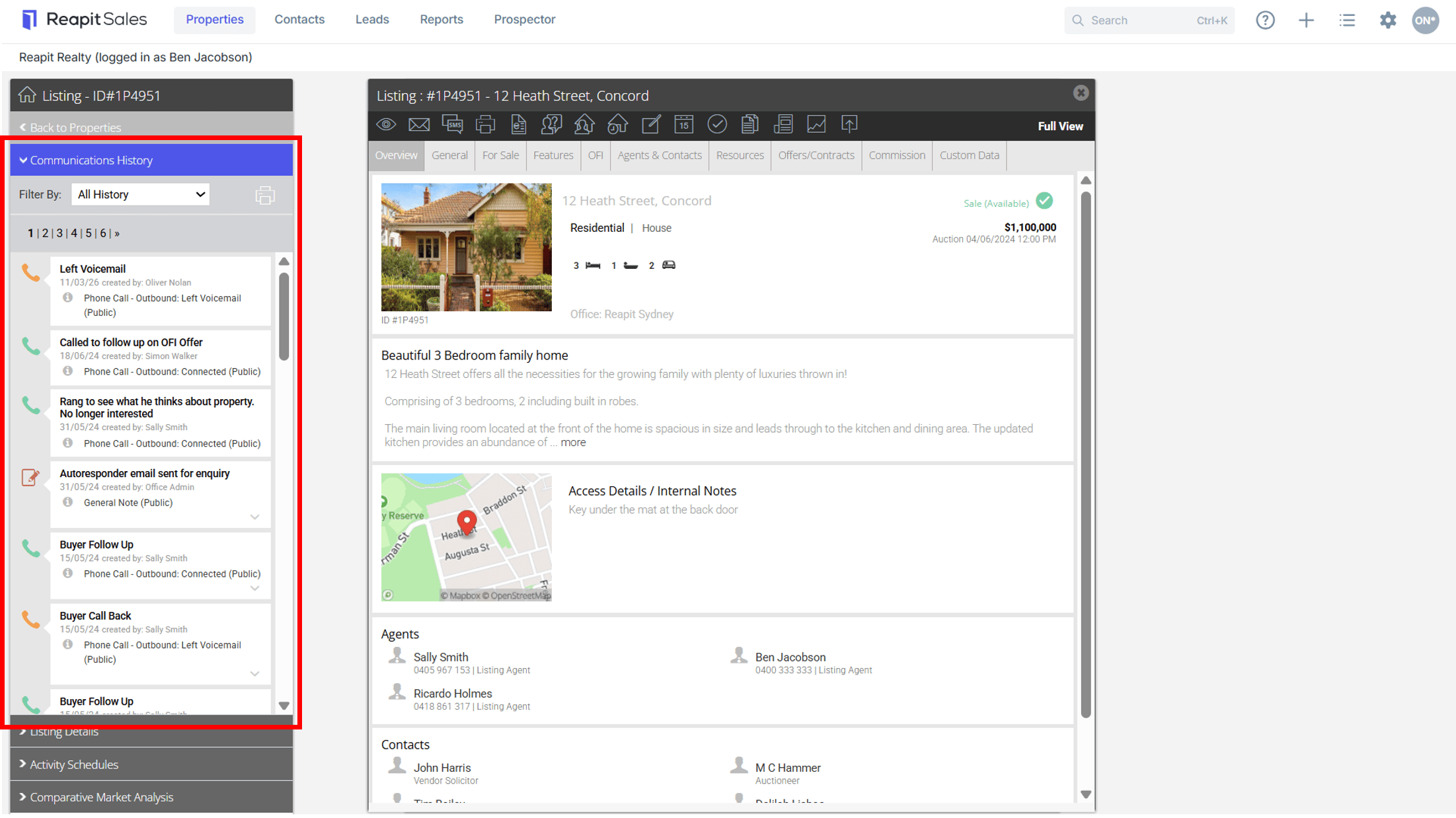
- Select Communications History on the Left Property Panel (If the matching left panel is not visible, click Full View in the top right hand corner of the property card).
- Here you can view a list of all Notes, SMS, E-Newsletters, Letters and Emails for the property.
- Click the item to view more detail.