'%20d='M0%208a8%208%200%200%201%208-8h24a8%208%200%200%201%208%208v24a8%208%200%200%201-8%208H8a8%208%200%200%201-8-8V8Z'/%3e%3cpath%20fill='%23fff'%20d='M10.41%206v3.779h15.048v19.537h4.132V6H10.41Z'/%3e%3cpath%20fill='%23fff'%20d='M20.967%2034V13.837L10.41%209.78v20.166L20.967%2034Z'/%3e%3cdefs%3e%3clinearGradient%20id='reapit-sales__a'%20x1='20.702'%20x2='20.702'%20y1='.351'%20y2='31.228'%20gradientUnits='userSpaceOnUse'%3e%3cstop%20stop-color='%235573FD'/%3e%3cstop%20offset='.575'%20stop-color='%234E56EA'/%3e%3c/linearGradient%3e%3c/defs%3e%3c/svg%3e)
Email to CRM - How It Works
This article explains the process of capturing emails sent or received outside of Reapit Sales.
Overview
Email to CRM - How It Works
This article explains the process of capturing emails sent or received outside of Reapit Sales.
Capturing email communication that you are sending to or receiving from your contacts outside of Reapit Sales can be achieved in the following ways:
- BCC your unique 'BCC to CRM' email address into any correspondence you are sending to your contacts.
- FORWARD emails you have received from your contacts to your unique
BCC to CRMemail address.
BBC Method
BCC your unique 'BCC to CRM' email address into any correspondence sent to your contacts. A copy of the email will be captured and stored in Reapit Sales as a contact history record against the contact that the email was sent to.
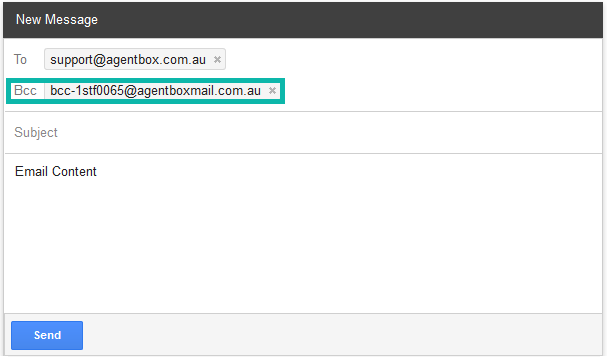
If the recipient is an existing contact in Reapit Sales that you are assigned to:
- A copy of the email will be captured and stored in Reapit Sales as a contact history record against the contact that the email was sent to.
If the recipient is an existing contact in Reapit Sales that you are NOT assigned to:
- You will be automatically assigned to the contact with either 'View Only' or 'Full Access' depending on the Advanced System Configuration option for Existing Contacts.
- A copy of the email will be captured and stored in Reapit Sales as a contact history record against the contact that the email was sent to.
If the recipient is not an existing (New) contact in Reapit Sales:
- You will receive an email notifying you that the recipient was not found in Reapit Sales.
- The contact will not be created. Contacts will need to be created in Reapit Sales prior to using the 'BCC to CRM' email address in correspondence to these contacts.
FORWARD METHOD
FORWARD emails received from your contacts to your unique BCC to CRM email address. A copy of the email will be captured and stored in Reapit Sales as a contact history record against the contact that the email was originally sent from.
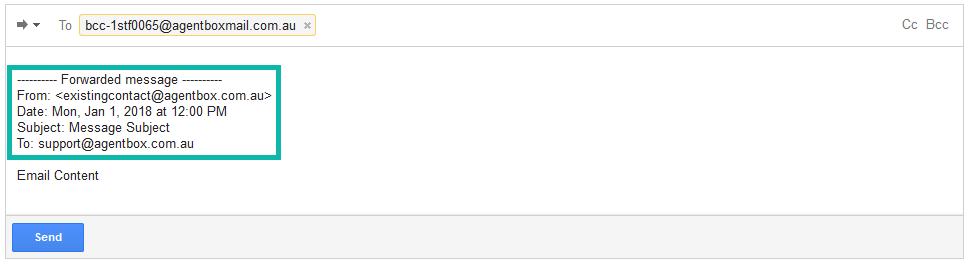
Note: This method relies on the email content in order to determine the email addresses associated with the original message being forwarded. When forwarding, you should not alter the content of the email, in particular the additional information added by your email client which identifies the original message, it's sender and recipients.
If the original message sender (FROM) is an existing contact in Reapit Sales that you are assigned to:
- A copy of the email will be captured and stored in Reapit Sales as a contact history record against the contact that the email was sent to.
If the original message sender (FROM) is an existing contact in Reapit Sales that you are NOT assigned to:
- You will be automatically assigned to the contact with either 'View Only' or 'Full Access' depending on the Advanced System Configuration option for Existing Contacts.
- A copy of the email will be captured and stored in Reapit Sales as a contact history record against the contact that the email was sent to.
If the original message sender (FROM) is not an existing (New) contact in Reapit Sales:
- You will receive an email notifying you that the recipient was not found in Reapit Sales.
- The contact will not be created. Contacts will need to be created in Reapit Sales prior to using the 'BCC to CRM' email address in correspondence to these contacts.