'%20d='M0%208a8%208%200%200%201%208-8h24a8%208%200%200%201%208%208v24a8%208%200%200%201-8%208H8a8%208%200%200%201-8-8V8Z'/%3e%3cpath%20fill='%23fff'%20d='M10.41%206v3.779h15.048v19.537h4.132V6H10.41Z'/%3e%3cpath%20fill='%23fff'%20d='M20.967%2034V13.837L10.41%209.78v20.166L20.967%2034Z'/%3e%3cdefs%3e%3clinearGradient%20id='reapit-sales__a'%20x1='20.702'%20x2='20.702'%20y1='.351'%20y2='31.228'%20gradientUnits='userSpaceOnUse'%3e%3cstop%20stop-color='%235573FD'/%3e%3cstop%20offset='.575'%20stop-color='%234E56EA'/%3e%3c/linearGradient%3e%3c/defs%3e%3c/svg%3e)
View Converted Leads
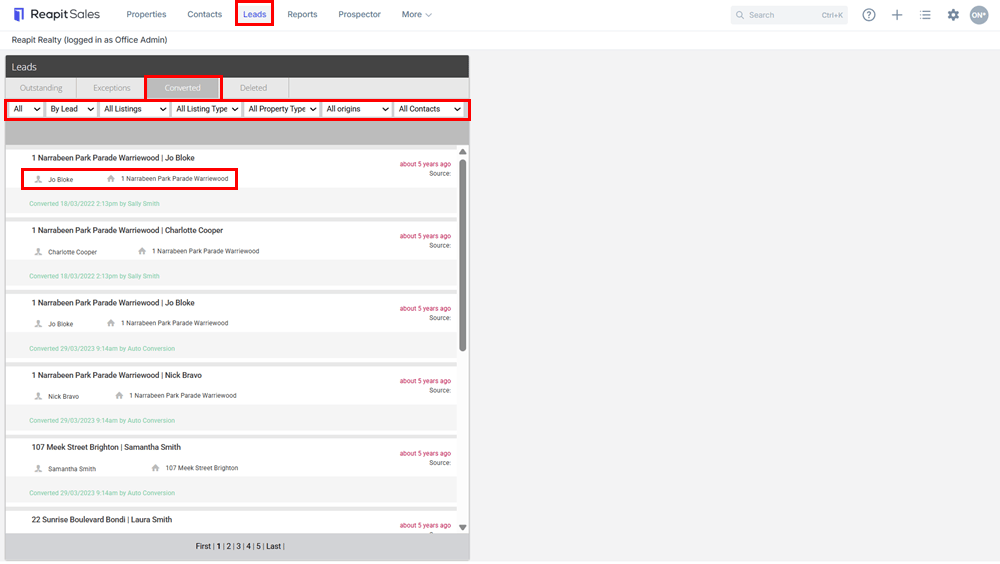
This article explains how to view converted leads in Reapit Sales.
View Converted Leads
This article explains how to view converted leads in Reapit Sales. *Note: this is an add-on module. Request more information via our Client Change Request form.
- Click Leads in the main menu to open the leads panel
- Click the Converted tab
- Use filters to refine list
- Click the contacts or property name to open the related lead or database record.
*Note: Once converted this cannot be reverted, you can manually archive the contact and delete the property enquiry.