'%20d='M0%208a8%208%200%200%201%208-8h24a8%208%200%200%201%208%208v24a8%208%200%200%201-8%208H8a8%208%200%200%201-8-8V8Z'/%3e%3cpath%20fill='%23fff'%20d='M10.41%206v3.779h15.048v19.537h4.132V6H10.41Z'/%3e%3cpath%20fill='%23fff'%20d='M20.967%2034V13.837L10.41%209.78v20.166L20.967%2034Z'/%3e%3cdefs%3e%3clinearGradient%20id='reapit-sales__a'%20x1='20.702'%20x2='20.702'%20y1='.351'%20y2='31.228'%20gradientUnits='userSpaceOnUse'%3e%3cstop%20stop-color='%235573FD'/%3e%3cstop%20offset='.575'%20stop-color='%234E56EA'/%3e%3c/linearGradient%3e%3c/defs%3e%3c/svg%3e)
Subscribe Contacts & Subscription Categories
This article runs through how to subscribe contacts and the subscription categories in Reapit Sales.
Subscribe Contacts & Subscription Categories
This article runs through how to subscribe contacts and the subscription categories in Reapit Sales.
How to Subscribe Contacts to E-Newsletters.
- Search for your Contact open their Contact Card.
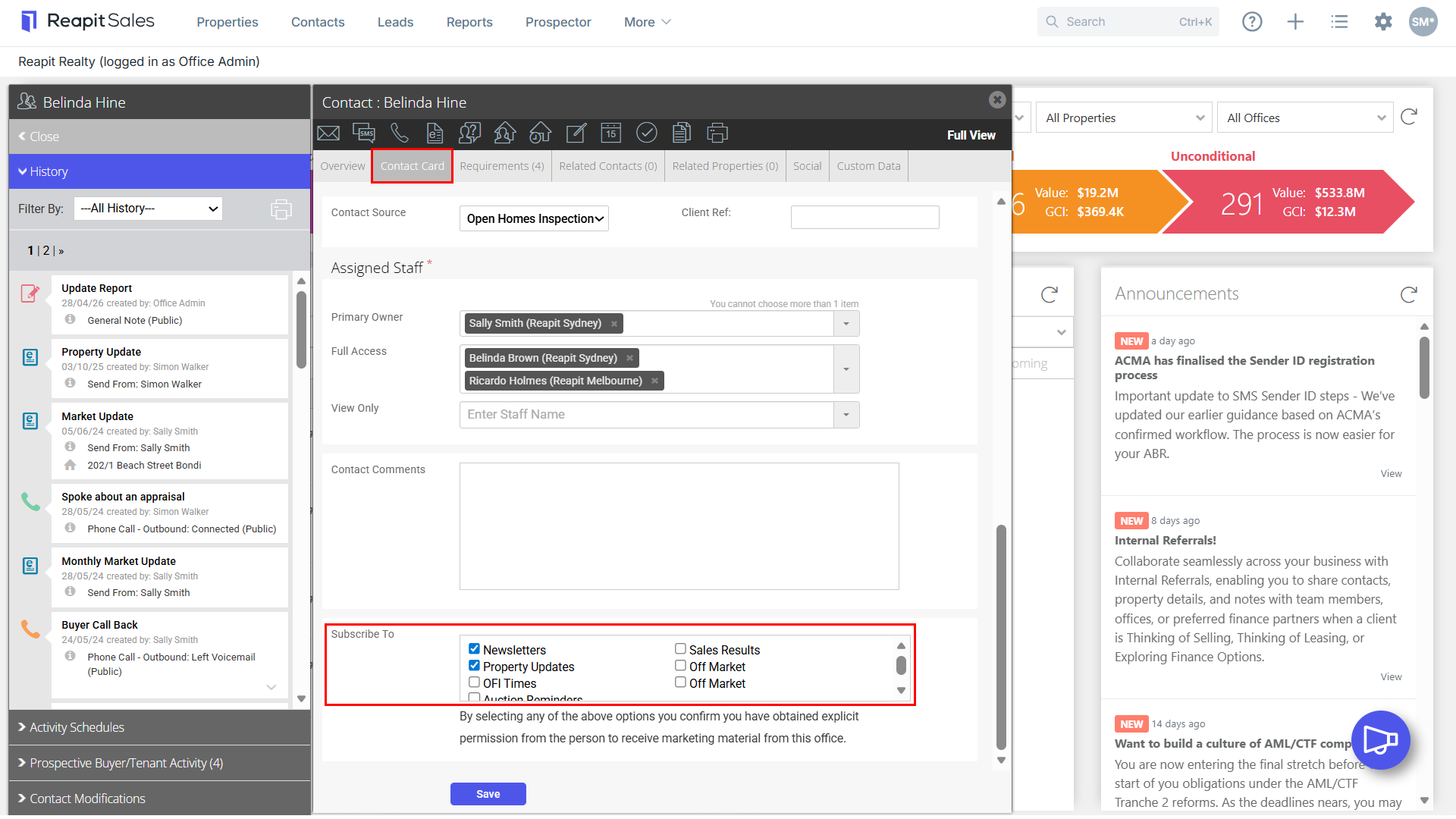
- At the bottom of the Contact Card tab you can subscribe the contact to a number of subscription categories by ticking their corresponding check-box.
Note: Only contacts that have the corresponding check-box ticked on their contact card will be sent an E-Newsletter when sending a bulk e-newsletter via the Advanced Contact Search.
Standard Inclusions:
- Newsletters - This subscription must be ticked to send ANY of the E-Newsletters to the contact. It will add the contact to the subscriber's recipient list to all manually created mass E-Newsletter blasts. This is the contacts consent to send bulk E-Newsletters to them.
- Property Updates - If a contact is subscribed to Property Updates, they will automatically receive an E-Newsletter containing new or updated properties that match their requirements. These are sent once a day and will only be sent if a new property has been made Available or a matching property has had the search price updated that day. Note: The contact must have Requirementsrecorded in their contact card to receive Property Updates.
Additional Property Alerts:
OFI Times, Auction Reminders, Sales Results, Off Market Alert - These checkboxes can be used as advanced contact search options, or can be enabled by Reapit Sales to provide additional automatic alerts.
The alert options are as follows:
Inspection Times - Sent weekly and displays matched listings with upcoming Inspection Times in the Next 7 days from the scheduled alert.
Auction Reminder - Sent weekly and displays matched listings with upcoming Auctions in the Next 7 days from the scheduled alert.
Sold Alerts - Sent weekly and displays Sales Results of matched listings from the Last 7 days previous to the scheduled alert.
Off Market Alert - Sent daily and works the same as the standard automatic alert, the only difference is that it will only show matched listings that are marked as 'Off-Market' using the off-market tickbox. If your system does not have Off Market check-boxes it can be enabled by contacting salessupportanz@reapit.com
If you are interested in enabling additional automatic alerts contact salessupportanz@reapit.com
Note: By selecting any of the above options, you confirm you have obtained explicit permission from the person to receive marketing material from your office.
- Click Save