'%20d='M0%208a8%208%200%200%201%208-8h24a8%208%200%200%201%208%208v24a8%208%200%200%201-8%208H8a8%208%200%200%201-8-8V8Z'/%3e%3cpath%20fill='%23fff'%20d='M10.41%206v3.779h15.048v19.537h4.132V6H10.41Z'/%3e%3cpath%20fill='%23fff'%20d='M20.967%2034V13.837L10.41%209.78v20.166L20.967%2034Z'/%3e%3cdefs%3e%3clinearGradient%20id='reapit-sales__a'%20x1='20.702'%20x2='20.702'%20y1='.351'%20y2='31.228'%20gradientUnits='userSpaceOnUse'%3e%3cstop%20stop-color='%235573FD'/%3e%3cstop%20offset='.575'%20stop-color='%234E56EA'/%3e%3c/linearGradient%3e%3c/defs%3e%3c/svg%3e)
Assign Staff Access to Leads Capture
This article demonstrates how to grant a staff member access to the Leads Capture module.
Assign Staff Access to Leads Capture
This article demonstrates how to grant a staff member access to the Leads Capture module.
*Note: Permissions May Apply. This is an add-on module. Request more information via ourClient Change Request Form.
- Click My Office from the menu bar.

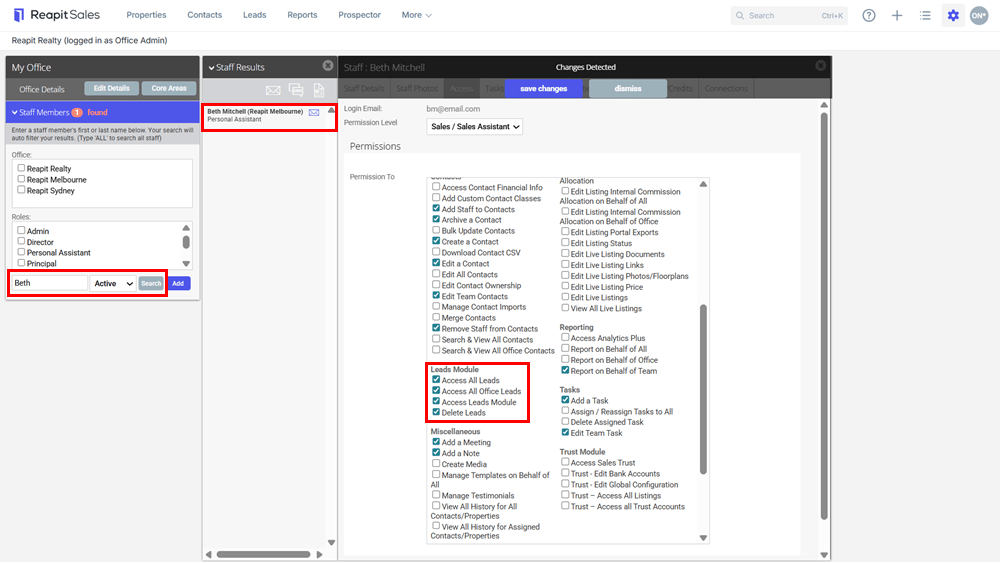
- Type the staff member's name on the Left Panel and the staff member will appear on the staff results panel
- Click the Staff Members Name to open their staff card and select the Access tab
- Select the appropriate Leads Module permissions and click Save.
- Access All Leads - Allows User to view & convert all Leads including leads related to Listings outside of their Team.
- Access All Office Leads - Allows User to view & convert Leads relating to any Listing within their associated Office(s).
- Access Leads Module - Allows User to access the Leads module. By default the User can only view & convert Leads relating to their Listings or Team Listings.
- Delete Leads - Allows User to delete any Lead which they are able to access.
- Click Save Changes.
*Note: Click here to view the article for Assigning Core Areas to a Staff Card.
This can be actioned by a ****master user or someone with the relevant permission - Manage Staff Members.