'%20d='M0%208a8%208%200%200%201%208-8h24a8%208%200%200%201%208%208v24a8%208%200%200%201-8%208H8a8%208%200%200%201-8-8V8Z'/%3e%3cpath%20fill='%23fff'%20d='M10.41%206v3.779h15.048v19.537h4.132V6H10.41Z'/%3e%3cpath%20fill='%23fff'%20d='M20.967%2034V13.837L10.41%209.78v20.166L20.967%2034Z'/%3e%3cdefs%3e%3clinearGradient%20id='reapit-sales__a'%20x1='20.702'%20x2='20.702'%20y1='.351'%20y2='31.228'%20gradientUnits='userSpaceOnUse'%3e%3cstop%20stop-color='%235573FD'/%3e%3cstop%20offset='.575'%20stop-color='%234E56EA'/%3e%3c/linearGradient%3e%3c/defs%3e%3c/svg%3e)
How to Enter an IBD Account
Settings This article shows how to enter IBD account details to a property in Reapit Sales.
Overview
How to Enter an IBD Account? ****
This article shows how to enter IBD account details to a property in Reapit Sales.
An IBD Account may be logged against any Offer/Contract that has been signed (under contract, conditional or unconditional).
*Note: Reapit Sales supports one IBD account per offer/contract logged against a listing.
To enter IBD Account details:
- Search for Listing and Open the related property card
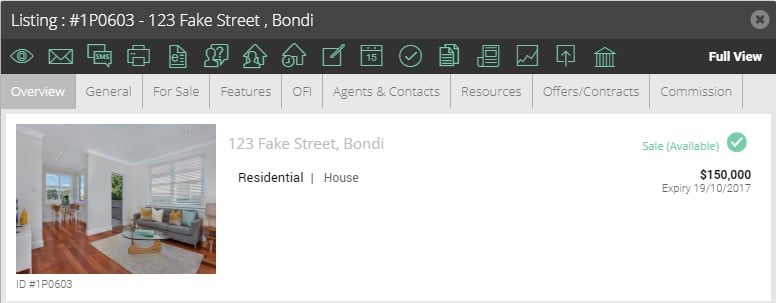
- Click on the Offers/Contracts tab

- If the corresponding sales ledger details do not appear, click on corresponding Edit button next to the offer/contract record under the Existing Offers/Contracts section.
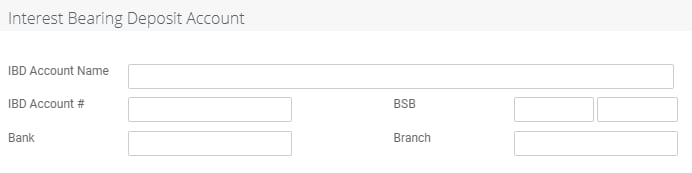
- Scroll down to find the Interest Bearing Deposit Account section. Enter in the IBD Account details. (if you do not see the Interest Bearing Deposit Account details section, ensure the offer/contract status is at least under contract, conditional or unconditional).
- Click Save.
The IBD account details will now be available when selecting IBD from the Account dropdown in a transaction screen within your Sales Trust module.