'%20d='M0%208a8%208%200%200%201%208-8h24a8%208%200%200%201%208%208v24a8%208%200%200%201-8%208H8a8%208%200%200%201-8-8V8Z'/%3e%3cpath%20fill='%23fff'%20d='M10.41%206v3.779h15.048v19.537h4.132V6H10.41Z'/%3e%3cpath%20fill='%23fff'%20d='M20.967%2034V13.837L10.41%209.78v20.166L20.967%2034Z'/%3e%3cdefs%3e%3clinearGradient%20id='reapit-sales__a'%20x1='20.702'%20x2='20.702'%20y1='.351'%20y2='31.228'%20gradientUnits='userSpaceOnUse'%3e%3cstop%20stop-color='%235573FD'/%3e%3cstop%20offset='.575'%20stop-color='%234E56EA'/%3e%3c/linearGradient%3e%3c/defs%3e%3c/svg%3e)
View Leads
This article provides an overview of the Leads screen in Reapit Sales.
View Leads
This article provides an overview of the Leads screen in Reapit Sales.
*Note: this is an add-on module. Request more information via our Client Change Request form.
- Click Leads in the main menu to open the leads panel
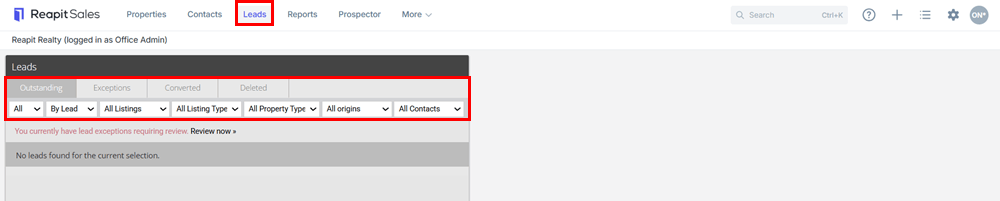
- Navigation Tabs

Outstanding - if Auto Processing in not enabled this is where you can view all leads waiting to be converted.
Exceptions - contains all leads with insufficient information for conversion e.g. could not be matched to a property address in Reapit Sales, do not contain enough data e.g. no surname etc.
Converted - This is where you can view leads which have been previously converted, if auto processing is enabled all leads excluding exceptions can be found here.
Deleted - This is where you can view deleted leads and reactivate if necessary
- Refine Results
.png?Policy=eyJTdGF0ZW1lbnQiOlt7IlJlc291cmNlIjoiaHR0cHM6Ly9kemY4dnF2MjRlcWhnLmNsb3VkZnJvbnQubmV0L3VzZXJmaWxlcy8xMTEyOC8xNDIwNS9ja2ZpbmRlci9pbWFnZXMvaW1hZ2UoMTAyKS5wbmciLCJDb25kaXRpb24iOnsiRGF0ZUxlc3NUaGFuIjp7IkFXUzpFcG9jaFRpbWUiOjE3NzQzMjcyNzB9fX1dfQ__&Signature=OkwGGHmSjzwpww6bgehoYhAKGEDrAvBCrCVOoFKevTb7~PuRSlaW0oC~cD-b4Fl0k--avFjaKj2EogjoEySnn80DJoxyjl2kUvbDyDNIl~V9M5N-B6JXlifXrp7VtiVvxyrRpoQ5HdJVfwMnuNCENjO9RmlMPrOjm8kpMuPrXewzaWoGKtr4TW6JPOhR0aKvQt~LaddfC5dzUV5CZr7GYaUqI3yZjBmzOXVEuaOr5Nn2iOiSmeTCJx0B9IpGTjOe~uGteheUxaOB3ftinXKbvsLmpIyBXbOWi~bcUvofsT2RDwv0-I~N0RV6~F3Gysrnv~WcS0V-k-tJ7om7sw5o-g__&Key-Pair-Id=K2TK3EG287XSFC)
*Narrow results further using filters. View today’s only or all leads
*Sort by listing, lead or contact
*Subject to access permission view My Listing Leads, Teams Listing Leads, Office Listing Leads, All Listing Leads or by staff member *Filter by For Sale or For Lease *Filter by Property Type
*Filter by lead origin e.g. Inspect Real Estate
*Filter out All Contacts, Existing Contacts in Database or New Contacts