'%20d='M0%208a8%208%200%200%201%208-8h24a8%208%200%200%201%208%208v24a8%208%200%200%201-8%208H8a8%208%200%200%201-8-8V8Z'/%3e%3cpath%20fill='%23fff'%20d='M10.41%206v3.779h15.048v19.537h4.132V6H10.41Z'/%3e%3cpath%20fill='%23fff'%20d='M20.967%2034V13.837L10.41%209.78v20.166L20.967%2034Z'/%3e%3cdefs%3e%3clinearGradient%20id='reapit-sales__a'%20x1='20.702'%20x2='20.702'%20y1='.351'%20y2='31.228'%20gradientUnits='userSpaceOnUse'%3e%3cstop%20stop-color='%235573FD'/%3e%3cstop%20offset='.575'%20stop-color='%234E56EA'/%3e%3c/linearGradient%3e%3c/defs%3e%3c/svg%3e)
BCC to CRM Troubleshooting
This article will assist you if you are experiencing issues with Email to CRM in Reapit Sales.
Overview
BCC to CRM Troubleshooting
This article will assist you if you are experiencing issues with Email to CRM in Reapit Sales by explaining some common errors.
Error Received: "Error: Could not resolve BCC to CRM Member" — The staff who's sending out the BCC needs to match their BCC email within their staff card when input into the BCC field of the email's header.
Error Received: "No CRM contacts were found in the recipient fields" — The contact within the "To" needs to be an existing contact within Reapit Sales and matches the details
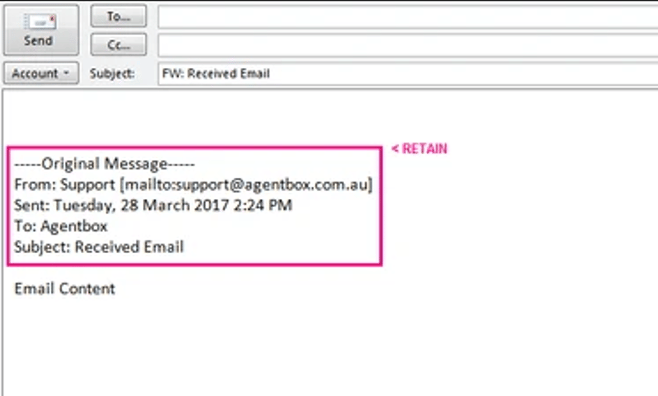
Issue: Forwarded Emails are not captured. — In order for Reapit Sales to correctly capture the message and contact details, ensure the sender details are being retained within the original email that is being forwarded.