'%20d='M0%208a8%208%200%200%201%208-8h24a8%208%200%200%201%208%208v24a8%208%200%200%201-8%208H8a8%208%200%200%201-8-8V8Z'/%3e%3cpath%20fill='%23fff'%20d='M10.41%206v3.779h15.048v19.537h4.132V6H10.41Z'/%3e%3cpath%20fill='%23fff'%20d='M20.967%2034V13.837L10.41%209.78v20.166L20.967%2034Z'/%3e%3cdefs%3e%3clinearGradient%20id='reapit-sales__a'%20x1='20.702'%20x2='20.702'%20y1='.351'%20y2='31.228'%20gradientUnits='userSpaceOnUse'%3e%3cstop%20stop-color='%235573FD'/%3e%3cstop%20offset='.575'%20stop-color='%234E56EA'/%3e%3c/linearGradient%3e%3c/defs%3e%3c/svg%3e)
Portal Exports
This article takes you through the Portal Export process in Reapit Sales.
Overview
Portal Exports
This article takes you through the Portal Export process in Reapit Sales.
*Note: Permissions may apply.
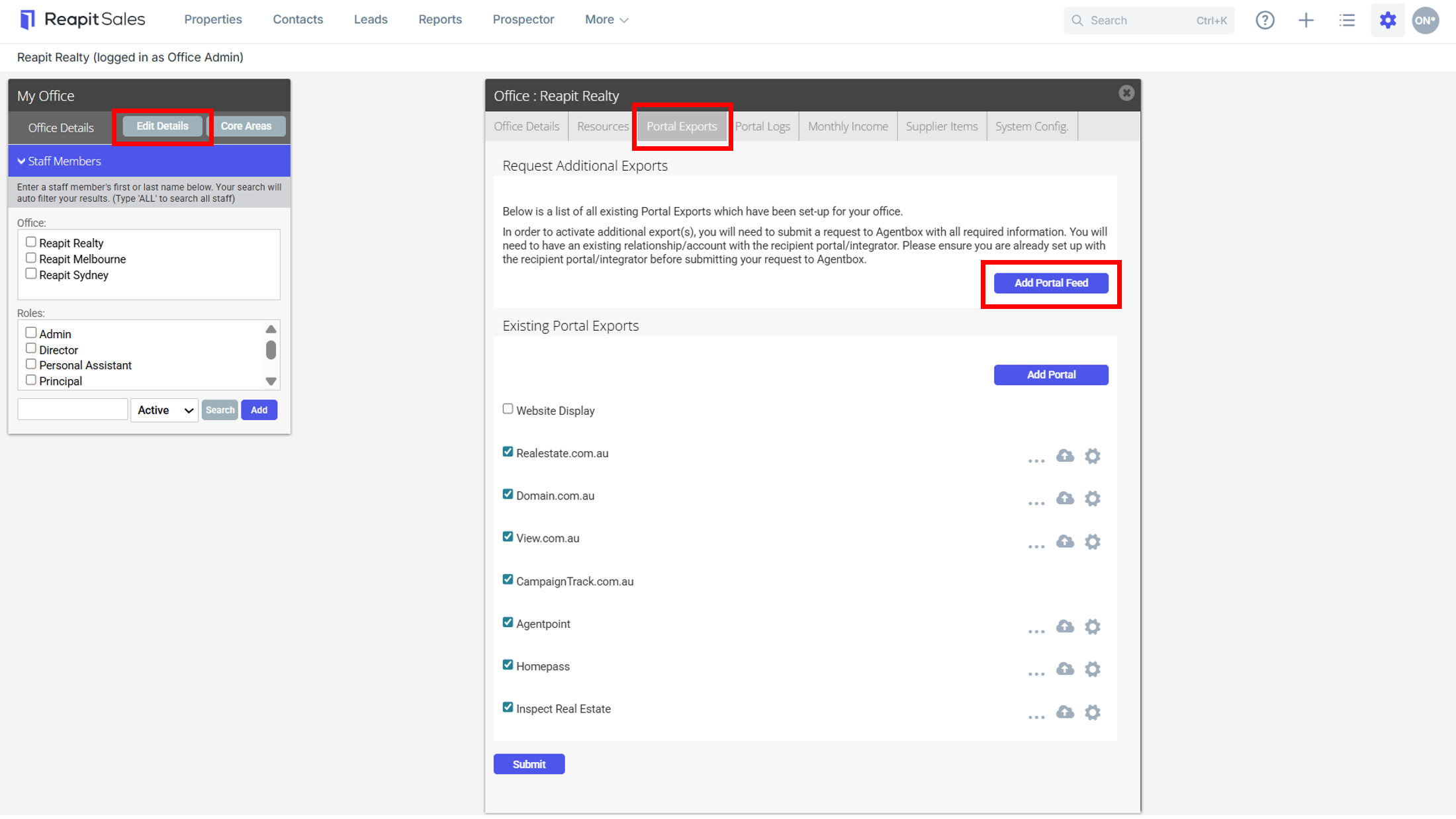
Here you will find a list of all existing Portal Exports which have been set-up for your office.
In order to activate additional export(s), you will need to submit a Request to Reapit Sales with all the required information. You will need to have an existing relationship/account with the recipient portal/integrator. Please ensure you are already set up with the recipient portal/integrator before submitting your request to Reapit Sales.
To request a New Portal Feed;
- Click My Office from the main menu.

- Click the Edit Details button on the Left Panel.
- Click on the Portal Exports tab.
- Click the Add Portal Feed button to complete and submit a Portal Export Request form.