'%20d='M0%208a8%208%200%200%201%208-8h24a8%208%200%200%201%208%208v24a8%208%200%200%201-8%208H8a8%208%200%200%201-8-8V8Z'/%3e%3cpath%20fill='%23fff'%20d='M10.41%206v3.779h15.048v19.537h4.132V6H10.41Z'/%3e%3cpath%20fill='%23fff'%20d='M20.967%2034V13.837L10.41%209.78v20.166L20.967%2034Z'/%3e%3cdefs%3e%3clinearGradient%20id='reapit-sales__a'%20x1='20.702'%20x2='20.702'%20y1='.351'%20y2='31.228'%20gradientUnits='userSpaceOnUse'%3e%3cstop%20stop-color='%235573FD'/%3e%3cstop%20offset='.575'%20stop-color='%234E56EA'/%3e%3c/linearGradient%3e%3c/defs%3e%3c/svg%3e)
Hidden Listings
This article explains how to mark a property as a Hidden Listing in Reapit Sales.
Overview
Hidden Listings
This article explains how to mark a property as a Hidden Listing in Reapit Sales.
Hidden listings allow you to market properties to your database via E-newsletters and will contribute to listing reporting and KPI's e.g. New Listings, however, keep the property hidden from Agentpoint powered websites and automated property alerts.
*Note: The hidden listing button does NOT override portal export buttons if they are selected.
**Note: Hidden Listings won't be able to pull up OFI Inspections through E-Newsletters.
- Search and open your listing.
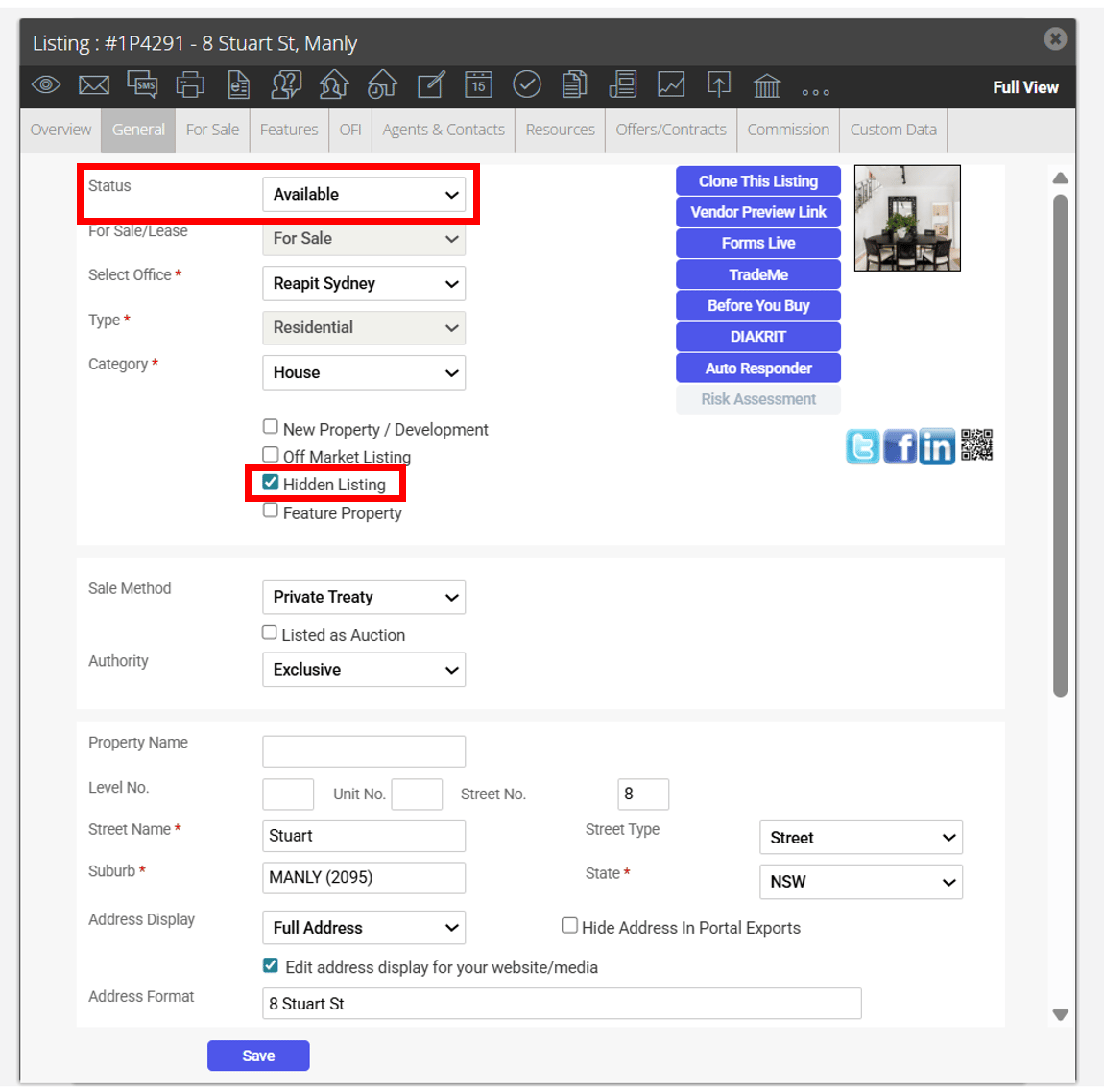
- In the general tab tick the Hidden Listing checkbox.
- Change the property status to available. The property can now be sent to the database via e-newsletter orexported to portals using the portal export buttons however it will be hidden from Reapit powered websites and automated property alerts until 'Hidden Listing' has been unchecked.