'%20d='M0%208a8%208%200%200%201%208-8h24a8%208%200%200%201%208%208v24a8%208%200%200%201-8%208H8a8%208%200%200%201-8-8V8Z'/%3e%3cpath%20fill='%23fff'%20d='M10.41%206v3.779h15.048v19.537h4.132V6H10.41Z'/%3e%3cpath%20fill='%23fff'%20d='M20.967%2034V13.837L10.41%209.78v20.166L20.967%2034Z'/%3e%3cdefs%3e%3clinearGradient%20id='reapit-sales__a'%20x1='20.702'%20x2='20.702'%20y1='.351'%20y2='31.228'%20gradientUnits='userSpaceOnUse'%3e%3cstop%20stop-color='%235573FD'/%3e%3cstop%20offset='.575'%20stop-color='%234E56EA'/%3e%3c/linearGradient%3e%3c/defs%3e%3c/svg%3e)
Bulk Delete Tasks
This article will cover how to bulk delete tasks in Reapit Sales.
Bulk Delete Tasks
This article will cover how to bulk delete tasks in Reapit Sales.
- Click on Tasks.

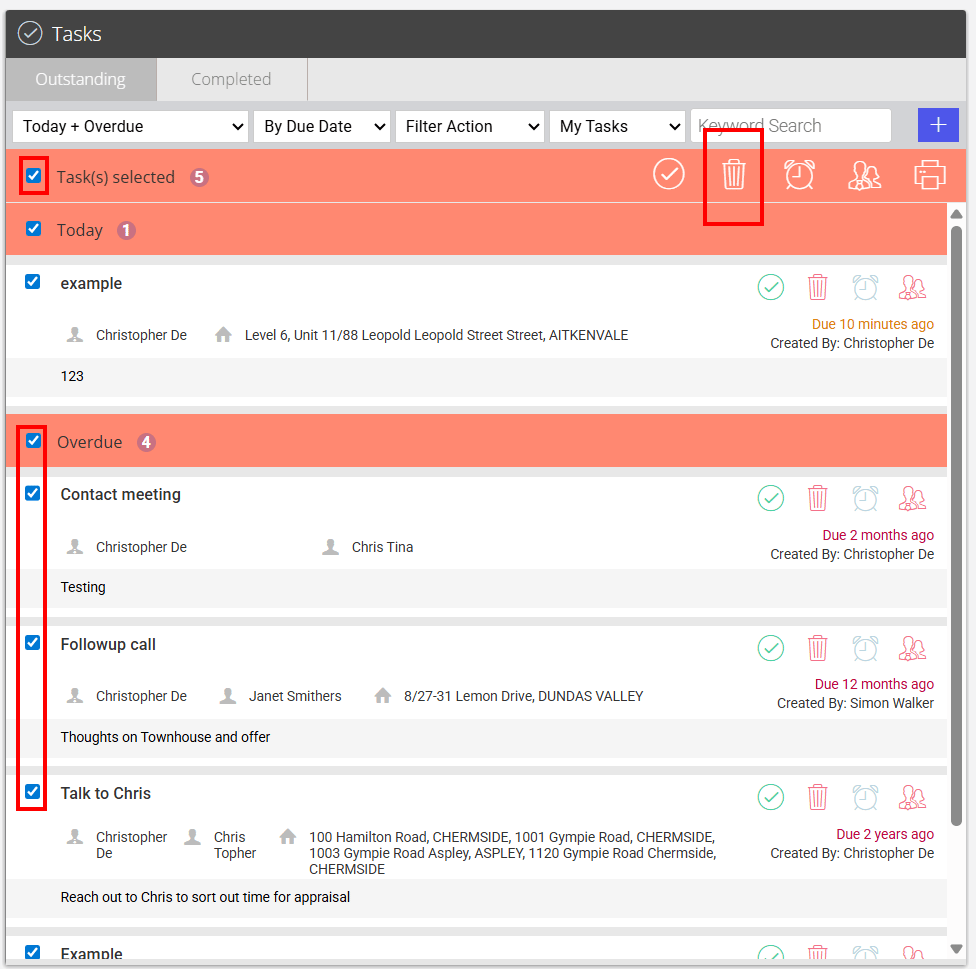
- In the task view, you can bulk delete by selecting the checkbox next to 'No Tasks selected' which selects all tasks on that page, or you can multi select by ticking the box next to each task. Once done, click the trash can icon.
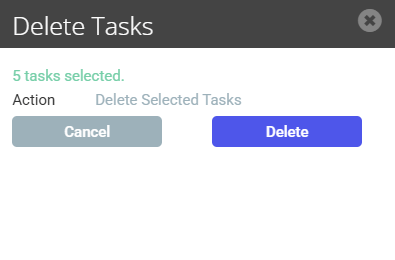
- Click Delete.