'%20d='M0%208a8%208%200%200%201%208-8h24a8%208%200%200%201%208%208v24a8%208%200%200%201-8%208H8a8%208%200%200%201-8-8V8Z'/%3e%3cpath%20fill='%23fff'%20d='M10.41%206v3.779h15.048v19.537h4.132V6H10.41Z'/%3e%3cpath%20fill='%23fff'%20d='M20.967%2034V13.837L10.41%209.78v20.166L20.967%2034Z'/%3e%3cdefs%3e%3clinearGradient%20id='reapit-sales__a'%20x1='20.702'%20x2='20.702'%20y1='.351'%20y2='31.228'%20gradientUnits='userSpaceOnUse'%3e%3cstop%20stop-color='%235573FD'/%3e%3cstop%20offset='.575'%20stop-color='%234E56EA'/%3e%3c/linearGradient%3e%3c/defs%3e%3c/svg%3e)
How to Paste from Word
This article will cover pasting contents from Microsoft Word to your template in Reapit Sales.
1. Click the Create Letter icon at the top of the contact or property card

2. In the Select a Template drop-down, scroll down and hit the Create New Letter Template button at the bottom of the list.
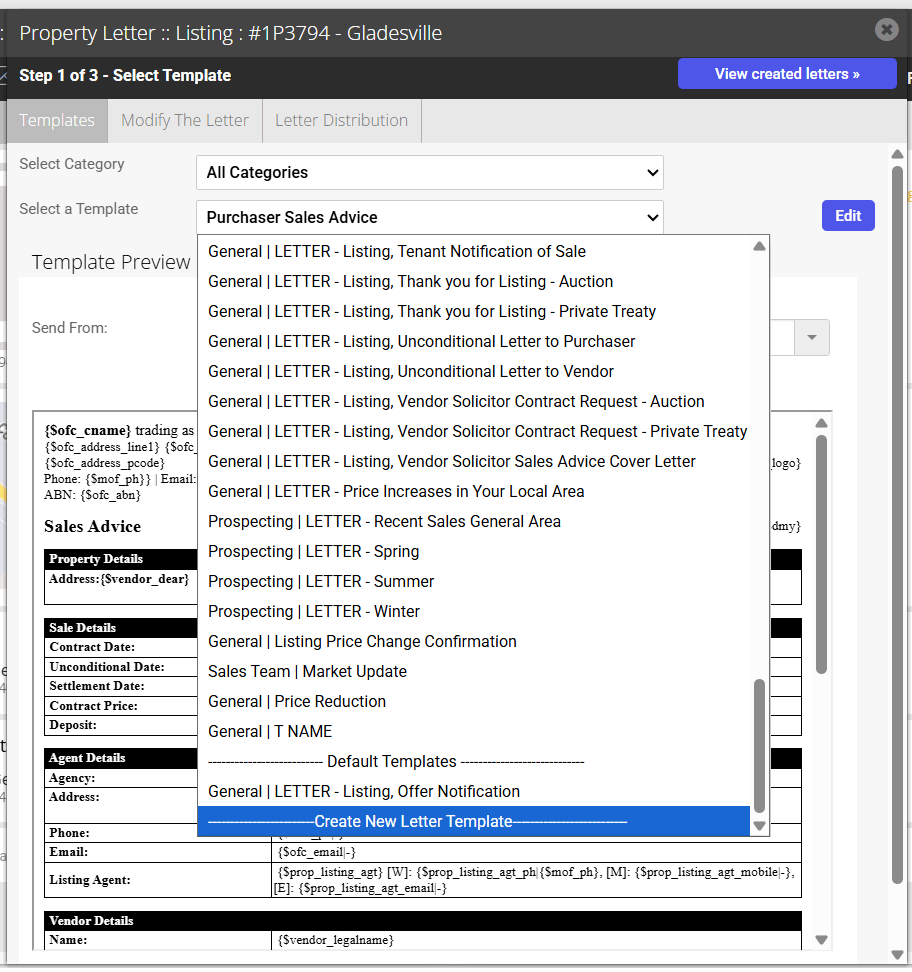
3. The Create Letter Template window will appear, which allows you to name the template

4.To paste from Microsoft Word, you can click on the Paste as Plain Text icon  or Paste from Word


5. Deselect the tick box Keep linebreaks
6. Use CTRL + V on your keyboard to paste the text into the window
7. Click Insert.
8. Once you have finished creating the letter, you are given the option of sharing the template. If you tick the Share to Agents checkbox, the letter template will be able to be viewed by anyone in the office. If this template is only for your own use, leave the checkbox empty and only you will be able to view the template.
9. Click Save. You will be redirected back to the Select Template page and your newly created template can be selected from the drop-down list.