'%20d='M0%208a8%208%200%200%201%208-8h24a8%208%200%200%201%208%208v24a8%208%200%200%201-8%208H8a8%208%200%200%201-8-8V8Z'/%3e%3cpath%20fill='%23fff'%20d='M10.41%206v3.779h15.048v19.537h4.132V6H10.41Z'/%3e%3cpath%20fill='%23fff'%20d='M20.967%2034V13.837L10.41%209.78v20.166L20.967%2034Z'/%3e%3cdefs%3e%3clinearGradient%20id='reapit-sales__a'%20x1='20.702'%20x2='20.702'%20y1='.351'%20y2='31.228'%20gradientUnits='userSpaceOnUse'%3e%3cstop%20stop-color='%235573FD'/%3e%3cstop%20offset='.575'%20stop-color='%234E56EA'/%3e%3c/linearGradient%3e%3c/defs%3e%3c/svg%3e)
Office-Wide SMS Credits
This article runs through about office-wide SMS credits in Reapit Sales.
Office-Wide SMS Credits
This article runs through about office-wide SMS credits in Reapit Sales.
Please refer to these tutorials if your system is configured with Office-Wide SMS Credits.
If you would like to change to this configuration, please submit a client change request to request Office-Wide SMS Credits.
Note: You must have a branch or multi-office system to use this configuration.
Under this configuration:
Users share and consume the credits of the Primary Office that they belong to. Credits can be purchased for or transferred to a specific office. Users with ‘Manage Office SMS Credits’ permission can purchase SMS Credits on behalf of their Office/s or transfer credits between their Office/s (Includes primary and additional Offices).
Note:
- Credits must be allocated to a specific office before they can be consumed. Master Users can manage unallocated credits.
- Users will always consume their Primary Office’s credit regardless of on whose behalf a message is sent.
- All changes to credits are logged for audit purposes.
Purchase Office-Wide SMS Credits
- Click Your Name in the top right-hand corner, from the drop-down box. Select Purchase SMS Credits.
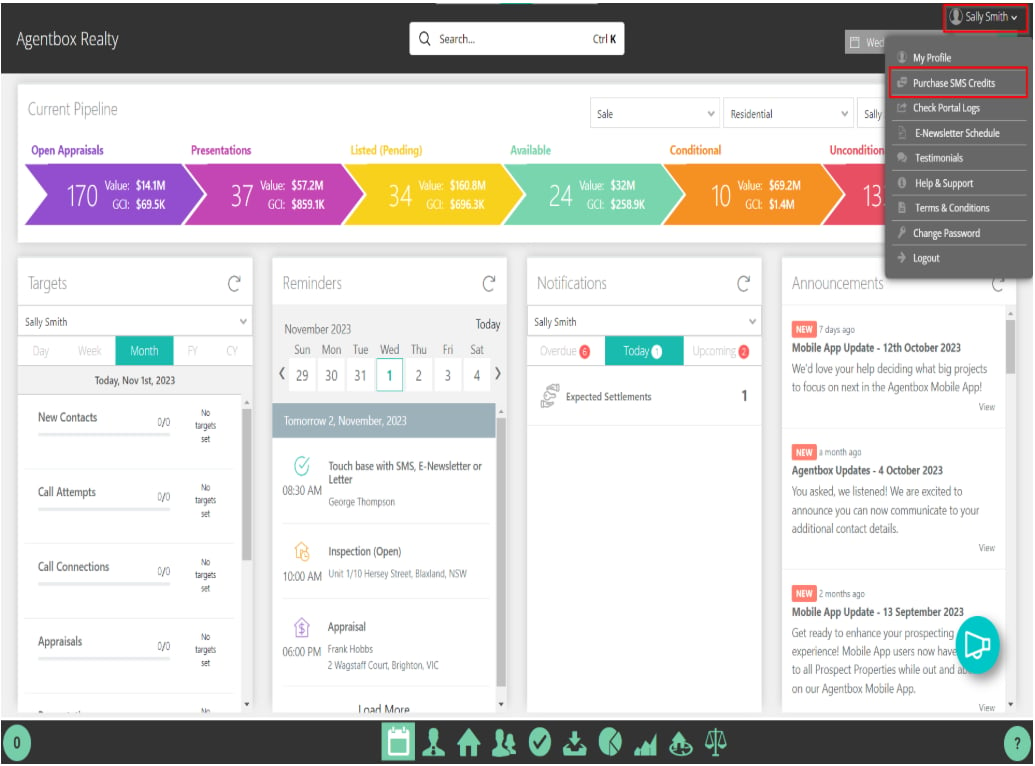
- A box will appear that will give you the option to purchase SMS credits:
- Master Users: Can see any system or unallocated credits plus a list of all Offices
- Non-Master - WITH Manage Office SMS Credits Permission: Cannot see any system or unallocated credits but can see their Primary Office plus any Additional Office that they have access too on their staff card
- Non-Master - WITHOUT Manage Office SMS Credits Permission: No Access
- Click the Actions Icon next to the System / Unallocated Credits (Master Users Only) or Office Credits and select Purchase SMS Credits
- Select if the purchase is for System Credits (Master Users Only) or Office Credits, enter the quantity, billing details and select Proceed to Continue to Payment Screen
- Credits will be applied instantly upon successful payment and a Tax Invoice / Receipt will be available to download on the confirmation page. You can now Send SMS, Transfer SMS Credits to / from This Account and
View Last 30 Days Logs.