'%20d='M0%208a8%208%200%200%201%208-8h24a8%208%200%200%201%208%208v24a8%208%200%200%201-8%208H8a8%208%200%200%201-8-8V8Z'/%3e%3cpath%20fill='%23fff'%20d='M10.41%206v3.779h15.048v19.537h4.132V6H10.41Z'/%3e%3cpath%20fill='%23fff'%20d='M20.967%2034V13.837L10.41%209.78v20.166L20.967%2034Z'/%3e%3cdefs%3e%3clinearGradient%20id='reapit-sales__a'%20x1='20.702'%20x2='20.702'%20y1='.351'%20y2='31.228'%20gradientUnits='userSpaceOnUse'%3e%3cstop%20stop-color='%235573FD'/%3e%3cstop%20offset='.575'%20stop-color='%234E56EA'/%3e%3c/linearGradient%3e%3c/defs%3e%3c/svg%3e)
Appraisal Info
This article shows how to access the Appraisal Information once converted into a Listing in Reapit Sales.
Overview
Appraisal Info
This article shows how to access the Appraisal Information once converted into a Listing in Reapit Sales.
Once the Appraisal is converted to a listing, the appraisal information can still be viewed and edited in the Resources tab. *Note: For reporting purposes the Appraisal Agent must be assigned in the Agents & Contacts tab using the role Appraisal Agent to get recognition for this appraisal.
- Search for your Property and open the Resources Tab.
- Click Appraisal Info on the sub-resources tab.
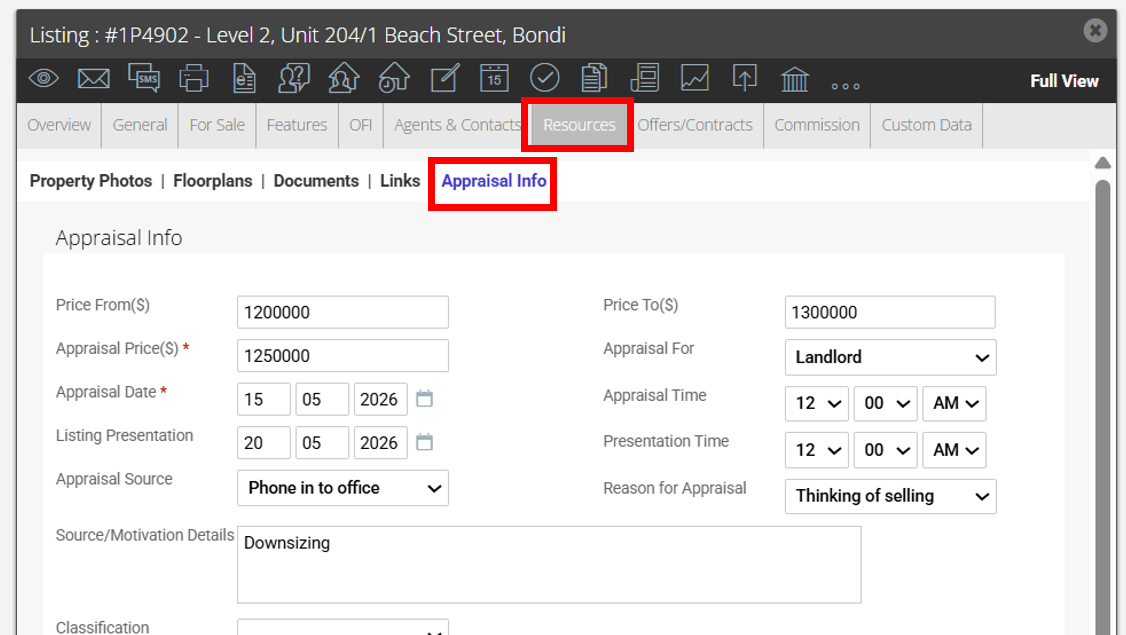
- You can View/Edit the original appraisal details, comparable sales and appraisal comments.