'%20d='M0%208a8%208%200%200%201%208-8h24a8%208%200%200%201%208%208v24a8%208%200%200%201-8%208H8a8%208%200%200%201-8-8V8Z'/%3e%3cpath%20fill='%23fff'%20d='M10.41%206v3.779h15.048v19.537h4.132V6H10.41Z'/%3e%3cpath%20fill='%23fff'%20d='M20.967%2034V13.837L10.41%209.78v20.166L20.967%2034Z'/%3e%3cdefs%3e%3clinearGradient%20id='reapit-sales__a'%20x1='20.702'%20x2='20.702'%20y1='.351'%20y2='31.228'%20gradientUnits='userSpaceOnUse'%3e%3cstop%20stop-color='%235573FD'/%3e%3cstop%20offset='.575'%20stop-color='%234E56EA'/%3e%3c/linearGradient%3e%3c/defs%3e%3c/svg%3e)
Export to Portals
This article will cover exporting properties to portals in Reapit Sales.
Export to Portals
This article will cover exporting properties to portals in Reapit Sales.
*Note: only those with the following permissions can export to portals;
- Edit Listing Portal Exports - Allows User to modify Portal Export options for Listings that they are able to edit.
- Search for your Property and open the property card
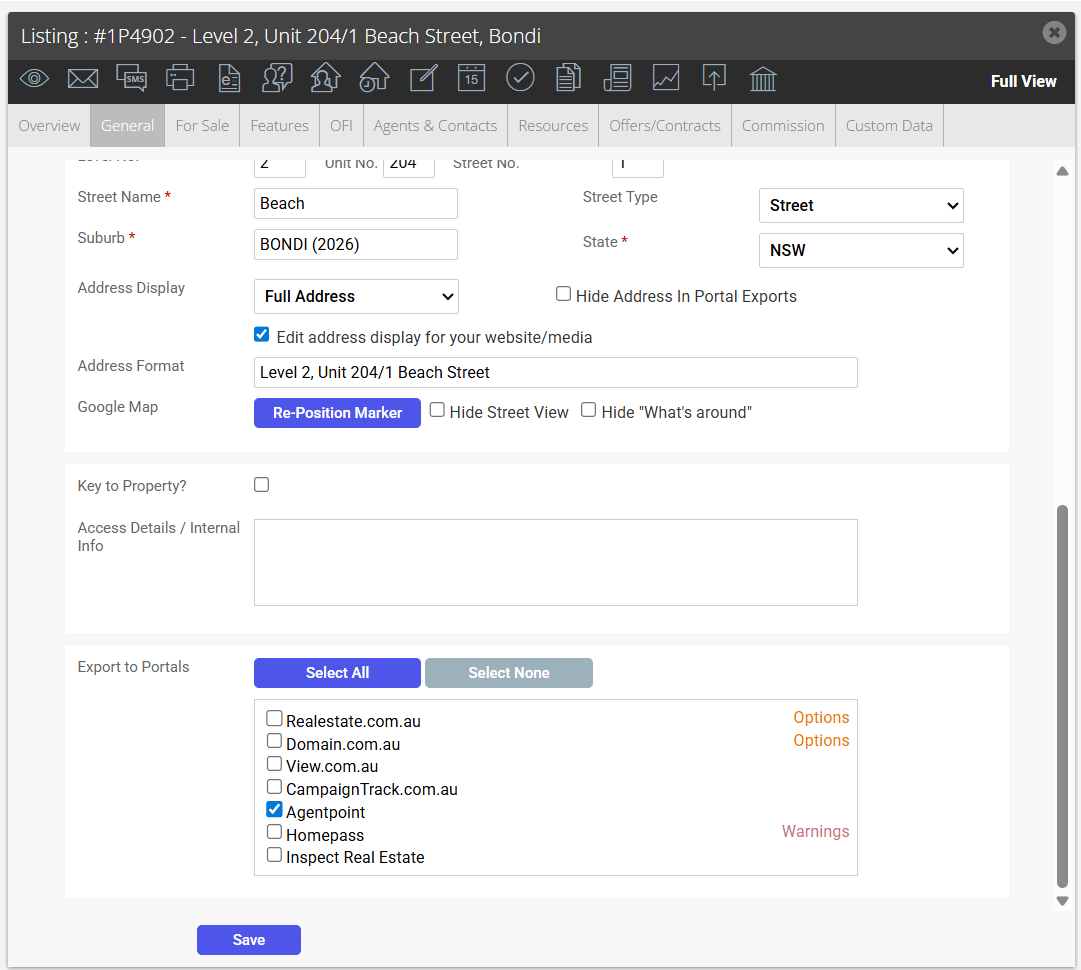
- Scroll to the bottom of the General Property Tab and tick the box next to each of the portals you would like to export the listing to or click Select All
- Click Save.