'%20d='M0%208a8%208%200%200%201%208-8h24a8%208%200%200%201%208%208v24a8%208%200%200%201-8%208H8a8%208%200%200%201-8-8V8Z'/%3e%3cpath%20fill='%23fff'%20d='M10.41%206v3.779h15.048v19.537h4.132V6H10.41Z'/%3e%3cpath%20fill='%23fff'%20d='M20.967%2034V13.837L10.41%209.78v20.166L20.967%2034Z'/%3e%3cdefs%3e%3clinearGradient%20id='reapit-sales__a'%20x1='20.702'%20x2='20.702'%20y1='.351'%20y2='31.228'%20gradientUnits='userSpaceOnUse'%3e%3cstop%20stop-color='%235573FD'/%3e%3cstop%20offset='.575'%20stop-color='%234E56EA'/%3e%3c/linearGradient%3e%3c/defs%3e%3c/svg%3e)
Mobile App: Targets
This article shows how to access Targets form the Sales Mobile App.
Overview
Mobile App: Targets
This article shows how to access Targets form the Sales Mobile App.
- To access targets, tap on 3 dots in the main menu. Select 'Taregts'.
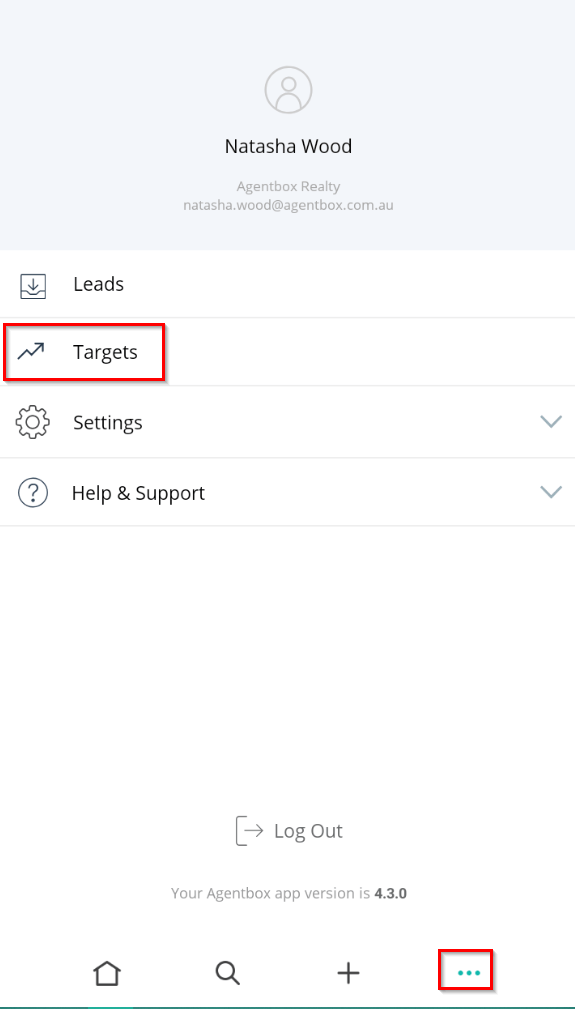
- The targets screen allows you to quickly see how you are tracking with your targets. Here you can Sort by Today, Week, Month, Calendar Year and Financial Year and view your call connections, appraisals, presentations and listings targets.
Those with the appropriate access levels can filter results by Office, Team or individual staff member by clicking on the name at the top of the targets list.