'%20d='M0%208a8%208%200%200%201%208-8h24a8%208%200%200%201%208%208v24a8%208%200%200%201-8%208H8a8%208%200%200%201-8-8V8Z'/%3e%3cpath%20fill='%23fff'%20d='M10.41%206v3.779h15.048v19.537h4.132V6H10.41Z'/%3e%3cpath%20fill='%23fff'%20d='M20.967%2034V13.837L10.41%209.78v20.166L20.967%2034Z'/%3e%3cdefs%3e%3clinearGradient%20id='reapit-sales__a'%20x1='20.702'%20x2='20.702'%20y1='.351'%20y2='31.228'%20gradientUnits='userSpaceOnUse'%3e%3cstop%20stop-color='%235573FD'/%3e%3cstop%20offset='.575'%20stop-color='%234E56EA'/%3e%3c/linearGradient%3e%3c/defs%3e%3c/svg%3e)
Head Office Jump
This article covers switching between offices connected to the head office in Reapit Sales.
Head Office Jump
This article covers switching between offices connected to the head office in Reapit Sales.
*Note: Master Users Only.
The Head Office jump allows you to access individual offices connected to the Head Office module. This is a great way to be able to assist offices as required and easily view reporting, listings, and so on.
To access an office, follow the steps below:
- Click the office name on the top left of the screen.
- Click on the office name you wish to switch to
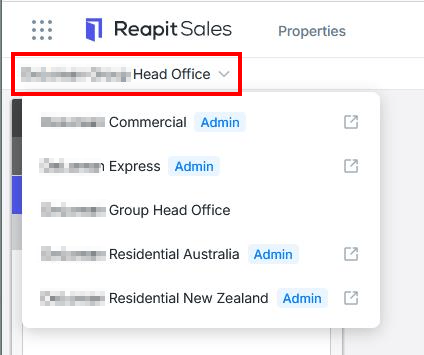
- The office account will open in a new tab
- Once logged in you can proceed to navigate the system as required. Some important things to note:
- When accessing an office via the Head Office Jump, your access permission level will be 'MASTER'. You will be able to access reporting, commissions, edit all properties and contacts and adjust staff profiles and My Office.
- Any updates made within an individual office account will be documented in the modifications logs