'%20d='M0%208a8%208%200%200%201%208-8h24a8%208%200%200%201%208%208v24a8%208%200%200%201-8%208H8a8%208%200%200%201-8-8V8Z'/%3e%3cpath%20fill='%23fff'%20d='M10.41%206v3.779h15.048v19.537h4.132V6H10.41Z'/%3e%3cpath%20fill='%23fff'%20d='M20.967%2034V13.837L10.41%209.78v20.166L20.967%2034Z'/%3e%3cdefs%3e%3clinearGradient%20id='reapit-sales__a'%20x1='20.702'%20x2='20.702'%20y1='.351'%20y2='31.228'%20gradientUnits='userSpaceOnUse'%3e%3cstop%20stop-color='%235573FD'/%3e%3cstop%20offset='.575'%20stop-color='%234E56EA'/%3e%3c/linearGradient%3e%3c/defs%3e%3c/svg%3e)
Data Export Options & Export Filter Rules
In this article, we'll cover the data export options and export filter rules in Reapit Sales.
Data Export Options & Export Filter Rules
In this article, we'll cover the data export options and export filter rules in Reapit Sales.
Data Export Options - (paid service)
If you are the database owner and would like to export your data from Reapit Sales the below option are available.
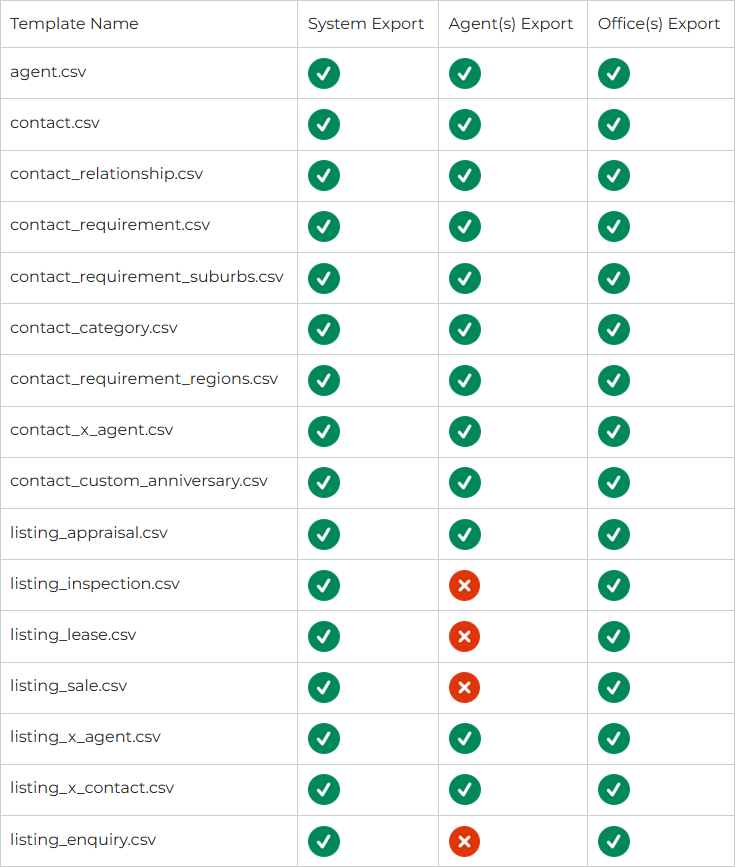
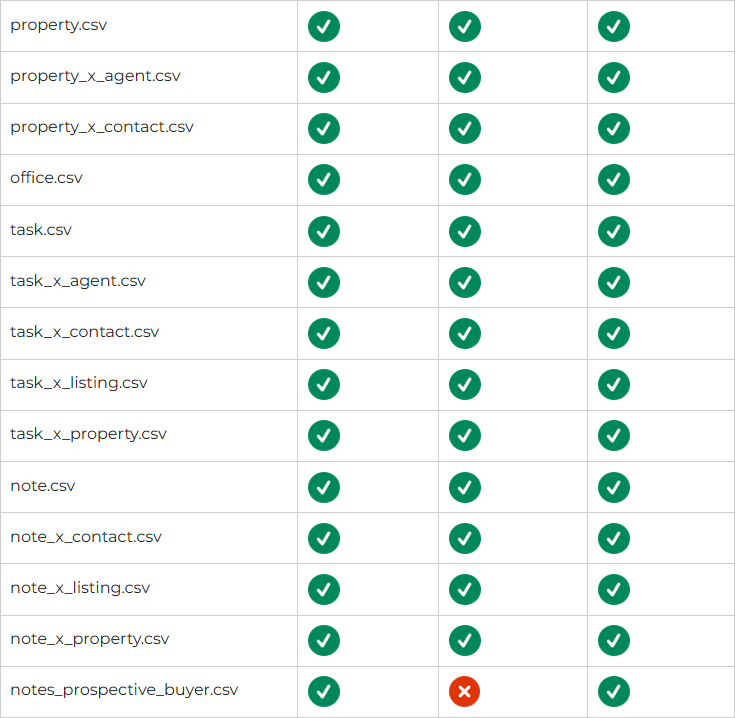
System Export: Suitable for most systems where whole database data is needed
Agent Export: Suitable for agent(s) leaving an existing system where they have the authority to take their data. The data in this export is limited to data where the nominated agent(s) are assigned.
Office(s) Export: Suitable for office(s) leaving a branch system where they have the authority to take their data. the data in this export is limited to data where the nominated office(s) are assigned.
What CSV files are included in the export?
The table below indicates what data is available based on the export option.
What are the split rules for office export?
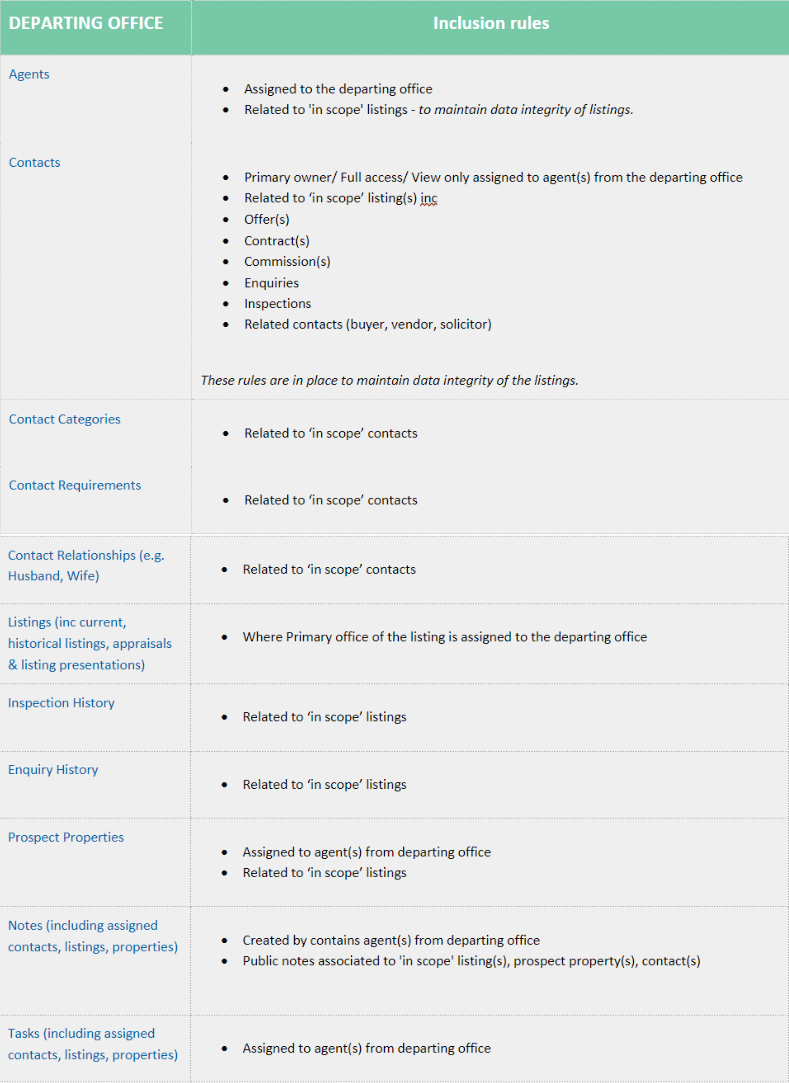
The data split rules are simple.
Listings ownership is defined using the ‘primary office’ on the listing.
All data related to the listings are kept as to not cause issues with listing data integrity
All other data is retained if there is a direct relationship between the agents from the departing office.
The table below contains a breakdown of the data ownership rules in more detail.
Considerations
Some agent profiles from other offices may be included in the export to prevent listing integrity issues. We have very strict rules to ensure only the agent profile comes across and not that agents' personal data.
What are the split rules for agent export
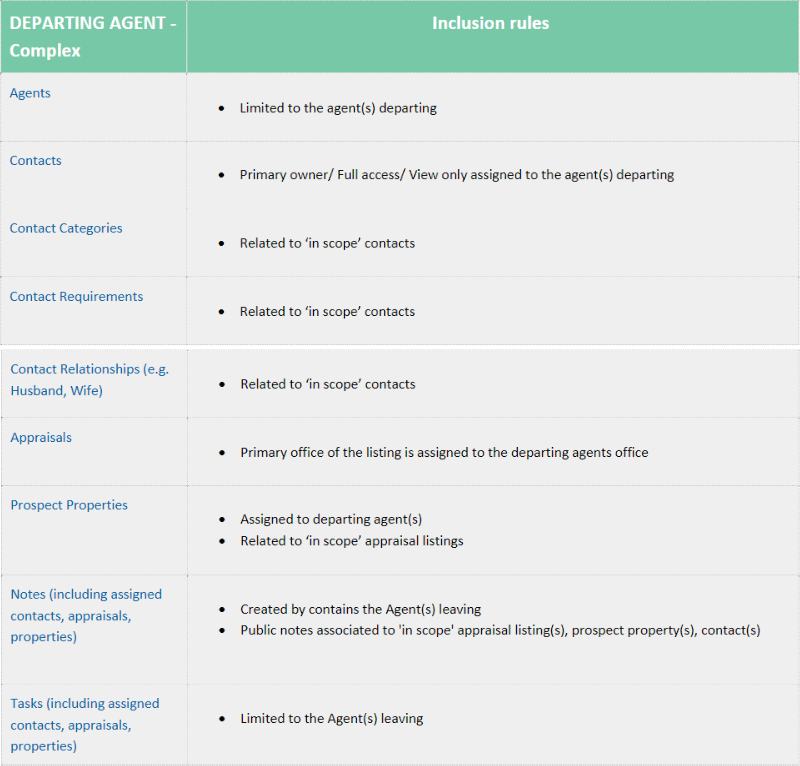
For individual agents or teams of agents departing we can offer a complex data scope containing the data that's assigned to them.
This export does contain less data than an office export due to offices owning listing and not agents, current and historical listing data will not be made available to prevent issues with websites and financial reports.
The table below contains a breakdown of the data ownership rules in more detail.
How long does it take to receive the export
Timeframes may vary based on database size, on average the data is made available within 3-5 business days depending on availability.
Can this export be imported into another Reapit Sales system
Yes it can. However, if you are looking to move into another system its best you speak with a sales representative as there may be additional services also so they can also consider the other requirements with a move like this i.e. portals, data imports.
How do I request the export
Log a support ticket with authority and the export option you want
What if I only want a contact export
- Please see - Contact CSV Download
What if I just want a property/listing export
Please see - View & Generate Reports