'%20d='M0%208a8%208%200%200%201%208-8h24a8%208%200%200%201%208%208v24a8%208%200%200%201-8%208H8a8%208%200%200%201-8-8V8Z'/%3e%3cpath%20fill='%23fff'%20d='M10.41%206v3.779h15.048v19.537h4.132V6H10.41Z'/%3e%3cpath%20fill='%23fff'%20d='M20.967%2034V13.837L10.41%209.78v20.166L20.967%2034Z'/%3e%3cdefs%3e%3clinearGradient%20id='reapit-sales__a'%20x1='20.702'%20x2='20.702'%20y1='.351'%20y2='31.228'%20gradientUnits='userSpaceOnUse'%3e%3cstop%20stop-color='%235573FD'/%3e%3cstop%20offset='.575'%20stop-color='%234E56EA'/%3e%3c/linearGradient%3e%3c/defs%3e%3c/svg%3e)
Log Unpresented Cheques
Initial Setup - New Clients This article demonstrates how to log unpresented cheques in Reapit Sales Sales Trust module.
Overview
Log Unpresented Cheques
Initial Setup - New Clients
This article demonstrates how to log unpresented cheques in Reapit Sales Sales Trust module.
If you have any payments in transit (cheques distributed but not yet presented on your Trust Account bank statement) follow the steps below:
*Note: You will need to ensure you have logged the correct opening balance against the relevant listings for you to be able to log an unpresented cheque, refer to Marketing Ledgers & Sales (deposit) Ledgers
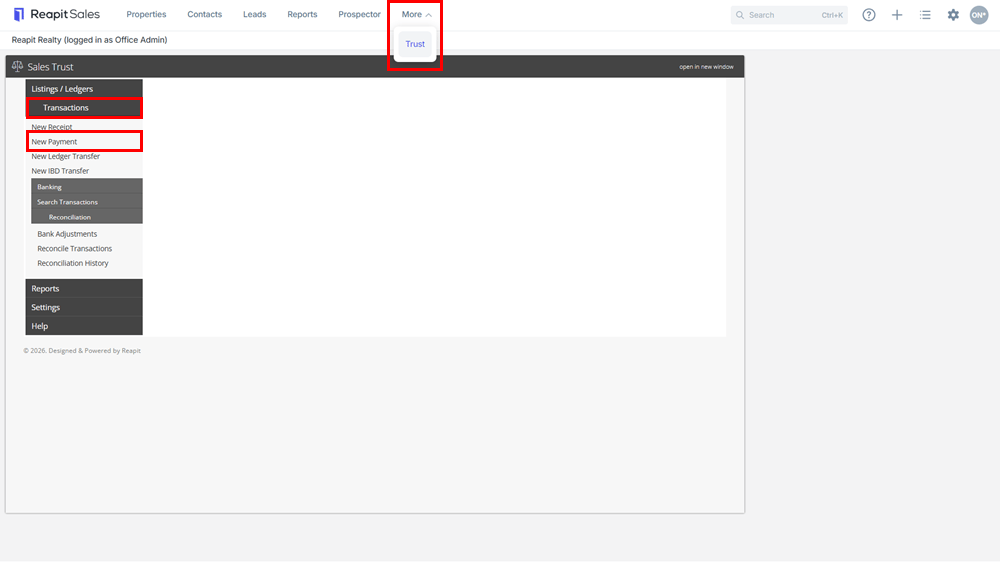
- Click on the Trust icon from the Main Menu. The Sales Trust panel will open.
- Select Transactions and New Payment
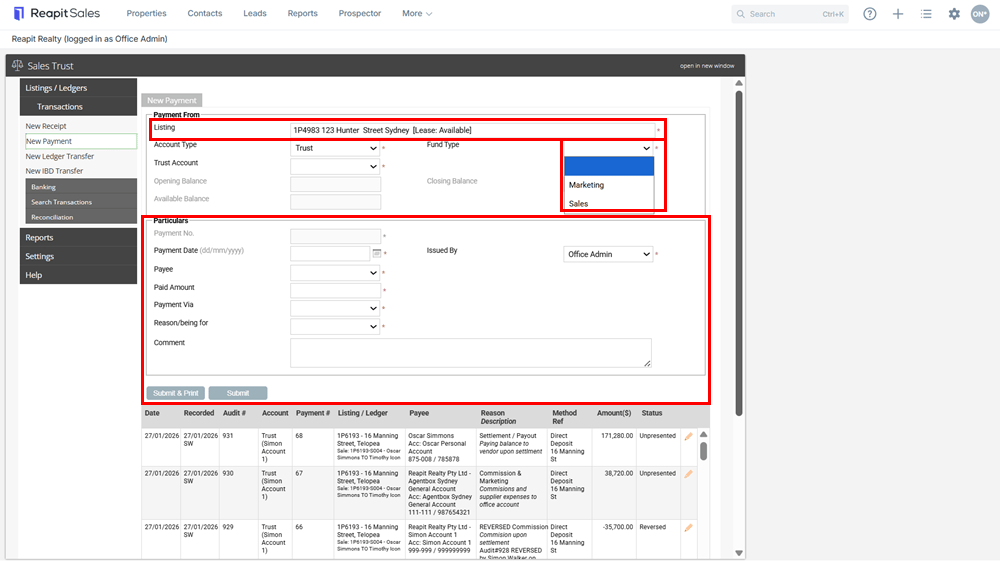
3.Search and select your listing from the Listing drop-down. Select the Fund Type (Sales or Marketing) - If Sales Fund is selected - Select the corresponding Sale (offer/contract).
- Enter the payment Particulars
- When entering the Payment Date, this may be the actual received date or simply a date prior to your last reconciliation date (in your previous system)
- Enter in the amount that was paid out of the trust account
- Select Cheque from the Payment Via drop-down and enter the actual receipt number of the unpresented cheque
- Click Submit & Print if you would like a copy of the transaction or click Submit to save without printing.
You will need to repeat the steps for all listings you currently have unpresented cheques for
*Note: Cheques can be marked as presented under Reconciliation > Reconcile Transactions.