'%20d='M0%208a8%208%200%200%201%208-8h24a8%208%200%200%201%208%208v24a8%208%200%200%201-8%208H8a8%208%200%200%201-8-8V8Z'/%3e%3cpath%20fill='%23fff'%20d='M32.576%206C12.293%206%208.776%2025.887%207.424%2034H9.1c.45-2.977%203.493-14.748%2010.899-20.287%200%200-5.633%206.976-6.572%2015.051%203.426-.652%2013.845-3.372%2016.056-12.927l-3.84-.61c1.352-1.351%204.909-5.17%206.931-9.226V6Z'/%3e%3cdefs%3e%3clinearGradient%20id='reapit-lettings__a'%20x1='20.702'%20x2='20.702'%20y1='.351'%20y2='31.228'%20gradientUnits='userSpaceOnUse'%3e%3cstop%20stop-color='%235573FD'/%3e%3cstop%20offset='.575'%20stop-color='%234E56EA'/%3e%3c/linearGradient%3e%3c/defs%3e%3c/svg%3e)
How to automatically change a listing from Draft to Early Bird Listed or Listed
This article will run through how to enable the setting to automatically change a listing from Draft to Early Bird Listed or Listed.
This article will run through how to enable the setting to automatically change a listing from Draft to Early Bird Listed or Listed in Reapit Lettings.
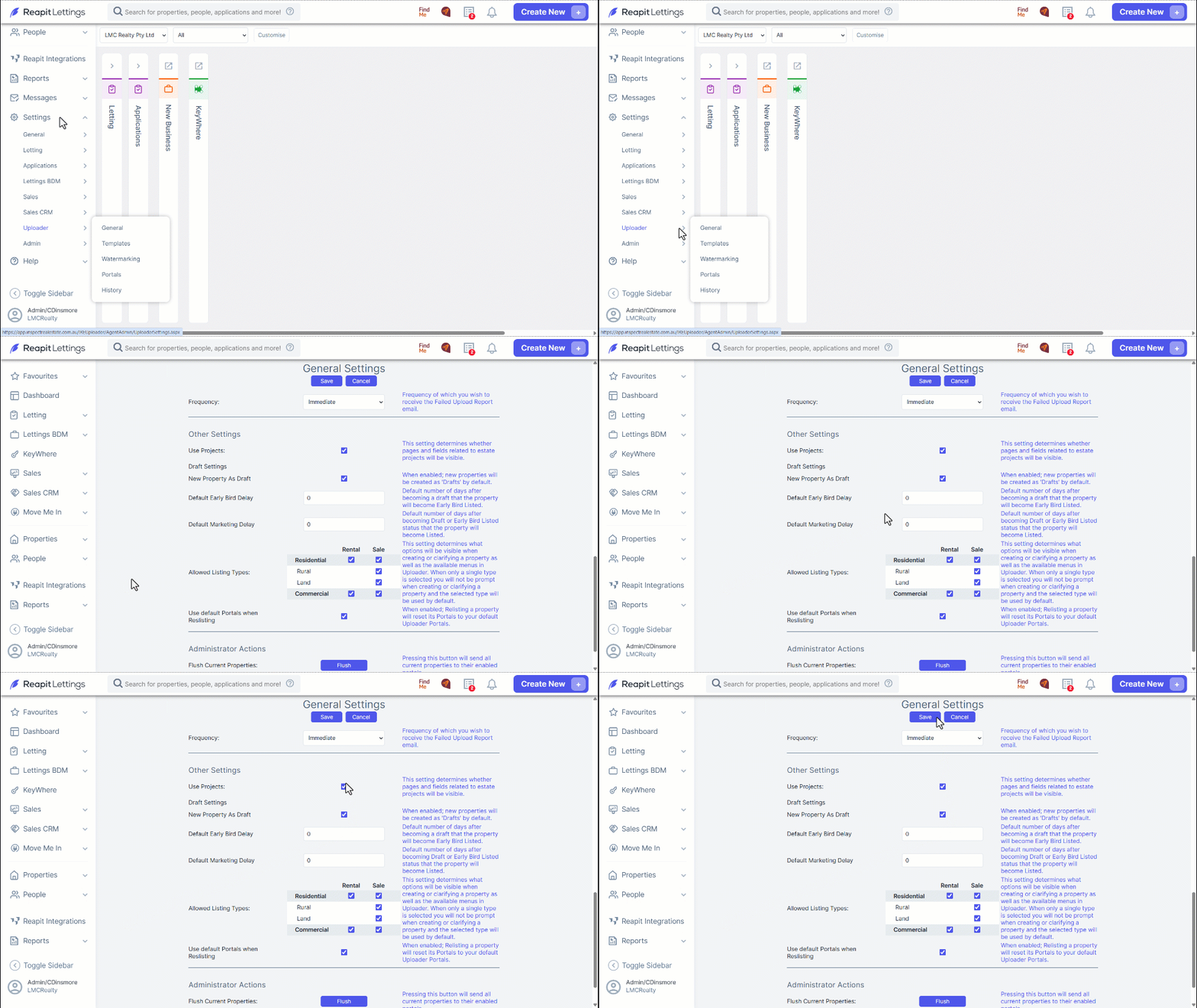
1. Navigate to Settings.
2. Navigate to Uploader.
3. Click General.
4. Navigate to the bottom of the page to Draft Settings
Select the New Property as Draft tick box if you wish to treat all new listings as a draft listing and customise and set the delays for when you would like to move to Early Bird Listed or Portal Listed.
5. Once changes have been made, click Save.