'%20d='M0%208a8%208%200%200%201%208-8h24a8%208%200%200%201%208%208v24a8%208%200%200%201-8%208H8a8%208%200%200%201-8-8V8Z'/%3e%3cpath%20fill='%23fff'%20d='M32.576%206C12.293%206%208.776%2025.887%207.424%2034H9.1c.45-2.977%203.493-14.748%2010.899-20.287%200%200-5.633%206.976-6.572%2015.051%203.426-.652%2013.845-3.372%2016.056-12.927l-3.84-.61c1.352-1.351%204.909-5.17%206.931-9.226V6Z'/%3e%3cdefs%3e%3clinearGradient%20id='reapit-lettings__a'%20x1='20.702'%20x2='20.702'%20y1='.351'%20y2='31.228'%20gradientUnits='userSpaceOnUse'%3e%3cstop%20stop-color='%235573FD'/%3e%3cstop%20offset='.575'%20stop-color='%234E56EA'/%3e%3c/linearGradient%3e%3c/defs%3e%3c/svg%3e)
How to Watermark a Photo
This article will run through how to watermark a photo prior to uploading so the photo’s cannot be used by other agencies
This article will run through how to watermark a photo prior to uploading so the photo’s cannot be used by other agencies in Reapit Lettings.
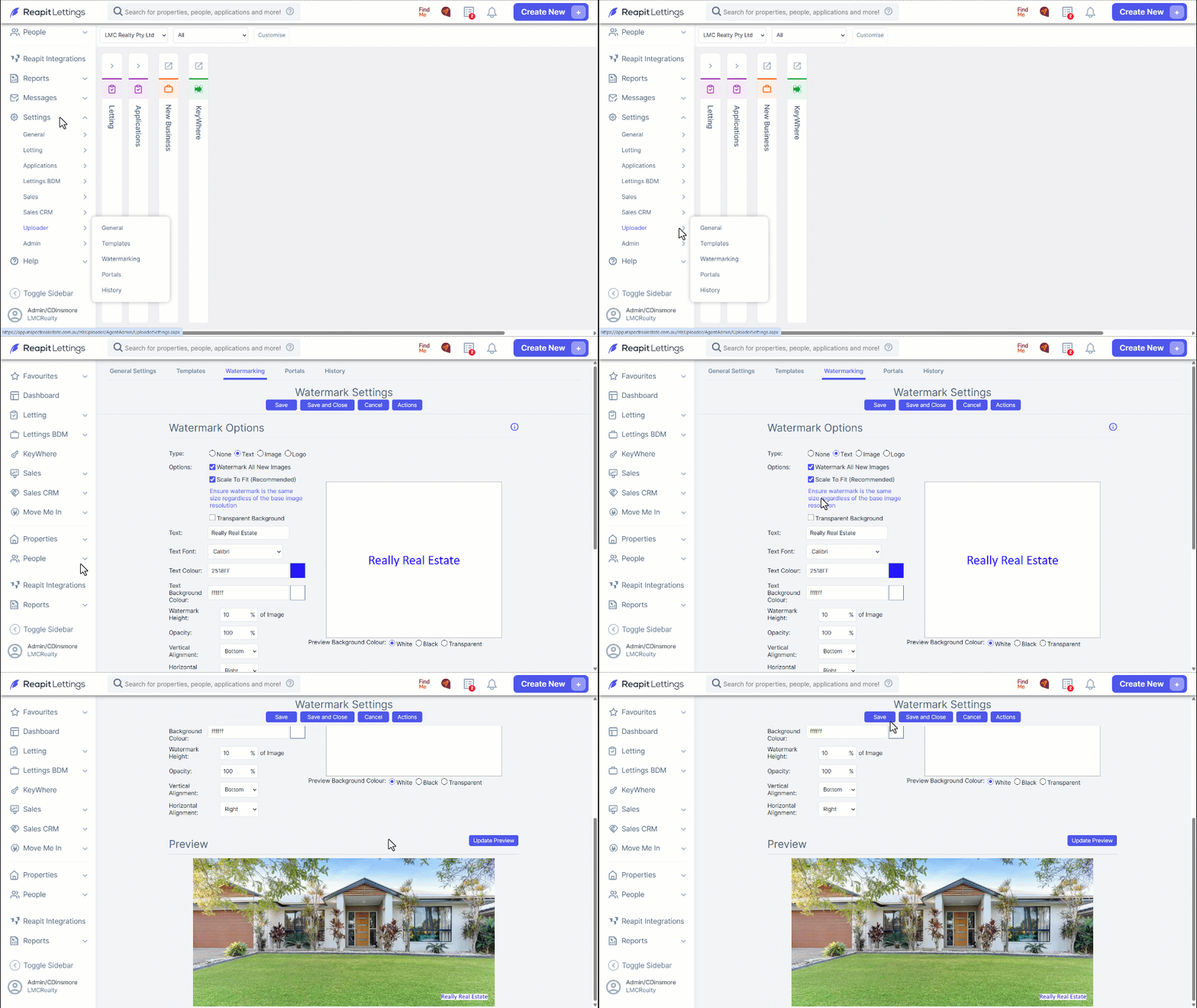
1. Navigate to Settings.
2. Navigate to Uploader.
3. Click Watermarking.
4. Choose your Watermark Option by selecting Text, Image or Logo.
From here, you can also select custom options such as; default all images to watermarking and you can adjust size, height and alignment of the watermark. You can also choose a background colour for the watermark.
5. Once you have updated the settings, click Update Preview.
6. Click Save once satisfied with the settings.