'%20d='M0%208a8%208%200%200%201%208-8h24a8%208%200%200%201%208%208v24a8%208%200%200%201-8%208H8a8%208%200%200%201-8-8V8Z'/%3e%3cpath%20fill='%23fff'%20d='M8.375%2013v14L20.5%2034l12.124-7v-7.737l-1.687-.975-2.806-1.62-1.082-.624v4.83l-.002%204.83H13.95V16.07l3.275-1.89%202.192-1.265%201.082-.625%203.275%201.877%202.192%201.256%201.083.62V9.782L20.5%206%208.376%2013Z'/%3e%3cdefs%3e%3clinearGradient%20id='reapit-pm__a'%20x1='20.702'%20x2='20.702'%20y1='.351'%20y2='31.228'%20gradientUnits='userSpaceOnUse'%3e%3cstop%20stop-color='%235573FD'/%3e%3cstop%20offset='.575'%20stop-color='%234E56EA'/%3e%3c/linearGradient%3e%3c/defs%3e%3c/svg%3e)
Movinghub Integration
This guide covers how to activate and deactivate the Movinghub integration within Reapit PM. Only office administrators are able to complete these processes. The Processes in this article include: How to Activate the Movinghub Integration How to Deactivate the Movinghub Integration
This guide covers how to activate and deactivate the Movinghub integration within Reapit PM.
Only office administrators are able to complete these processes.
The Processes in this article include:
- How to Activate the Movinghub Integration
- How to Deactivate the Movinghub Integration
How to Activate the Movinghub Integration
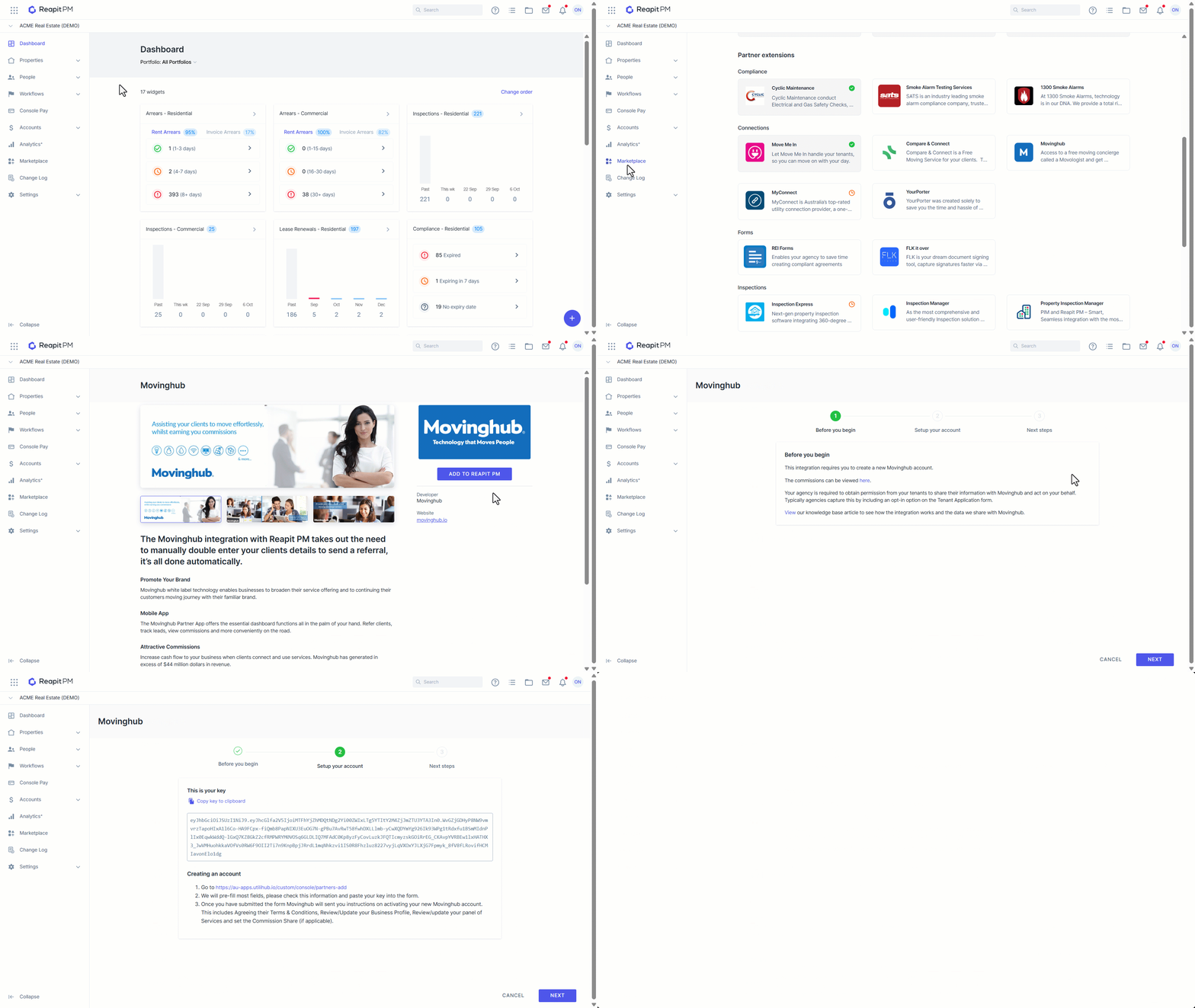
- Click on Marketplace.
- Navigate to Partner extensions and click on Movinghub.
- Click on Add to PM..
- You will now be guided through the rest of the setup in the activation wizard. This includes; how to create a new Movinghub account, what commissions are paid and what data we share with Movinghub.
| How new tenancy leads are sent |
|
| How vacating leads are sent |
|
| How lease renewal leads are sent |
|
| Opting in and opting out a tenant |
|
| Viewing leads that have been sent |
|
How to Deactivate the Movinghub Integration
- Click on Marketplace.
- Navigate to Partner extensions and click on Movinghub.
- Click Deactivate.
- Confirm you want to deactivate. Once deactivated. Reapit PM will no longer ask the PM to opt the tenant in or out and no more leads will be sent. Your Movinghub account will remain active.