
Reapit Verify Self Activation
The Reapit Verify integration with Reapit Sales can be enabled by a self-service activation for all Reapit Sales customers, regardless of tier. This feature allows Master Users to activate the Reapit Verify integration directly from the platform without requiring implementation support. Once activated, offices within the system can immediately begin using Reapit Verify functionality within listings to initiate identity verification checks for vendors and buyers. The processes in this article include: Activation Post Activation
The Reapit Verify integration with Reapit Sales can be enabled by a self-service activation for all Reapit Sales customers, regardless of tier.
This feature allows Master Users to activate the Reapit Verify integration directly from the platform without requiring implementation support.
Once activated, offices within the system can immediately begin using Reapit Verify functionality within listings to initiate identity verification checks for vendors and buyers.
The processes in this article include:
- Activation
- Post Activation
Note:
- Only Master Users can activate the integration
- There is no additional subscription fee to enable the integration
- Charges are incurred only when verification checks are performed
- Activation applies to all your offices within the system
- Reach out to your Account Management team if you require Partial office activation.
Activation
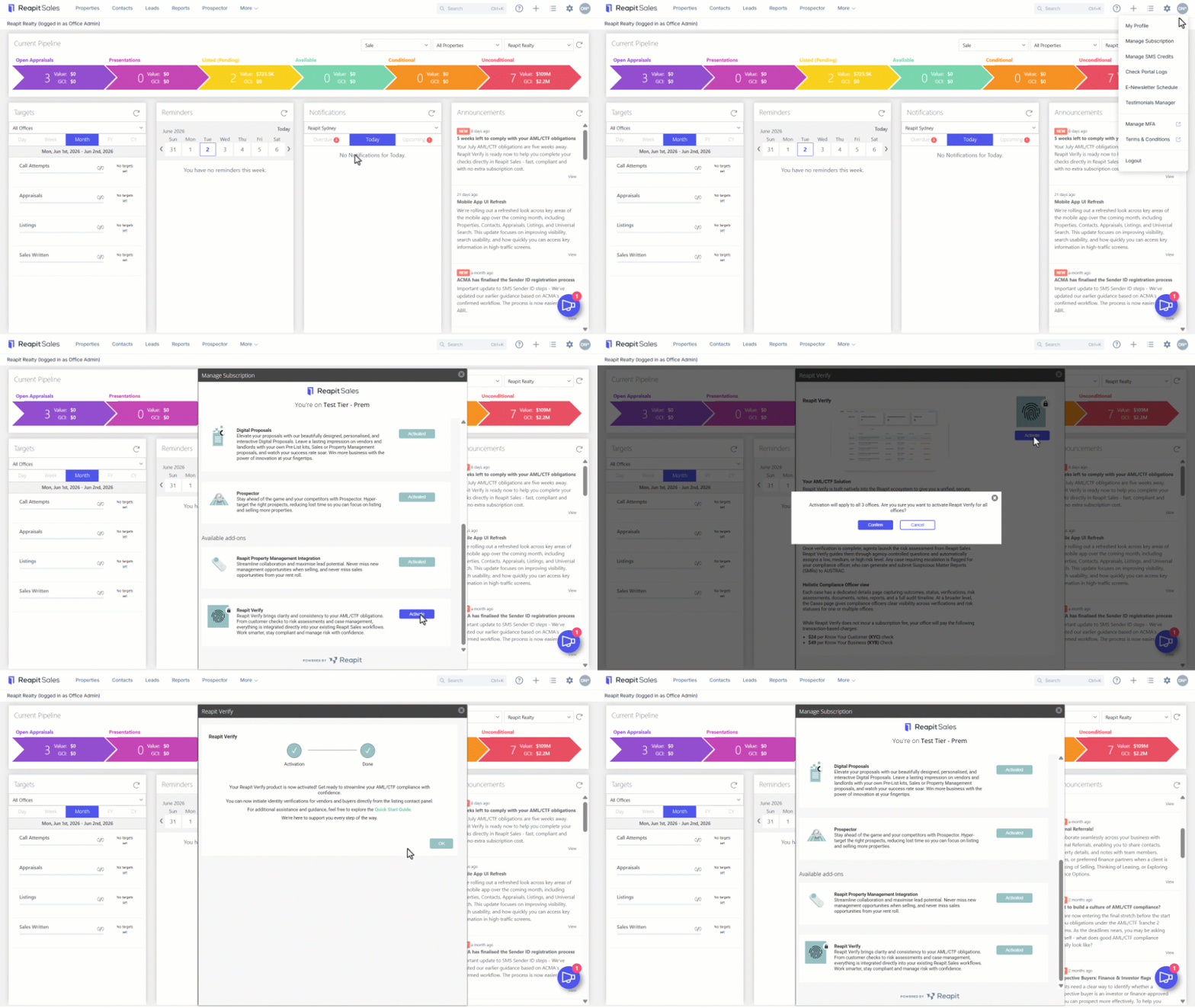
- Click on your initials in the top right corner of the screen
- Select Manage Subscriptions.
- Navigate to the Reapit Verify section and select Activate.
- Review the Integration information.
- Select Activate.
- A confirmation popup will appear advising the user that the activation will apply to all offices within the system.
Note: If only selected offices are to be enabled, contact your Account Management team
- Click on Confirm.
- The activation process will begin, and a loading/progress screen will display. Activation will generally complete within a few minutes.
- Close the tab or browser if required. The activation will continue to run in the background. You can return to the Manage Subscriptions screen at any time to confirm the integration is active.
Post Activation
Following successful activation, you (as the Master User) will be assigned as the Compliance Officer and be required to create user logins to Reapit Verify for team members in your office. Please refer to User Management - Section 4 in this guide for further information: Reapit Verify.