
Reapit Verify - Frequently Asked Questions
This article covers the most frequently asked questions for Reapit Verify.
What AML/CTF capabilities does Reapit Verify support?
| Capability | Included in Reapit Verify |
| Know Your Customer (KYC) Check | ✅ This is the core of Verify: identity verification, sanctions screening, PEP checks, document verification, and audit trails. These can be initiated from within Reapit Sales. |
| Know Your Business (KYB) Check | ✅ Verify can verify individuals associated with a business, as well as full business verification (i.e., ASIC lookups, corporate registry checks, beneficial ownership mapping). |
| Sanctions screening | ✅ Verify performs sanctions screening as part of a KYC check against major global sanctions lists as part of the identity verification process. |
| Politically Exposed Person (PEP) checks | ✅ PEP screening is included as part of a KYC check and automatically flags individuals who meet PEP criteria. |
| Beneficial ownership checks | ✅ Verify can collect and verify identity information for full corporate beneficial‑ownership discovery. |
| Customer risk assessments | ✅ Verify includes full AML/CTF risk scoring frameworks, with customisable questions and the ability to initiate these via Reapit Sales. |
| Record keeping and audit trails | ✅ Verify maintains a complete audit trail of identity checks, verification outcomes, timestamps, and compliance‑relevant data. These records are accessible within the Reapit ecosystem. |
| Source of funds and source of wealth collection | ✅ When enhanced due diligence is required (for example, if a PEP check returns positive and the customer is assessed as medium or high risk) agencies may choose to ask for additional information about the customer’s source of funds or source of wealth. Any SOF/SOW information you collect can be recorded directly in Reapit Verify as part of your compliance documentation. |
| Ongoing monitoring throughout a transaction | ✅ If you have a reason to verify a customer again during the transaction, you can simply run another check in Reapit Verify, in alignment with your agency’s AML/CTF program and internal risk procedures. |
Q: Who do we verify if the vendor has a Power of Attorney? Vendor, POA, or both?
A: Where possible, we would recommend verifying both the POA and Vendor, but if the vendor isn't in a position to be verified, then just verifying the POA is fine.
Q: How can we manually verify someone who is not good with IT?
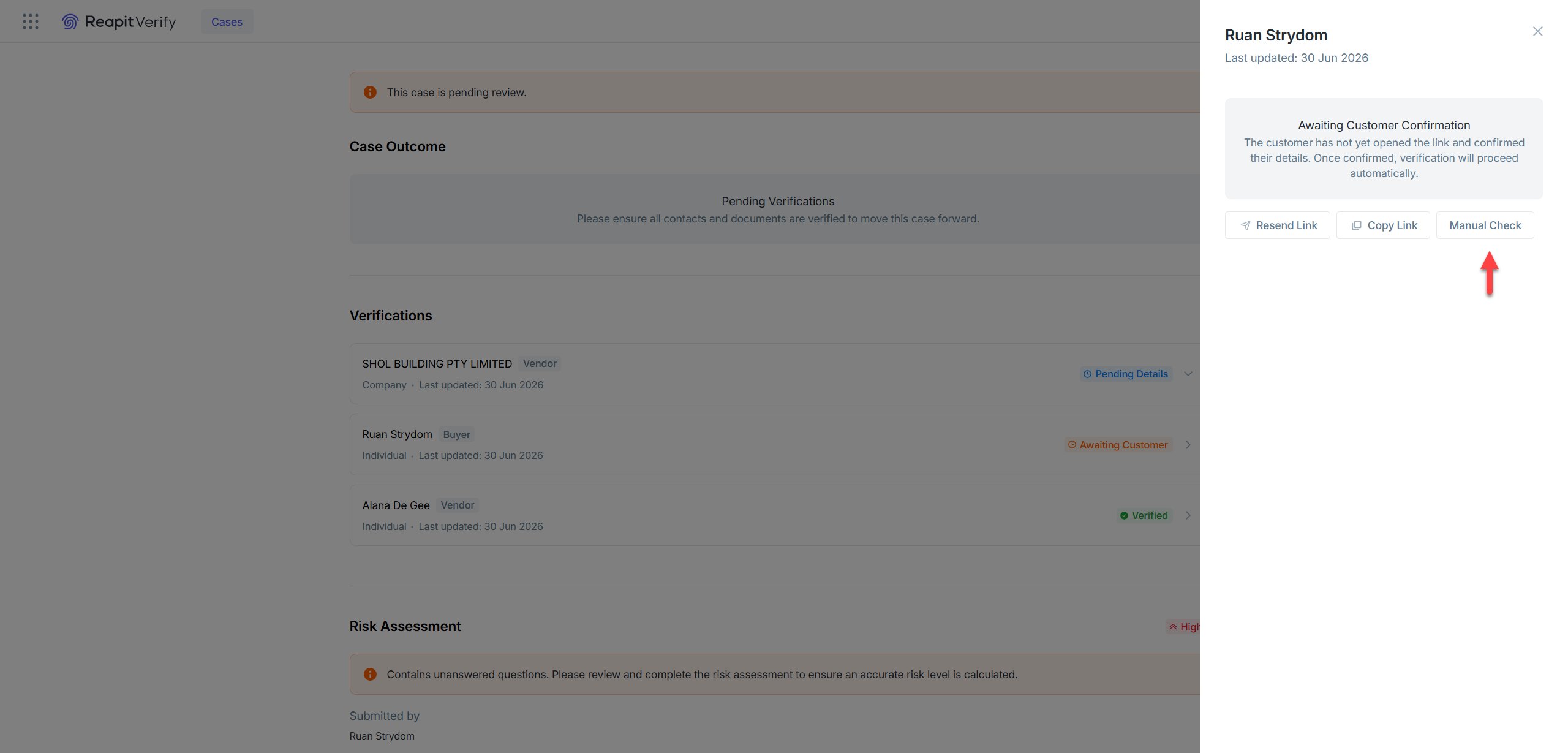
A: Manual verification is available, but you do still need to trigger the initial verification. Once triggered, you will be able to access the verification in Reapit Verify. Clicking on the verification will open the verification drawer where you will find the manual check button.
Please note: There is no additional charge for completing a manual verification check. Customers are only charged for the SMS sent to the vendor/buyer, and when the vendor/buyer clicks the link to complete the verification process. The manual check does not incur any extra cost.
Q: What is an Ultimate Beneficial Owner (UBO)?
A: A beneficial owner is someone who owns 25% or more of a customer or controls the customer. Ownership control can be direct or indirect. Indirect ownership can be through other companies or intermediaries. Where ownership is layered, you must trace the ownership until the beneficial owner(s) are identified.
Q: Why would the verify button not appear for a vendor on a specific listing (business vendor), but it appears on other listings in the same system?
A: The only time we have come across an example of the Verify Now button not showing is when Reapit Verify has not been activated for an account. This is common in branch systems where Verify was activated for one account but not a second.
Q: If the master user activates this via Manage Subscriptions, will it automatically make them the compliance officer? Do we have extra steps to activate the compliance officer profile?
A: The Master User will automatically be set up as a Compliance Officer. They will then be able to set up all other users.
Q: Who will answer the risk assessments?
A: Generally speaking, it will be the agent as they will be the ones dealing with the vendor/buyer. Admins will be able to do it on their behalf, but we do recommend the agent double-checking the answers.
Q: Who can set the 'Simple verification' and 'Advanced check'?
A: The default check type can be set as part of the setup by going to Settings > Organisation. The default check will be triggered when someone clicks the Verify Now button from Sales. If a verification is manually triggered from Verify, the person triggering the check will be able to select the type of check when completing the verification details.
Q: In Reapit Verify, how do we verify a vendor that is a company?
A: This can now be done from Reapit Sales or Verify. Below is a link to a video on how to trigger a KYB check from Verify:
Reapit Verify | KYB Demonstration
If triggering the check from Reapit Sales, you need to make sure the contact is a business contact and the ABN is entered in the Financial Information section.
Q: Do we need to ask them to create a business contact card with the authorised person’s first and last name, even if those fields aren’t required? Or is it okay to proceed with just the required details, like company name and contact numbers? Or is there a different process we should follow?
A: To trigger the KYB check, you will need to create a business contact that includes the authorised person’s first name, last name and mobile number, along with the business name and ABN.
While some of these fields may not appear as mandatory, they are required for the KYB process to be successfully initiated.
Details about different roles in Reapit Verify

Q: What should we do if Reapit Verify isn't showing in the app switcher, but showing an active status in the Manage Subscription?
A: If you are unable to access Reapit Verify through the app switcher, please reach out to the Support team for further investigation.
Q: How long should we wait for the “In Progress” status? This is just in case the client has already completed the verification on their end?
A: You will need to click the refresh button next to the status to update it. It should update within a minute of the verification being completed. If you know the verification has been completed, but the status doesn't update, then there is an issue we need to have a look at.
Q: Will a medium or high risk alert stop the transaction from proceeding?
A: Medium/high-risk customers or transactions do not necessarily require reporting to AUSTRAC. The transaction may still proceed, however this will be guided by the AML/CTF program and compliance officer. If a scenario goes against the agent's code of ethics (e.g. by proceeding with the transaction, you wouldn't be acting in the best interest of the vendor), this is an example where you may decide not to proceed with the transaction.