Activating Autoresponder
This article will run through how to activate Autoresponder in your Reapit Sales account
Activating Auto Responder
Note: For Autoresponder to work reliably, please set up your SPF records as per this article. Setting up SPF records allows our servers to send email on behalf of your domain.
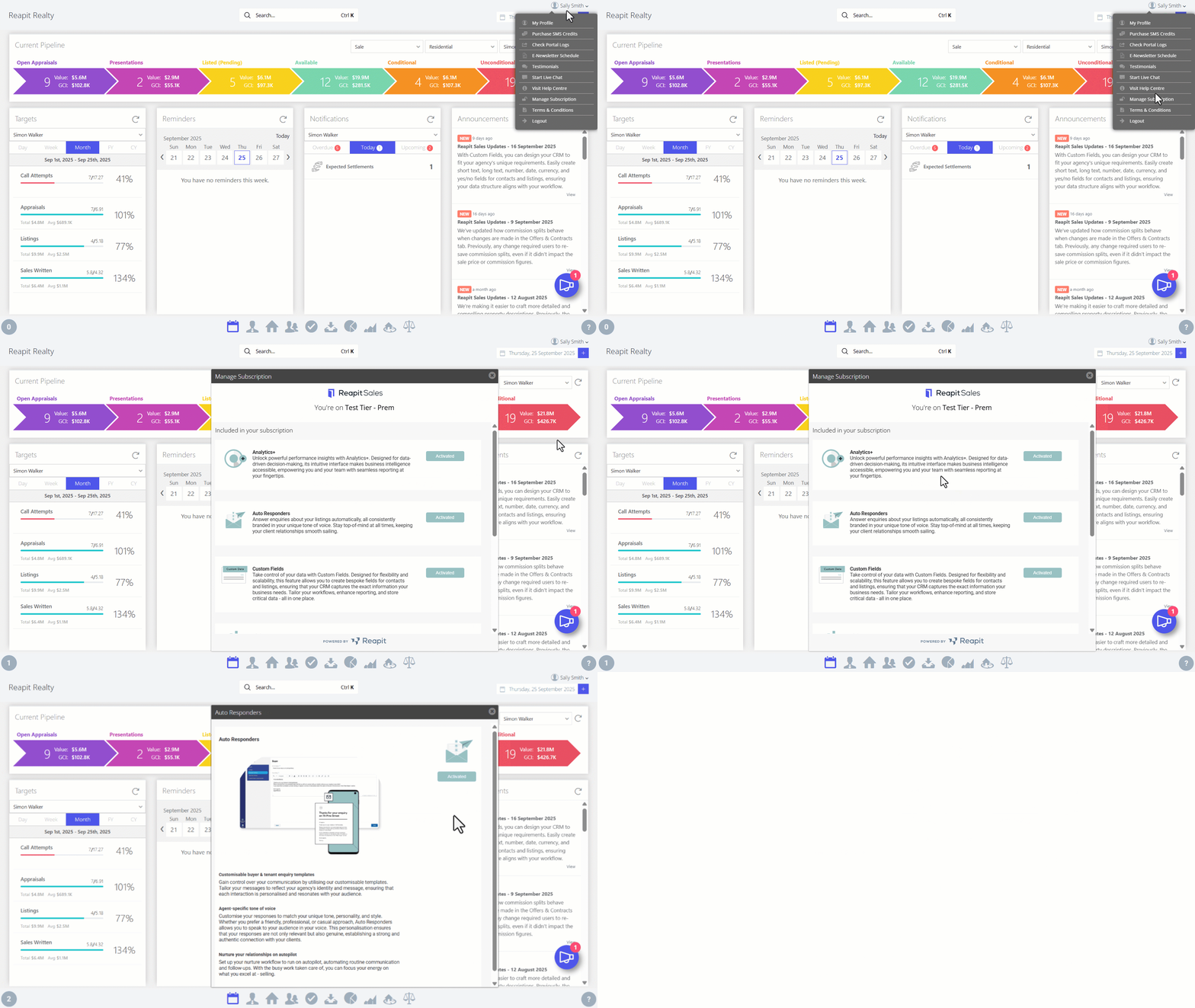
- Click on your Profile Name.
- Click on Manage Subscription.
- Navigate to Autoresponders and click on Activate.
- In the Autoresponders pop up, select Activate.
- A pop-up message will appear initially stating "Activation of your Autoresponders product is currently in progress. Keep an eye on the progress bar or visit our resources page while you wait." Once Autoresponders have successfully completed activation, you will see a second pop-up message stating "Your Autoresponders product is now activated. Before autoresponders will be sent, please log in to the platform and configure your brand logos, colours, and templates.
- Once you've configured your agency branding, select the I confirm that I have configured my brand logos, colours, and templates and am ready to enable auto Responders for all Reapit Sales users checkbox and then click Next.
- You will receive a notification message advising that your auto responders product is activated. Click OK.