FAQs Reapit Connect Multi-Factor-Authentication
This article covers some frequently asked questions to help you get started with Reapit Connect Multi-Factor-Authentication (MFA)
FAQs
Reapit Connect Multi-Factor-Authentication
This article covers some frequently asked questions to help you get started with Reapit Connect Multi-Factor-Authentication (MFA)
Why did you introduce mandatory MFA?
We introduced mandatory MFA to strengthen the security of your Reapit ecosystem and protect your agency’s data from unauthorised access. Passwords alone are no longer enough to defend against modern cyber threats, and MFA adds an essential extra layer of protection by verifying that the person logging in is genuinely who they claim to be.
Mandatory MFA helps safeguard your clients’ information, reduces the risk of account compromise, and supports your agency in meeting industry‑standard security expectations. It’s one of the most effective and widely recommended ways to keep your systems secure.
| What are the recommended Authenticators? | ||
| Microsoft Authenticator App | OR | Google Authenticator App |
Will all staff from one office receive the upgrade at the same time?
Not necessarily, rollout groups are based on system cohorts and product modules, not office locations or networks.
Unable to access authenticator app or provide passcode
If you are unable to access your authenticator app, or you have lost/forgotten your phone, you will need to speak with your Reapit User Admin in your office or Reapit's Support Team to reset your authentication. Once your current authenticated device has been reset, you can use an alternative device until the device can be recovered.
Don’t want to download an app to your phone or don’t have a phone?
Downloading an authenticator app to a mobile phone is optional. There are various services available which can be installed/accessed via a web-browser, for example Authenticator, which is a Google Chrome browser based add on/extension.
Shared Accounts
Sharing credentials and user accounts creates security risks and provides lack of accountability. Reapit therefore does not permit user accounts or credentials to be shared among multiple users. Each user must have their own unique account with individual credentials, and these must be kept secure and confidential. Reapit may take steps to block or disable any user account which is used or accessed improperly.
Do you support Email/SMS verification?
We currently only support verification using a passcode generated from an authentication app. This process of logging in adds a layer of protection and security measures to your system to protect your data.
Do I need to enter a passcode every time I login?
Yes, to ensure you are correctly using Multi Factor Authentication (MFA) for your account, you will be required to enter a passcode every time you login to a service, product module or app that uses Reapit Connect.
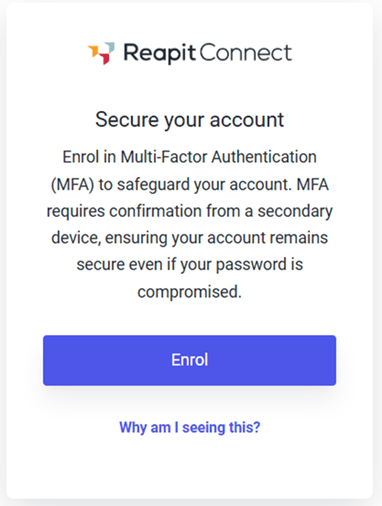
Why can I not login until I enrol in MFA?
If you are seeing the following screen, it means that mandatory MFA has been enabled. You will not be able to login until you have setup an authenticated device.